20
To insert the lamp (HMI 575) open the housing by loosening the fastening screws at the side panels and
frontcover.
Do not install a lamp with a wattage! A lamp like this generates temperatures the device is not designed for.
Damages caused by non-observance are not subject to warranty.
Insert the lamp now. Do not touch the glass-bulb bare-handed during the installation! Please follow the lamp
manufacturer‘s notes!
Before you close the housing again, make sure that the lamp is installed tightly into the lampholder system.
Reclose the housing and tighten the fastening screws.
Do not operate this device with opened service-lid!
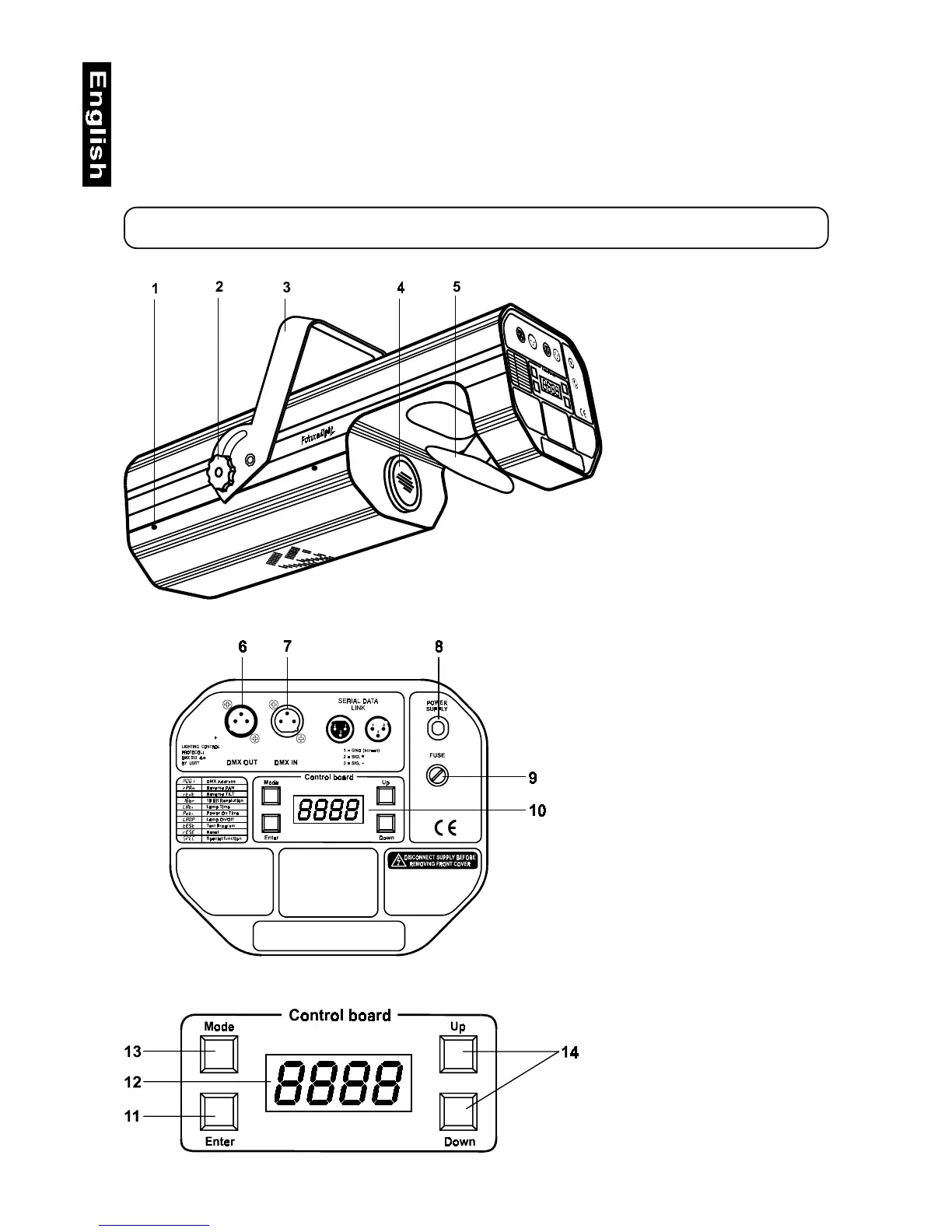
1 - Fastening screws
2 - Fixation screw for bracket
3 - Bracket
4 - Objective
5 - Mirror
Rearpanel:
6 - DMX Output
7 - DMX Input
8 - Powercord
9 - Fuseholder
10 - Control board
Control board:
11 - Enter-button
12 - Display
13 - Mode-button
14 - Up/Down-buttons


 To Next Page