Printer Cleaning Guide
(GEN2™, GEN2 Universal™, and GEN3 Evolution® Printers)
2010 – 2012 FutureLogic, Incorporated. All Rights Reserved. PUBN Page 7 11/14/2012
MNL-000054 REV.D
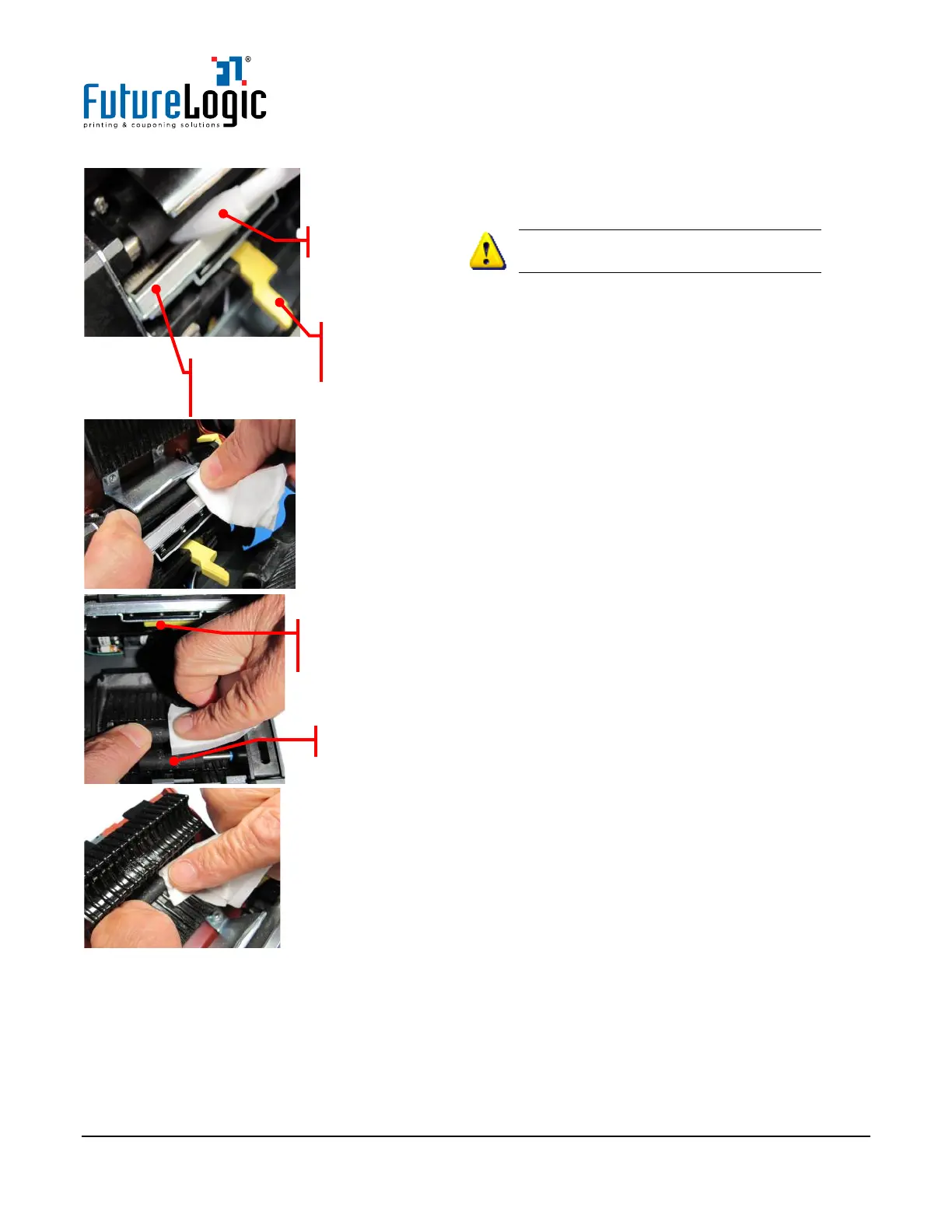
5. Pull open the Main Release Lever before
cleaning the Print Head and Platen Rollers.
WARNING!! Use care when cleaning
the Print Head print-line.
6. Use the Cleaning Swab to clean across the
Print Head print-line). Use this same Cleaning
Swab to clean the sensors (see page 8).
If a Cleaning Swab is not available, use a clean
Cleaning Wipe to avoid placing dirt and
contaminants on the Print Head.
7. Use the Cleaning Wipe to wipe and clean the
Platen Roller.
8. Rotate the Platen Roller.
9. Repeat steps 7 and 8 until the entire roller
is clean.
10. Push the Main Release Lever back to the
Close position.
11. Use the Cleaning Wipe to wipe and clean the
Presenter Rollers.
12. Rotate the Presenter Rollers.
13. Repeat steps 11 and 12 until both rollers
are clean.
14. Use the Cleaning Wipe to wipe and clean the
Upper Pinch Roller.
15. Clean the sensors. See page 8.
-line
Push back into
close position



 To Next Page