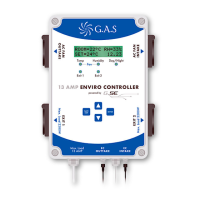
LED’s
CONTROL KEYS
SAVE
EXIT
ENTER
Exit 1 Exit 2
Temp Humidity Day/Night
Fan
Exit 1 Exit 2
Temp Humidity Day/Night
Fan
Exit 1 Exit 2
Temp Humidity Day/Night
Fan
Five lights on the front of the controller give
you information about your grow room.
When the controller is turned on, all 5 lights will briefly
illuminate, then go off.
The controller is operated by four buttons.
ENTER BUTTON
Press to select or
open menus.
SAVE EXIT
Allows you to save an
entry and move back up
a level on the display.
UP AND DOWN ARROWS
Navigate up and down the menu display.
To select a menu item press
ENTER
Up and down keys also allow you to
change values in the controller like
temperature and humidity settings.
All values get stored in the
internal memory and will
be stored for 72 hours if
there is a power failure.
Temp
Grow room is above set temperature
Humidity
Grow room is above set humidity
Day/Night
Blinking LED indicates night time or lights are off.
Solid LED indicates day time or lights are on.
Exit 1
Exit 1 power supply is on
Exit 2
Exit 2 power supply is on
5
MAIN MENU – HOME SCREEN
When the controller is turned on,
the main menu – home screen is
displayed. This shows your room
temperature, relative humidity, fan
setting and the time.
Press the DOWN arrow to view your
outtake and intake settings.
Press ENTER to access all the sub menus.
Menus will flash when highlighted – selected.
If viewing a different menu, you can go back
to the Main Menu – Home Screen by either
leaving the controller for 2 minutes, or by
pressing the SAVE EXIT button repeatedly to
move backwards through any sub menus.
Room=23°C RH=60%
Set19°C 09:13
Outtake 90%
Intake 70%
Press
Room=23°C RH=60%
Set19°C 09:13
Fan settings
Set exit 1
Set Fan Settings
Highlighted menus will blink
Press
ENTER
to select and access sub menus
ess
ENTER
The LED’s indicate when on:-


 To Next Page