11
Wah-pad connecting
The wah-pad enables automatic (without touching the GSC switches or a wah-wah effect’s switch)
switching on a wah-wah effect by placing a foot on it and switching off a wah-wah effect by removing a
foot. The wah-pad should be placed beneath a wah-wah effect and the wah-pad’s connector should be
plugged into LINK connector. A wah-wah effect’s input and output should be connected to LOOP1 or
LOOP2 connectors. Wah-pad settings are described at “LOOP button settings”.
Depending on the GSC programming, the wah-pad enables to switch on No. 5 preset in each bank
(“changing preset” mode) or to switch on at any LOOP1 or LOOP2 preset to which a wah-wah effect is
connected (“adding to preset a wah-wah” mode). Programming of the modes is done by the function “Amp
settings programming” individually for each bank using No. 5 preset footswitch (blinking of VOLUME
indicator means “changing preset” mode and lighting up or down of this indicator means “adding to preset
a wah-wah” mode). In case of using “changing preset” mode at No. 5 preset of each bank there should be
activated this loop at this preset to which a wah-wah effect is connected. Such solution enables to
simultaneously control other effects and amp by the wah-pad.
In the Loops direct switching mode the wah-pad is activating always LOOP1 or LOOP2 loops
(independently from programmed settings).
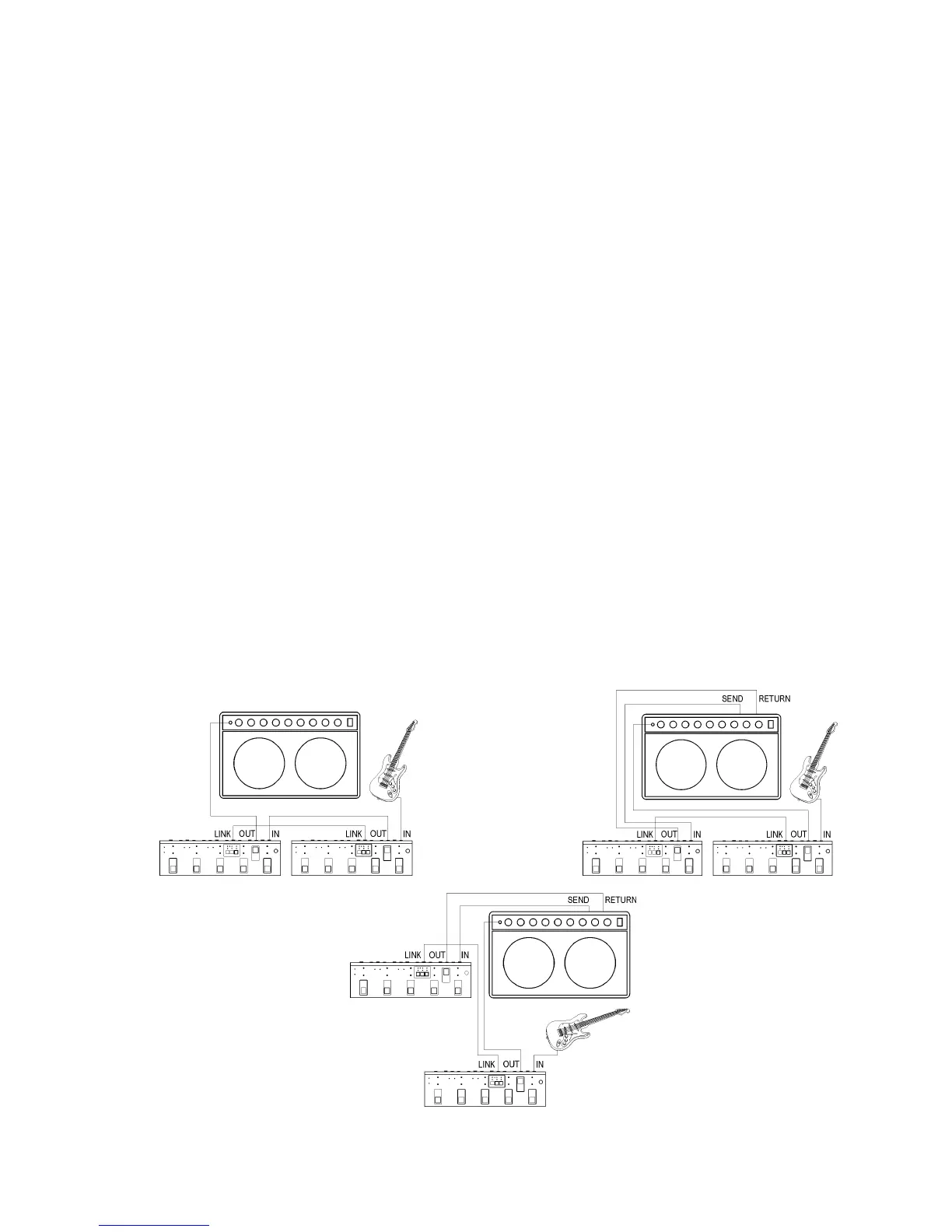
Second GSC connecting
LINK connector enables to connect the second GSC device to form a set with double possibilities.
Connection should be done using regular stereo or mono Jack/Jack cable.
Possible modes of working:
- “remote”, the first GSC is placed on the floor and the second GSC nearby the amp (not on the
floor) what eliminates possibility to press its footswitches while playing a song
- “nearby”, both GSCs are placed on the floor and enable to press their footswitches while
playing a song.
Set selected mode of working of both devices (in “Settings” at SWITCH button, indicator No. 4).
Selected bank and preset numbers are transmitted between GSCs through LINK connection. In “nearby”
mode can be selected one of 10 presets (the first GSC five presets and next five ones of the second GSC).
It is sufficient to use A, B, C banks of the first GSC in this mode (it serves 10 presets in 3 banks).
Below are shown possible connections of two GSCs’ system.
It is recommended to use plastic casing connectors for “remote” mode of working through LINK
connection (to avoid incidental touching an amp or an effect non insulated casings).


 To Next Page