Administrative Tool
p. 55
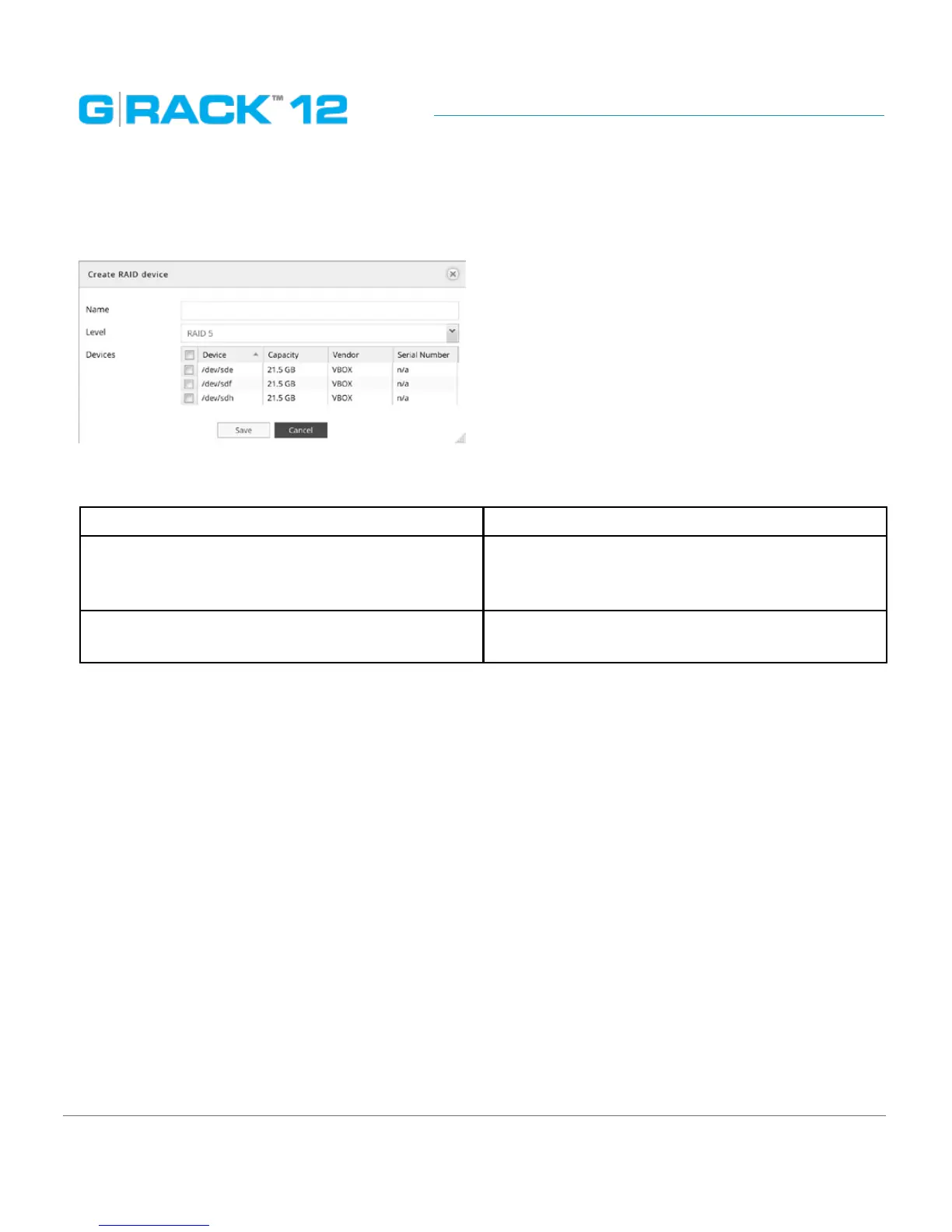
Create RAID device
Use this menu to create a new data RAID device
The following table describes the labels on the screen:
Name Input a name for new RAID
Level Choose RAID level from the list - 5 or 6. Please
refer to Appendix for additional information.
Default displayed is RAID 5.
Devices Select physical drives, that will be part of this
RAID array.
NOTE: The minimal number of drives for different RAID levels is:
• RAID 5 - minimum 2 physical disks
• RAID 6 - minimum 3 physical disks
For best practice we recommend using all disks of the same capacity and the same vendor. If your
system happens to have disks of different capacity, please make sure to have the disks of the same
size within one RAID (When using disks of different sizes, the system may report the capacity
incorrectly). This approach will help to ensure data integrity and security, it’s also associated with
correctly storing and fetching the data.


 To Next Page
 Loading...