EasyManua.ls Logo

Gallagher HR4 - Tag Display

Gallagher HR4
161 pages
Print Icon
To Next Page IconTo Next Page
To Previous Page IconTo Previous Page
Loading...
11
3E3020 Gallagher HR4 Hand Held EID Tag Reader User Manual
English

VID Cross reference


Once it makes this link, it will recall the Visual Tag Number




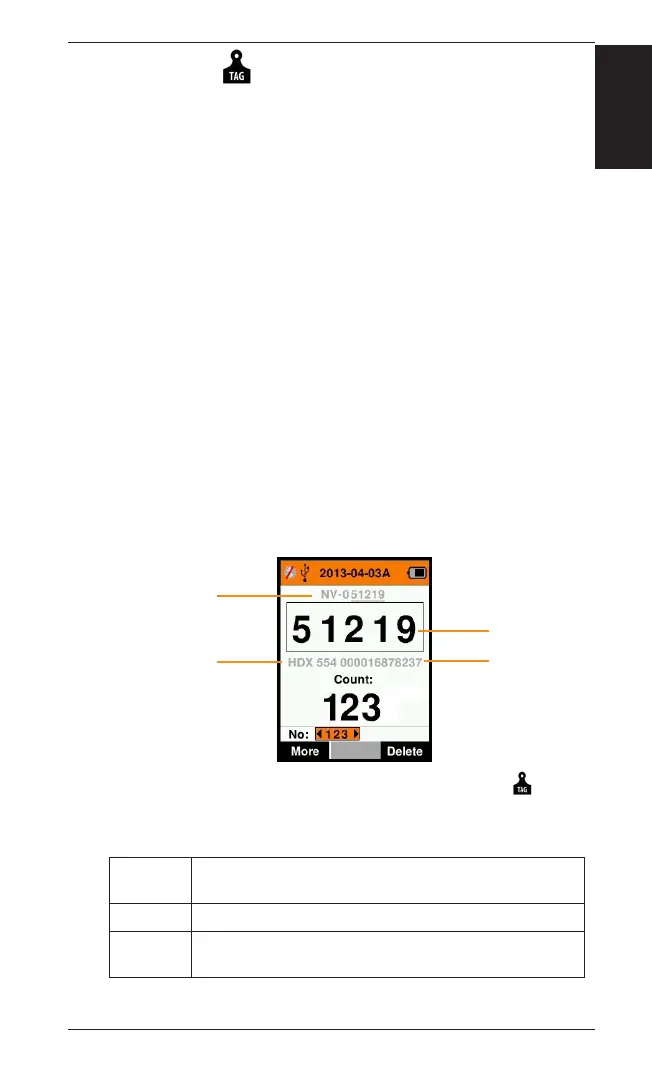
above the Big ID box on the Reader screen and the EID is displayed
below it when the tag is read. The numbers in the Big ID screen
will be part of the EID or VID depending on your Tag Display setup.


scanned animal, you will see both the EID and VID on the screen.


to you.

1. From the Main Menu, select the  icon and
press OK.
2. 
Digits The number of digits (from 3 to 10) are shown in large
type.
EID or VID Indicates which ID is displayed in the Big ID box.
 Determines the number of digits from the right of the VID
that are ignored for the large digit display (only for VID).
3. Press the Return key to exit to the Main Menu and save
changes.
Full animal VID
EID tag type
Full 16 digit EID
Big ID

Table of Contents

Other manuals for Gallagher HR4

Related product manuals