EasyManua.ls Logo

Gallagher HR4 - Reading EID Tags; Reading Tags

Gallagher HR4
161 pages
Print Icon
To Next Page IconTo Next Page
To Previous Page IconTo Previous Page
Loading...
12
3E3020 Gallagher HR4 Hand Held EID Tag Reader User Manual
English
Read Tags
When the Reader is powered on, the main menu screen will be
displayed with the Read Tags icon highlighted.
Press the OK
To read a tag
Squeeze the trigger on your Reader and pass the antenna near




successful tag read.
Important: 



.

.
Note: 

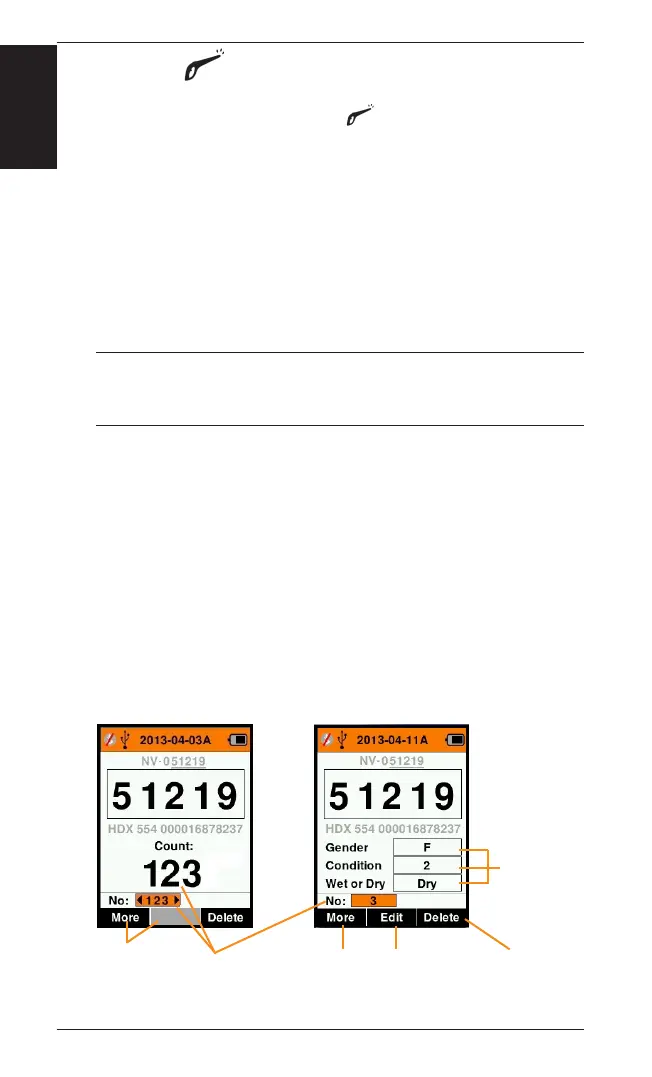
Count or ‘No:’
to show the number of animals in the current session.

scroll back through the previous animals in the session.
If Record traits = NO If Record traits = YES
Tags counted in
this session
Traits included
in this session

below to Delete
tag shown

below to Edit
trait values

below to view
animal history
and animal notes

assigned

Table of Contents

Other manuals for Gallagher HR4

Related product manuals