English
Gallagher 3E5260 M6000i/M12000i Energizer User Manual
14
Current Display
The output current indicates how hard your energizer is working. When your fence
is in good condion this reading will be low, typically under 15 Amps. As the load
on the fence increases the current will rise and output voltage will fall. The output
current will typically change with fence condions, seasonal grass growth and wet
weather. A high output current, typically over 40 Amps indicates there is a very high
load or short circuit on the fence.
Voltage Display
Output voltage is an indicaon of how eecve the shock is on your fence. It is
generally recommended to have 3KV or above on the fence at any me. If the output
voltage is too low there will not be enough voltage to ‘break’ through the animals
hide and deliver an eecve shock.
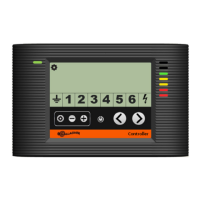
Zone Indicators
The zone indicators show what zones are acve on the fence system. The Energizer
zone ( ) and Earth zone ( ) are always available. Zones 1 – 6 can be added by
installing a combinaon of up to 6 Fence Monitors or Alarm Systems. See A ccessories
(p.19).
Navigaon Buons
The navigaon buons allow you to view the performance of dierent areas of your
fence system. By pressing (<) or (>) you can scroll through the zone indicators to
view fence or earth voltage. The zone you are looking at is highlighted by the zone
indicaon arrow ( ).
Standby Buon
Pressing the standby buon turns the energizer pulses on or o.
Sengs Buons
The sengs buons allow you to adjust the alarm levels and output voltage of the
energizer. Pressing the setup buon ( ) turns o the energizer pulses and enters
setup mode. If no further buons are pressed within 10 seconds the energizer
automacally exits setup mode and starts pulsing as normal.
Other Icons
The controller may occasionally display other icons for your informaon.
Energizer over-temperature: The energizer has detected that its internal
temperature is too high and has automacally slowed its pulse rate down. The
energizer may shut down unl the temperature has decreased.
Sengs mode: The user has entered the controller setup mode.
Standby mode: The energizer has been placed into standby and has stopped
pulsing. Press the standby buon to resume normal operaon.


 To Next Page