Setting Up The PC Software (Windows 10/11)
GALLERYCARD-091123
THIS IS YOUR GALLERY DTF
RIP SOFTWARE ACTIVATION KEY
TO ACTIVATE YOUR SOFTWARE:
1. Go to www.galleryprinters.com/downloads
2. Click on the “Download Software” button to download and install
the software
3. During install, you will be prompted for the Activation Code and
registration information
4. When the registration window opens, click “Enter activation code”.
5. Enter your code and customer information. Follow the on-screen prompts.
6. You will require this code whenever referencing your product with the
manufacturer or dealer you purchased it from.
ACTIVATION CODE:
P1234 5678 9012 34
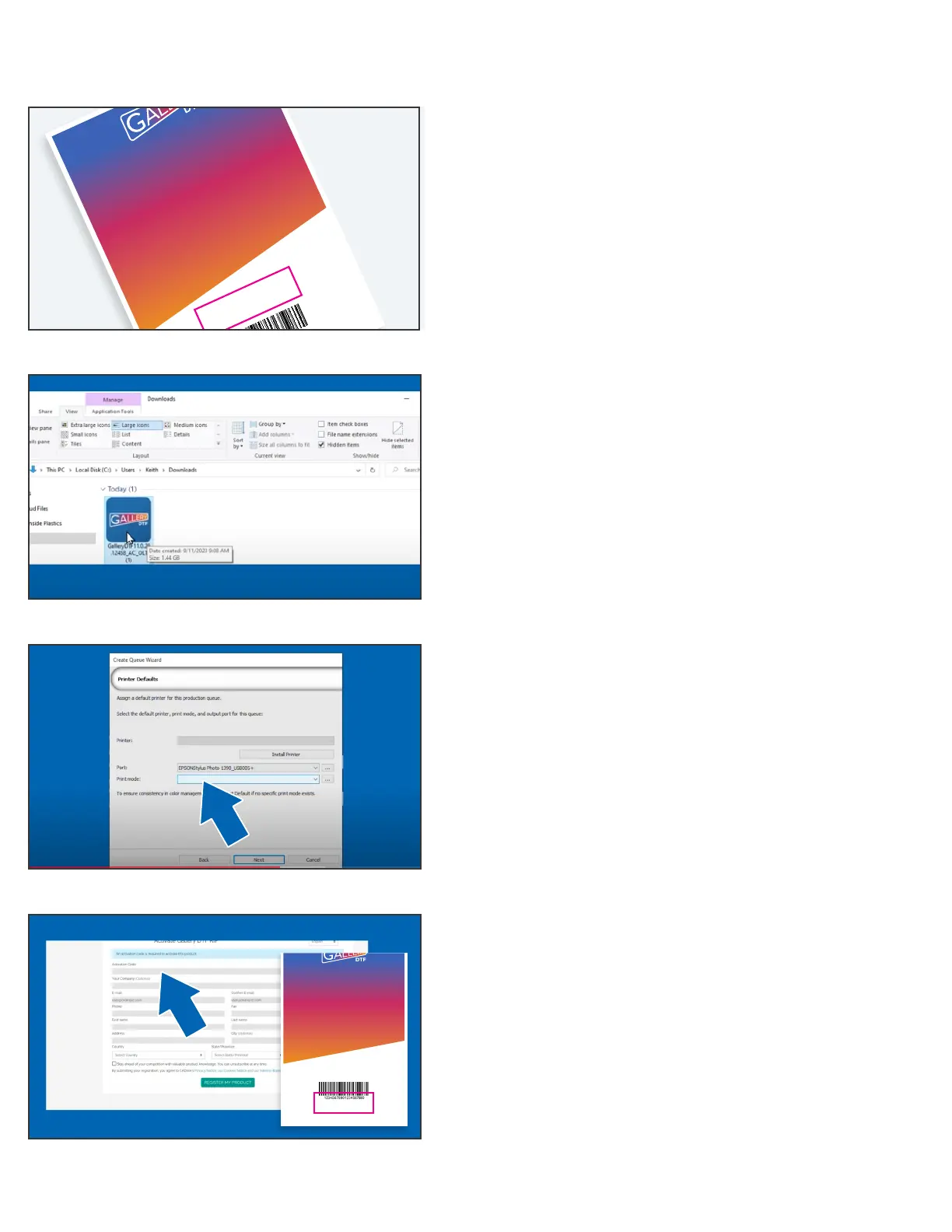
Step A
Find the card in the printer box with the download link for
the software and your software activation code.
Step B
Download and install the Gallery DTF RIP software,
select Gallery 1390 printer (Make sure USB cable is attached
and printer front power LED is Green).
Step C
During install, select EPSON Stylus Photo 1390 as the
communications port. (This is what Windows calls the
Gallery 1390 printer).
Step D
Under the HELP menu, activate your software using the
license key number on the card in the printer box.
You can watch a video of the full software download/install
sequence at the following link: galleryprinters.com/videos.
Continue To Next Page To Complete Gallery 1390R Printer Set Up
THIS IS YOUR GALLERY DTF
RIP SOFTWARE ACTIVATION KEY
TO ACTIVATE YOUR SOFTWARE:
1. Go to www.galleryprinters.com/downloads
2. Click on the “Download Software” button to download and install
the software
3. During install, you will be prompted for the Activation Code and
registration information
4. When the registration window opens, click “Enter activation code”.
5. Enter your code and customer information. Follow the on-screen prompts.
6. You will require this code whenever referencing your product with the
manufacturer or dealer you purchased it from.
ACTIVATION CODE:
P1234 5678 9012 34


 To Next Page
 Loading...