The document provided is a Quick Installation Guide for the GAMDIAS ATHENA M2 Mid-Tower PC Case. It offers comprehensive information on the case's specifications, components, installation procedures, and compatibility with various PC hardware.
Function Description
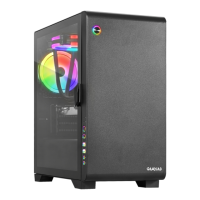
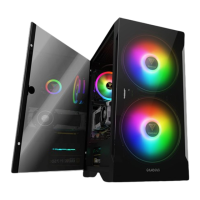
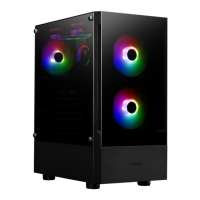
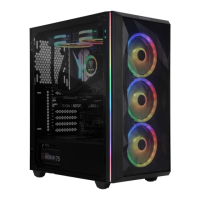
The GAMDIAS ATHENA M2 is a mid-tower PC case designed to house and protect computer components while providing efficient cooling and aesthetic appeal. It supports standard ATX, Micro-ATX, and Mini-ITX motherboards, making it suitable for a wide range of custom PC builds. The case features a mesh front panel and a tempered glass side panel, offering both optimal airflow and a clear view of the internal components, including RGB lighting. Its primary function is to provide a structured and cooled environment for high-performance computing hardware.
Important Technical Specifications
Model Name: ATHENA M2
Case Type: MID Tower
Motherboard Support: ATX, Micro-ATX, Mini-ITX
Color: Black
Expansion Slots: 7
Material: SPCC & ABS & Tempered glass
Window: Front (Mesh), Left (4mm Tempered Glass)
Panel Light: Rainbow Color (ARGB)
Drive Bays:
- 5.25": N/A
- 3.5": 2 x 3.5" or 1 x 2.5" + 1 x 3.5" (HDD Cage)
- 2.5": 1
Radiator Support:
- Top: 240 mm
- Front: 360 mm, 280 mm
- Rear: 120 mm
Fan Support:
- Top: 2 x 120mm, 2 x 140mm
- Front: 3 x 120mm, 2 x 140mm
- Rear: 1 x 120mm, 1 x 140mm
PSU: ATX PS2, 163mm Length (max)
I/O Port:
- USB 3.0 x1
- USB 2.0 x2
- HD Audio x1
- Fan LED control x1
- Fan Speed control x1
Clearance:
- CPU cooler height limitation: 170mm
- VGA length limitation: 330mm
- PSU length limitation: 170mm
Dimension (L x W x H): 405 x 215 x 460 mm (15.9 x 8.5 x 18.1 inch)
Usage Features
The ATHENA M2 case is designed for ease of use during assembly and operation.
- Side Panel Removal: The tempered glass side panel can be easily removed by pressing and sliding, simplifying access to internal components for installation or maintenance.
- HDD/SSD Installation: The case supports both 3.5" HDDs and 2.5" SSDs, with clear instructions for aligning and screwing them into designated mounting holes. The HDD cage provides flexible options for storage configuration.
- Cooling Compatibility: It offers extensive compatibility for both air cooling and liquid cooling solutions. Users can install multiple fans (120mm or 140mm) at the top, front, and rear, or radiators of various sizes (240mm, 360mm, 280mm, 120mm) to ensure optimal thermal performance for high-end components.
- Front I/O Ports: The front panel includes essential connectivity options such as one USB 3.0 port, two USB 2.0 ports, HD Audio (headphone and microphone jacks), and dedicated buttons for fan LED control and fan speed control.
- RGB Fan Control: The integrated ARGB fan controller allows users to manage the rainbow color lighting effects of the fans. A specific feature allows synchronization with the motherboard by pressing and holding the FAN Speed Control Button for 3 seconds, and turning off the fan LEDs by pressing and holding the FAN LED Control Button for 3 seconds.
- Cable Management: While not explicitly detailed, the "Cable Tie" accessory suggests provisions for organized cable routing, contributing to better airflow and a cleaner internal aesthetic.
Maintenance Features
- Detachable Mesh Front Panel: The front panel is detachable, which likely aids in cleaning the mesh filter and accessing front-mounted fans or radiators for maintenance.
- Top Dust Filters: The inclusion of top dust filters helps prevent dust accumulation inside the case, protecting components and maintaining cooling efficiency. These filters are typically easy to remove and clean.
- Side Panel Access: The press-and-slide mechanism for the tempered glass side panel ensures quick and tool-less access to the interior for cleaning, component upgrades, or troubleshooting.
- Accessory Kit: The provided accessory kit includes various screws (for PSU, HDD, SSD, motherboard, fans, and cable management) and a buzzer for motherboard alarms, which are useful for initial setup and potential future maintenance or upgrades.

 Need help?

 To Next Page
 General