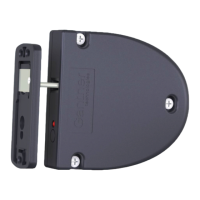
GL7p - Battery-powered, door-mounted electronic locker lock GL7p
Configuration
www.gantner.com
HB_GL7p--EN_12
47
5.4.10 Configuration Settings Table
The following table lists all the configuration information available for the GL7p in GAT Config Manager.
Select the operating mode of the lock:
- “FreeLocker”
- “PersonalLocker_ProgrammingCard”
- “PersonalLocker_ExpiryDate”
- “FreeLocker_UniqueNumber”
- "FreeLockerUniversal"
Switch on/off the integrated beeper
AutoUnlock point of time [min]
Unlock locker at a defined time (input in minutes after
midnight), "0" = inactive
AutoUnlock after locking active
Unlock locker automatically after being locked for a certain
time
AutoUnlock after locking [min]
Time in minutes after which the locker is unlocked after
locking (if the function is activated, see previous setting)
Select the type of time limit for the locker (see "6.3.1. Free
Locker Mode (with or without Duration of Use Function)"):
“Duration” or “Point of time”
Define the time limit. Value must be entered in minutes (if the
most significant bit is not set) or in hours (if the most
significant Bit is set). Examples:
Dec. value 1 up to 32767 -> 1 up to 32767 minutes
Dec. value 32768 to 65535 -> 1 up to 32766 hours
TimeLimit Interrupt Timeout [min]
Minimum waiting time from the end of a locker usage period
until the next usage period can begin
When set to "True", a valid expiration date must be set on
the data carriers for them to be used (default: 1.1.2007 is not
valid)
Define the index of the personal locker
Switch on/off the automatic lock function without data carrier
for personnel lockers
When set to "True", a new index or validity date can only be
transferred from a data carrier to the lock when the locker is
open. When this option is deactivated, transferal is possible
even when the locker is locked (see "6.3.5. Personal Locker
Expiry Date Mode")
When set to "True", a locker can be reopened after the
expiration of its useful life using the data carrier with which it was
locked (see "6.3.5. Personal Locker Expiry Date Mode")
WriteLockerData PL ExpDate
When set to "True", the lock status is written to the data
carrier when the data carrier is read


 To Next Page