30
SYSTEM SETUP
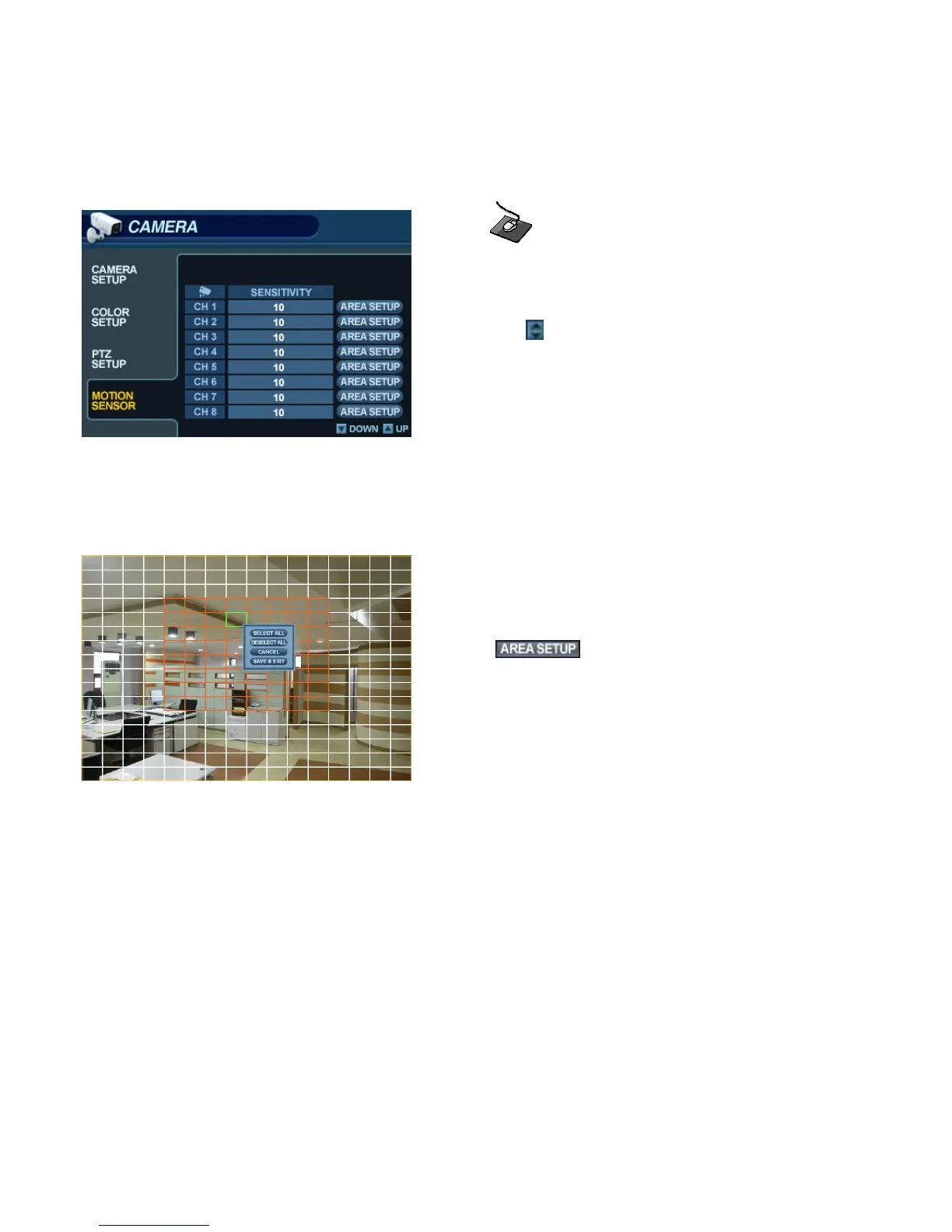
CAMERA : MOTION SENSOR
Click on the MOTION SENSOR menu.
Click on a SENSITIVITY value for the desired channel.
Then use the button to increase or decrease the sensitivity.
SENSITIVITY : Determines the degree of motion required before recording is activated.
(1: Least Sensitive to Motion - 10: Most Sensitive to Motion)
Click the button to edit the motion detection area.
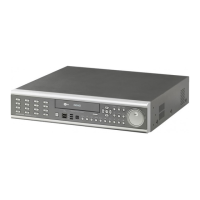
AREA SETUP : Choose this option to define which areas of the image are sensitive to motion.
Click on individual squares to select or deselect each square.
Click-and-drag to select or deselect entire areas of the grid.
To quickly select or deselect the entire grid at once, right-click and choose either ‘SELECT ALL’ or ‘DESELECT ALL’.
- Red outlined grid area: Selected area.
- White outlined grid area: Unselected area.
- Green outlined grid square: Current position of mouse cursor.


 To Next Page