45
SYSTEM SETUP
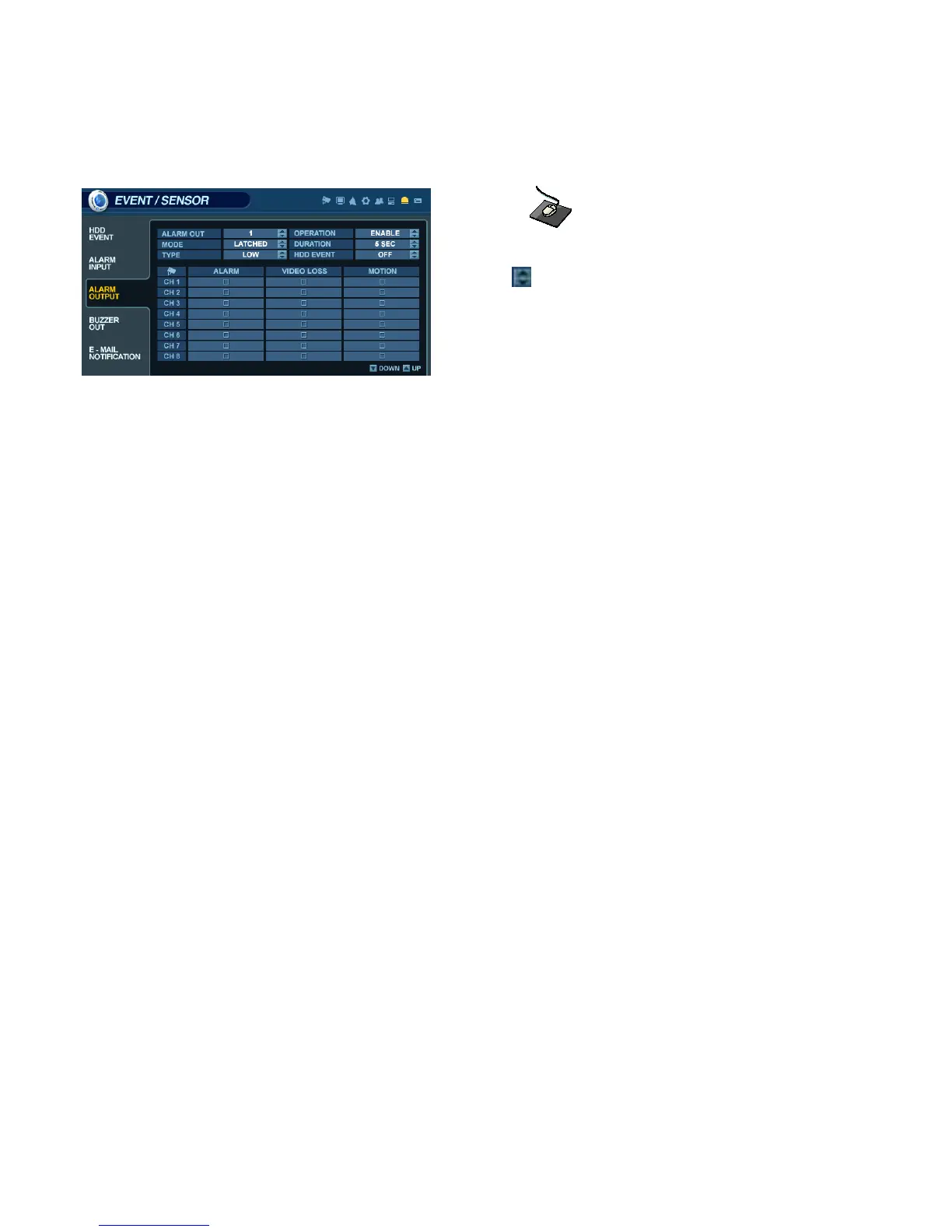
EVENT / SENSOR - ALARM OUTPUT
Click on the ALARM OUTPUT menu, and click on a field.
Use the button to modify the value.
This menu will determine the behavior and actions that will trigger each of the 16 alarm outputs.
Behavior settings
ALARM OUT : Choose which alarm output to configure. (1~16 and R1~R4)
OPERATION : The selected alarm output can be enabled or disabled.
MODE : Can be either set as ‘TRANSPARENT’ (the output is active only when the trigger criteria is present)
or ‘LATCHED’ (the output is active for a set period of time after the trigger).
DURATION : In ‘LATCHED’ mode, the amount of time that the alarm output remains active after it has been triggered.
TYPE : Can be set to high (0V to +5V when activated) or low (+5V to 0V when activated).
HDD EVENT : Determines whether a hard drive event will trigger an alarm output.
Action settings
ALARM : Determines whether the specific channel alarm input would trigger the alarm output.
VIDEO LOSS : Determines whether video loss on any of the selected channels will trigger the alarm output.
MOTION : Determines whether motion detection on any of the selected channels will trigger the alarm output.
NOTE: Remember to select ‘APPLY’ and press ‘ENTER’ to save all settings before exiting these menus.



 To Next Page