EasyManua.ls Logo

Garmin 340 - User Manual

Garmin 340
12 pages
Print Icon
To Next Page IconTo Next Page
Loading...
1
Audio Panel
pilot’s guide
GMA 340
Question and Answer IconNeed help?

Do you have a question about the Garmin 340 and is the answer not in the manual?

Summary

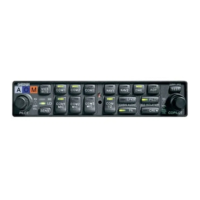
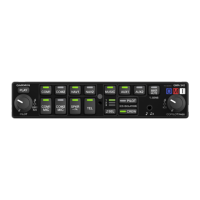
Function Selection Switches

Pilot Intercom System (ICS) Volume

Controls Pilot ICS volume, also passenger volume on GMA 340H. Linked to ON/OFF knob.

Pilot ICS Voice Activated (VOX) Intercom Squelch Level

Adjusts Pilot ICS VOX squelch level. CW increases audio needed to break squelch.

Copilot and Passenger ICS Volume Control

Controls Copilot ICS volume, and Passenger ICS volume when pulled out.

Copilot and Passenger VOX Intercom Squelch Level

Adjusts Copilot/Passenger ICS VOX squelch level. CW increases audio needed to break squelch.

Transceiver Audio Selector Buttons

Buttons to select COM 1, COM 2, or COM 3 for MIC and audio source.

Transmitter (Audio;Mic) Selection Buttons

Buttons to select which COM transceiver is used for microphone input.

Split COM Button

Button to activate Split COM function for separate pilot/copilot transmissions.

On, Off, and Failsafe Operation

Power Control and Failsafe

Unit power controlled by small knob (5, 7). Failsafe connects pilot headset to COM 1 on power loss.

Split COM Function

Dedicated pilot/copilot COM MIC/audio over separate radios, with PA override.

Aircraft Radios & Navigation Audio

Intercom System (ICS) Operation

Marker Beacon Receiver

Summary

Function Selection Switches

Pilot Intercom System (ICS) Volume

Controls Pilot ICS volume, also passenger volume on GMA 340H. Linked to ON/OFF knob.

Pilot ICS Voice Activated (VOX) Intercom Squelch Level

Adjusts Pilot ICS VOX squelch level. CW increases audio needed to break squelch.

Copilot and Passenger ICS Volume Control

Controls Copilot ICS volume, and Passenger ICS volume when pulled out.

Copilot and Passenger VOX Intercom Squelch Level

Adjusts Copilot/Passenger ICS VOX squelch level. CW increases audio needed to break squelch.

Transceiver Audio Selector Buttons

Buttons to select COM 1, COM 2, or COM 3 for MIC and audio source.

Transmitter (Audio;Mic) Selection Buttons

Buttons to select which COM transceiver is used for microphone input.

Split COM Button

Button to activate Split COM function for separate pilot/copilot transmissions.

On, Off, and Failsafe Operation

Power Control and Failsafe

Unit power controlled by small knob (5, 7). Failsafe connects pilot headset to COM 1 on power loss.

Split COM Function

Dedicated pilot/copilot COM MIC/audio over separate radios, with PA override.

Aircraft Radios & Navigation Audio

Intercom System (ICS) Operation

Marker Beacon Receiver

Garmin 340 Specifications

General IconGeneral
BrandGarmin
Model340
CategoryControl Panel
LanguageEnglish

Related product manuals