Need help?
Do you have a question about the Garmin GPSMAP 1243xsv and is the answer not in the manual?
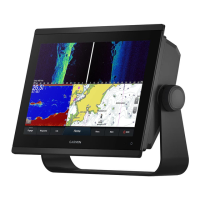
Provides a visual overview of the chartplotter's physical components and their functions.
Instructions for setting up and using voice control with a compatible headset.
Understanding user roles and features available with the ActiveCaptain app.
Learn to update device software and charts using the ActiveCaptain app.
Overview of Navigation Chart, Fishing Chart, and common chart symbols.
Instructions for setting a course and navigating to a selected destination on the chart.
Using AIS to identify and track other vessels for traffic awareness.
Configuring collision alarms for AIS and MARPA targets to enhance safety.
Configuring radar overlays, map orientation, and chart details.
Instructions for recording and saving contour maps using the Quickdraw feature.
Answers common questions about navigation, including route creation and guidance.
Instructions for setting and following a direct course to a destination.
Creating, editing, moving, and viewing waypoints on the chartplotter.
Steps for creating, saving, and navigating routes, including editing saved routes.
Setting parameters like preferred depth and vertical clearance for Auto Guidance.
Features for sail racing, including starting line guidance and race timer.
Using autopilot for heading hold, wind hold, tacking, and gybing.
Explains Traditional, Split-Frequency, Split-Zoom, ClearVü, and SideVü sonar views.
Details LiveVü, RealVü 3D sonar views for real-time underwater imaging.
Learning to read radar display and overlaying radar data on charts.
Exploring radar options like MotionScope, Echo Trails, and radar setup configurations.
Overview of autopilot configuration and selecting preferred heading sources.
Understanding the autopilot screen layout and adjusting steering increments.
Enabling and using the Shadow Drive feature for manual steering control.
Using steering patterns like U-Turn, Circles, Zigzag, and Williamson Turn.
Information on Yamaha autopilot screens, settings, and overlay bars.
How to view, edit, and customize various gauges and engine alert icons.
Details on viewing Yamaha and Mercury engine data and alerts.
Steps for connecting an inReach device to the chartplotter for message management.
Enabling and setting up the Power-Pole anchor overlay for chartplotter control.
Enabling Mercury Helm and controlling trolling speed via chartplotter overlays.
Setting and adjusting Mercury cruise control and viewing engine data.
Accessing and controlling the Dometic Optimus system, including its overlay bar.
Activating subscriptions, customizing channel guides, and setting parental controls.
Using Compass Lock and Vessel Lock for camera tracking.
Understanding the bird's-eye view and individual camera feeds.
Configuring system settings like display, GPS, station, and power options.
Setting parameters for Auto Guidance path calculation like depth and clearance.
Managing NMEA 0183 and NMEA 2000 settings and connected devices.
Configuring vessel details like transducers, fuel, vessel type, and hull ID.
Updating built-in maps using a memory card and the Garmin Express application.
Instructions for updating charts and device software using Garmin Express or ActiveCaptain.
 General
| Display Resolution | 1280 x 800 pixels |
|---|---|
| Display Type | WXGA display |
| Touchscreen | Yes |
| Keypad | Yes |
| Water Rating | IPX7 |
| Antenna | Internal or external over NMEA 2000 |
| Receiver | 10 Hz |
| Garmin Marine Network Ports | 2 |
| NMEA 2000 Ports | 1 |
| NMEA 0183 Input Ports | 1 |
| NMEA 0183 Output Ports | 1 |
| Wireless Connectivity | Yes |
| J1939 Connectivity | Yes |
| BlueChart g3 Charts | Yes |
| LakeVü g3 Charts | Yes |
| Waypoints | 5, 000 |
| Routes | 100 |
| Track Log | 50, 000 points; 50 saved tracks |
| Sonar Capabilities | Yes |
| CHIRP Sonar | Yes |
| ClearVü | Yes |
| SideVü | Yes |
| Traditional Sonar Frequency | 50/77/83/200 kHz |
| ClearVü/SideVü Frequency | 260/455/800 kHz |
| Weight | 5.1 lbs (2.3 kg) |
| Mounting Options | Flush |
| Video Input Ports | 1 BNC |
| Accepts Data Cards | microSD card |
| CHIRP Frequency | Low, High |
| Transmit Power | 500 W (RMS) |
| Operating Temperature | -15°C to 55°C (5°F to 131°F) |
| Storage Temperature | -4°F to 158°F (-20° to 70°C) |
| Power Input | 10-32 Vdc |


 To Next Page