EasyManua.ls Logo

Garmin Apollo SL30 COMM - User Manual

Garmin Apollo SL30 COMM
88 pages
Print Icon
To Next Page IconTo Next Page
Loading...
Apollo
Model SL30 NAV/COMM
Installation Manual
August 2003
560-0404-03a

Table of Contents

Questions and Answers

  • M
    Michael CooperAug 12, 2025
    What to do if Garmin Car Navigation system unit won’t communicate via RS-232?
    • T
      Timothy WilsonAug 12, 2025
      If your Garmin Car Navigation system unit won’t communicate via RS-232, the issue may stem from an improper setup on the remote device, device incompatibility, or an incorrect connection. Consult the configuration of the other device. Verify that the SL30 Rx is connected to the remote device Tx and the SL30 Tx is connected to the remote device Rx.
  • T
    Thomas FernandezAug 16, 2025
    What to do if my Garmin Car Navigation system SL30 does not transmit?
    • R
      Roberto SmithAug 16, 2025
      If your Garmin Car Navigation system SL30 doesn't transmit, it could be due to several reasons. First, ensure the TxKey (mic key) input is pulled low for transmit. Second, verify that you have selected a valid frequency, as the unit will not transmit on a weather channel. Third, confirm that the power input is correctly connected to the Comm 15 pin connector. Finally, check that the input supply voltage is greater than 9 volts DC.
  • E
    elliottdeniseAug 20, 2025
    Why doesn't the intercom function in my Garmin Apollo SL30 COMM Car Navigation system?
    • S
      Stephanie CarneyAug 20, 2025
      If the intercom isn't working on your Garmin Car Navigation system, it might be because the intercom select input isn't connected to ground, preventing the intercom function from activating. Another reason could be an active frequency signal is present, which takes priority. Also, the voice activation level might be set too high, requiring you to speak too loudly. Try changing the active frequency or adjusting the intercom level threshold using the setup function.
  • A
    Andrea SandersAug 25, 2025
    How to fix a Garmin Apollo SL30 COMM SL30 that does not power on?
    • M
      Matthew MillerAug 25, 2025
      If your Garmin Car Navigation system SL30 isn't powering on, the unit might not be getting power. You should check the power connections, breakers, and the main avionics switch to ensure they are properly connected and functioning.
  • J
    James StanleyAug 27, 2025
    Why is there no NAV audio on my Garmin Apollo SL30 COMM?
    • C
      Clarence HicksAug 27, 2025
      If you're not getting any NAV audio on your Garmin Car Navigation system, the output might be disabled or set to a very low level. Check the System page, then NAV Options, and finally the NAV Audio Level to ensure it is properly configured.
  • G
    Gregory HolderAug 31, 2025
    How to stop NAV audio in Comm on Garmin Apollo SL30 COMM?
    • C
      crystalscottAug 31, 2025
      If you're hearing NAV audio mixed with Comm on your Garmin Car Navigation system, it's likely due to the 'Mixed with Comm' feature being enabled. To resolve this, go to the System page, then NAV Options, and uncheck 'Mix NAV Audio With Com'.
  • M
    Michelle GuzmanSep 4, 2025
    What to do if resolver won’t calibrate on Garmin Car Navigation system?
    • R
      robinsonthomasSep 4, 2025
      If the resolver won't calibrate on your Garmin Car Navigation system, it could be due to an incompatible resolver or an improper connection. Check the resolver specifications and wiring to ensure they are correct.
  • A
    april34Sep 7, 2025
    Why Garmin Car Navigation system Unit won’t communicate via RS-232?
    • J
      Joshua BellSep 7, 2025
      If your Garmin Car Navigation system unit won’t communicate via RS-232, it could be due to an improper setup on the remote device, the device not being compatible, or an improper connection. Consult the configuration of the other device and verify that the Rx is connected to the Tx and the Tx is connected to the Rx of the device.

Summary

SECTION 1 - INTRODUCTION

ABOUT THIS MANUAL

Overview of the manual's purpose and intended audience for installing aircraft navigation devices.

APOLLO SL30 DESCRIPTION

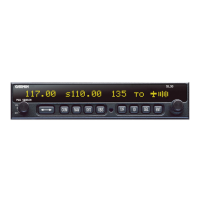
Details the Apollo SL30's features, including its VHF Comm transceiver and VOR/LOC/GS navigation receiver.

FEATURES

Lists general, navigation radio, and communication radio features of the Apollo SL30 unit.

SYSTEM INTERFACES

Describes how the SL30 connects with external avionics and data systems.

UNPACKING THE EQUIPMENT

Instructions for carefully unpacking and inspecting the Apollo SL30 package contents.

SECTION 2 - INSTALLATION

PRE-INSTALLATION INFORMATION

Guidelines and FAA advisory circulars to follow for a successful SL30 installation.

INSTALLATION CONSIDERATIONS

Factors to consider during installation, including mounting, cooling, and system configurations.

MINIMUM SYSTEM CONFIGURATION

Outlines required components for VFR and IFR installations of the SL30.

EQUIPMENT MOUNTING

Procedures for attaching connectors and mounting the SL30 frame in the instrument panel.

ELECTRICAL CONNECTIONS

Detailed instructions for powering and connecting the SL30's electrical systems.

ANTENNA INSTALLATION AND CONNECTIONS

Requirements for installing Comm and Nav antennas, including placement.

USE OF SPLITTER AND COMBINER

Explains the use of splitters/combiners for dual antenna setups with the SL30.

SECTION 3 - SPECIFICATIONS

ELECTRICAL

Detailed electrical specifications for the Apollo SL30, including voltage, current, and fuses.

PHYSICAL

Physical dimensions and weight specifications for the Apollo SL30 unit.

ENVIRONMENTAL

Environmental testing categories and conditions met by the Apollo SL30.

NAV RECEIVER PERFORMANCE

Performance specifications for the VOR and Localizer functions of the SL30.

COMM RECEIVER PERFORMANCE

Performance specifications for the SL30's Comm receiver, including sensitivity and selectivity.

SECTION 4 - LIMITATIONS

INSTALLATION

Limitations and recommendations for SL30 installation, including helicopter use.

COMPUTATION RATES

Information on the SL30's frequency computation rate and VOR monitor function.

APPENDIX A - TROUBLESHOOTING

CONTACTING THE FACTORY FOR ASSISTANCE

Information and required details for contacting Garmin AT for technical support.

APPENDIX B - PERIODIC MAINTENANCE

VOR CHECKS

Procedures for performing VOR accuracy checks as required for IFR flight.

CLEANING THE FRONT PANEL

Instructions for cleaning the SL30's front panel, keypad, and display.

APPENDIX C - ENVIRONMENTAL QUALIFICATIONS

APPENDIX D - ACCESSORIES

FROM GARMIN AT, INC.

Lists accessory items available from Garmin AT for the Apollo SL30.

Splitter;Combiner

Details on the splitter/combiner accessory for dual antenna/SL30 installations.

APPENDIX E - SERIAL INTERFACE SPECIFICATIONS

INPUT COMMANDS

Lists the RS-232 serial input commands supported by the SL30.

OUTPUT MESSAGES

Details the RS-232 serial output messages provided by the SL30.

DATA FORMAT

Specifies the data format for serial communication with the SL30.

Garmin Apollo SL30 COMM Specifications

General IconGeneral
Channels760
Channel Spacing25 kHz
TypeAviation Communication Radio
CategoryAviation
Frequency Range118.000 - 136.975 MHz
Power Output10 Watts
Operating Voltage14 V DC

Related product manuals