
 To Next Page

L
Lisa SchmidtJul 28, 2025
How to update the software of Garmin APPROACH CT10 club sensors?
- EEdwin PetersonJul 28, 2025
To update the software, select Club Sensors > Software Update, then select a sensor to update.

How to update the software of Garmin APPROACH CT10 club sensors?
To update the software, select Club Sensors > Software Update, then select a sensor to update.
What to do if I need to reassign my Garmin APPROACH CT10 sensors?
To reassign your sensors, select Reassign. Bring the club within 1 meter (3 ft.) of your watch. Select the club to which the sensor will be assigned.
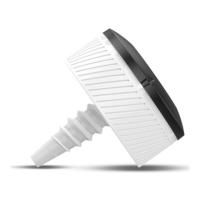
Instructions on how to screw and tighten the sensor into the end of a golf club grip.
Guidance on using a starter pack of sensors for AutoShot™ feature and automatic scoring.
How the device automatically records score based on detected shots, including manual entry for omissions.
Step-by-step guide to replace the sensor's battery.
Guidance on checking sensor compatibility with Garmin golf devices.
 General
| Product color | Black, White |
|---|---|
| Analyzer location | Club |
| Swing tempo | Yes |
| Battery type | Built-in battery |
 Weight and Dimensions
| Width | 27 mm |
|---|---|
| Height | 13 mm |
| Weight | 9 g |