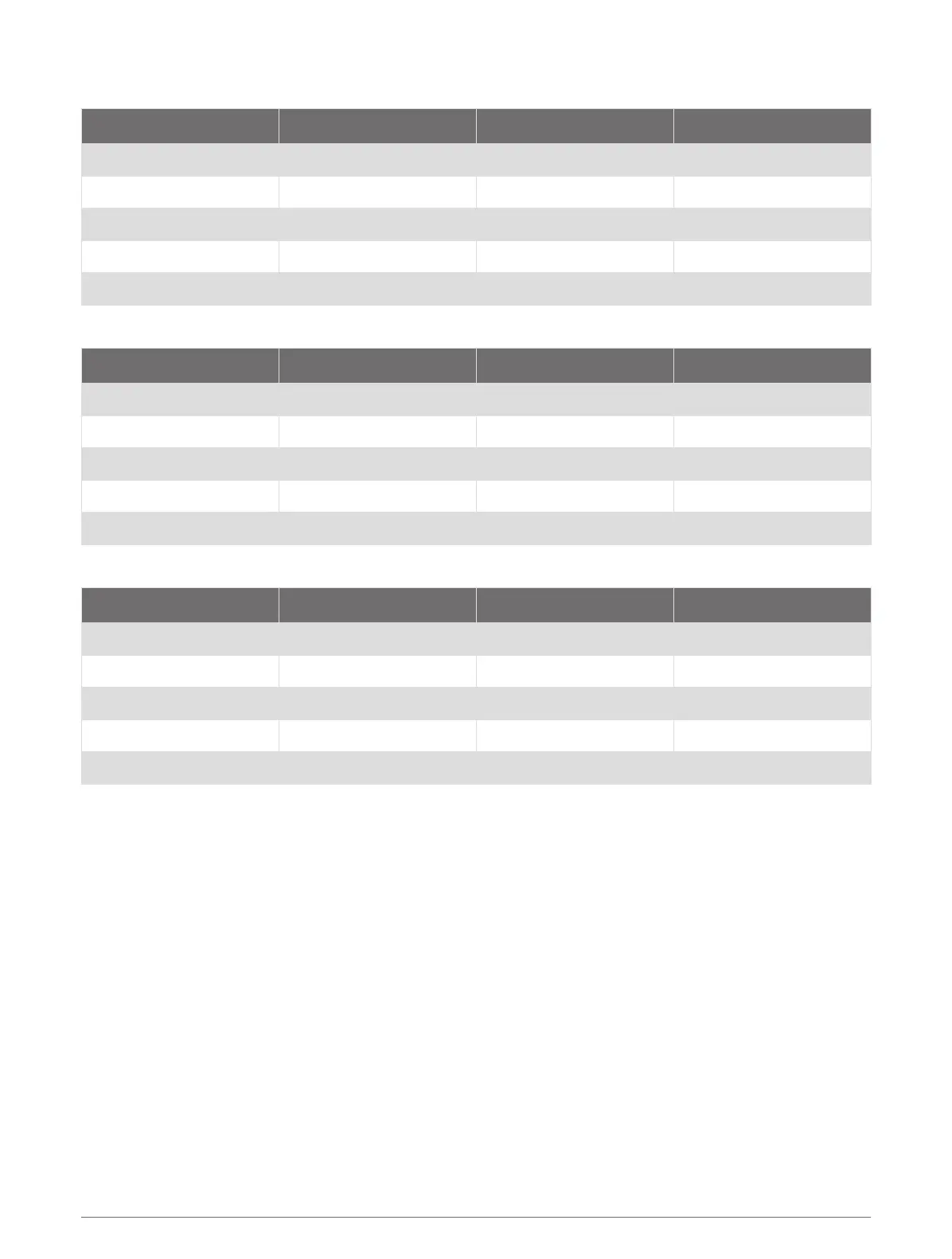
Resistive Tank Sensor 2 (Channel 7)
Device Switch NMEA 2000 Fluid Type NMEA 2000 PGN NMEA 2000 Instance
105 Fuel (Default) 127505 1
106 Fresh Water 127505 1
107 Waste Water 127505 1
108 Black Water 127505 1
109 Live Well 127505 1
Voltage Tank Sensor 1 (Channel 22)
Device Switch NMEA 2000 Fluid Type NMEA 2000 PGN NMEA 2000 Instance
110 Fuel (Default) 127505 2
111 Fresh Water 127505 2
112 Waste Water 127505 2
113 Black Water 127505 2
114 Live Well 127505 2
Voltage Tank Sensor 2 (Channel 23)
Device Switch NMEA 2000 Fluid Type NMEA 2000 PGN NMEA 2000 Instance
115 Fuel (Default) 127505 3
116 Fresh water 127505 3
117 Waste water 127505 3
118 Black water 127505 3
119 Live well 127505 3
Configuring the Livewell Automatic Pump Cycle Settings
When activated, a connected livewell pump runs for 1 minute and stops. By default, this device activates the
livewell every 5 minutes, and the activation cycle time can be configured. You can change this value to 1, 3, 5, 7,
9 11, 13, or 15 minutes.
NOTE: You can bypass this activation cycle and set the pump to run continuously by holding the livewell switch
on the Garmin chartplotter for 3 seconds. When bypassed, the pump runs continuously until stopped.
1 Connect the SWITCH INPUT: LIVEWELL CYCLE ADJ wire to a common ground for three seconds.
The runtime-cycle setting changes to the next higher delay. The screen displays the new time between
cycles.
2 Repeat the previous step to increase the delay up to a maximum of 15 minutes.
NOTE: When the live-well pump cycle is set to 15 minutes, you must connect the SWITCH INPUT: LIVEWELL
CYCLE ADJ wire to a common ground for three seconds to set the runtime to back to 1 minute.
20



 To Next Page