1122
GPS is really about marking and going to
places called ‘waypoints’. Before we can use the
GPS 12 MAP to guide us somewhere, we have
to mark a position as a waypoint. Your GPS 12
MAP can hold up to 500 waypoints.
To mark your present position:
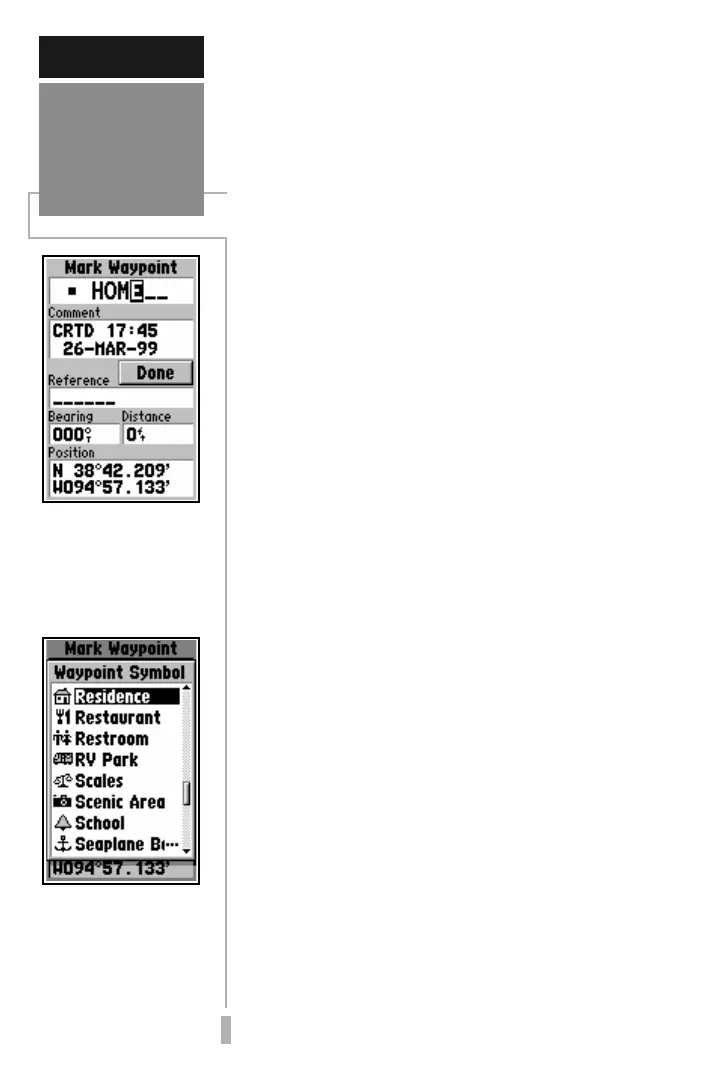
1. Press and hold the ENTER/MARK key. The Mark
Waypoint Page will appear, with a default three-
digit name for the new waypoint in the top
portion of the page.
To rename the waypoint:
1. Use the keypad to highlight the name field, and
press ENTER.
2. Enter the new waypoint name using the rocker
keypad, and press ENTER.
Each waypoint may also be assigned a
custom waypoint symbol for easy waypoint
recognition on the Map Page.
To change the waypoint symbol:
1. Highlight the waypoint symbol field (immediately
to the left of the waypoint name field) and press
ENTER.
2. Select the desired symbol, and press ENTER.
3. Move the cursor to the ‘DONE?’ prompt, and press
ENTER.
The Mark Position Page will be replaced with
the page displayed before you pressed ENTER/
MARK to mark your position. The new
waypoint is now stored in the GPS 12 MAP’s
memory.
Marking
Waypoint
Positions
GETTING STARTED
Each waypoint stored in
memory is identified by
a unique name, up to six
characters long (letters
and/or numbers).
Each waypoint may also
be assigned a custom
waypoint symbol, mak-
ing it easy to identify the
waypoint on the Map
Page.


 To Next Page