72
REFERENCE
Setup Menu:
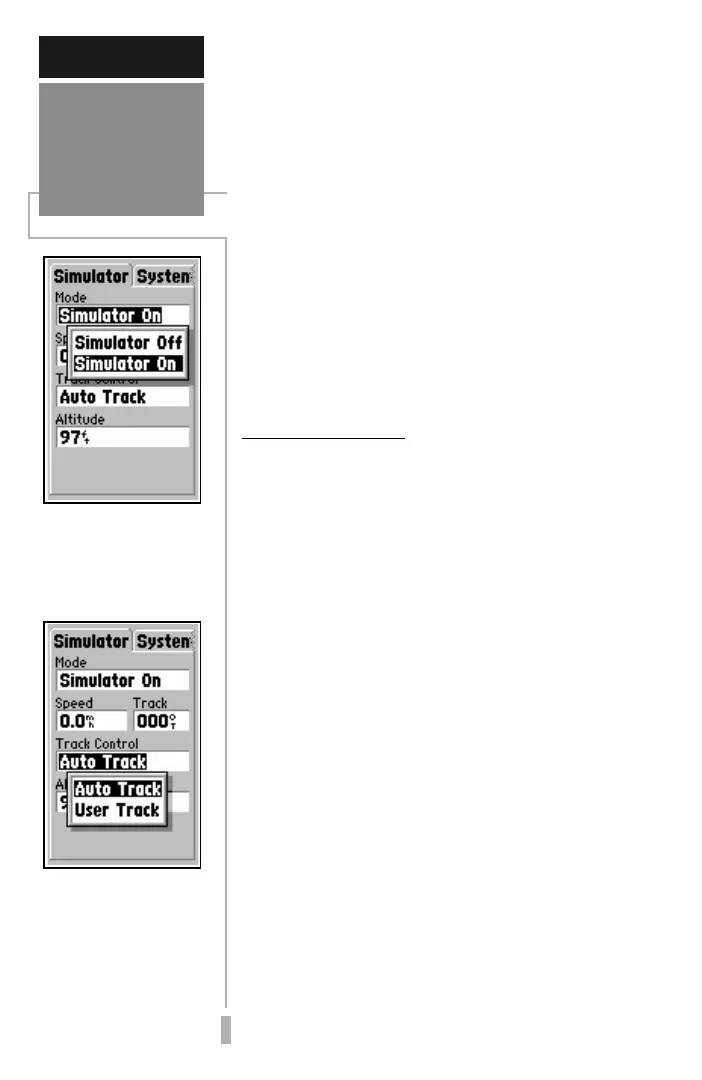
Simulator
‘Simulator’ allows you to
configure the built-in
simulator feature.
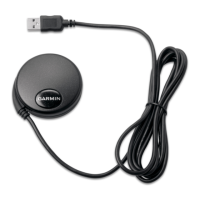
The ‘Track Control’ set-
ting allows the simulator
to automatically “line
up” on the correct bear-
ing to a destination
waypoint.
Timer, and usage timers for current day and
since new
Time—Formats for local 24 hour, local 12
hour (AM/PM) or UTC; Difference setting from
UTC to local time
Alarms—Alarm Clock, Arrival Alarm, Off
Course Alarm
Position—Position Format (latitude/
longitude, UTM/UPS, Maidenhead, regional
grids); Map Datum selection
Interface—Format (NMEA, RTCM, GARMIN
proprietary); Mode setting for use with PC or a
second unit
The following pages describe, in more detail,
the available settings for each Setup file tab
item.
Simulator Settings
Mode lets you turn the built-in simulator on
or off.
To enable/disable the built-in simulator:
1. Highlight the ‘Mode’ field and press ENTER.
2. Select ‘Simulator Off’ or ‘Simulator On’ (as
desired) and press ENTER.
Speed lets you select a simulated speed when
the simulator is enabled.
Track Control allows the built-in simulator
to automatically align track heading to the
desired course (when using a GOTO or
route), or allows you to manually adjust the
track heading, as desired.
Track allows you to manually enter a track
heading. This setting is only available when
Track Control is set to ‘User Track’.
Altitude allows you to specify a user-defined
altitude for your simulated position.
To select a simulator setting:
1. For track control, highlight the ‘Track Control’ field
and press ENTER. Select ‘Auto Track’ or ‘User
Track’ and press ENTER.


 To Next Page