EasyManua.ls Logo

Garmin GPS 175 - User Manual

Garmin GPS 175
290 pages
Print Icon
To Next Page IconTo Next Page
Loading...
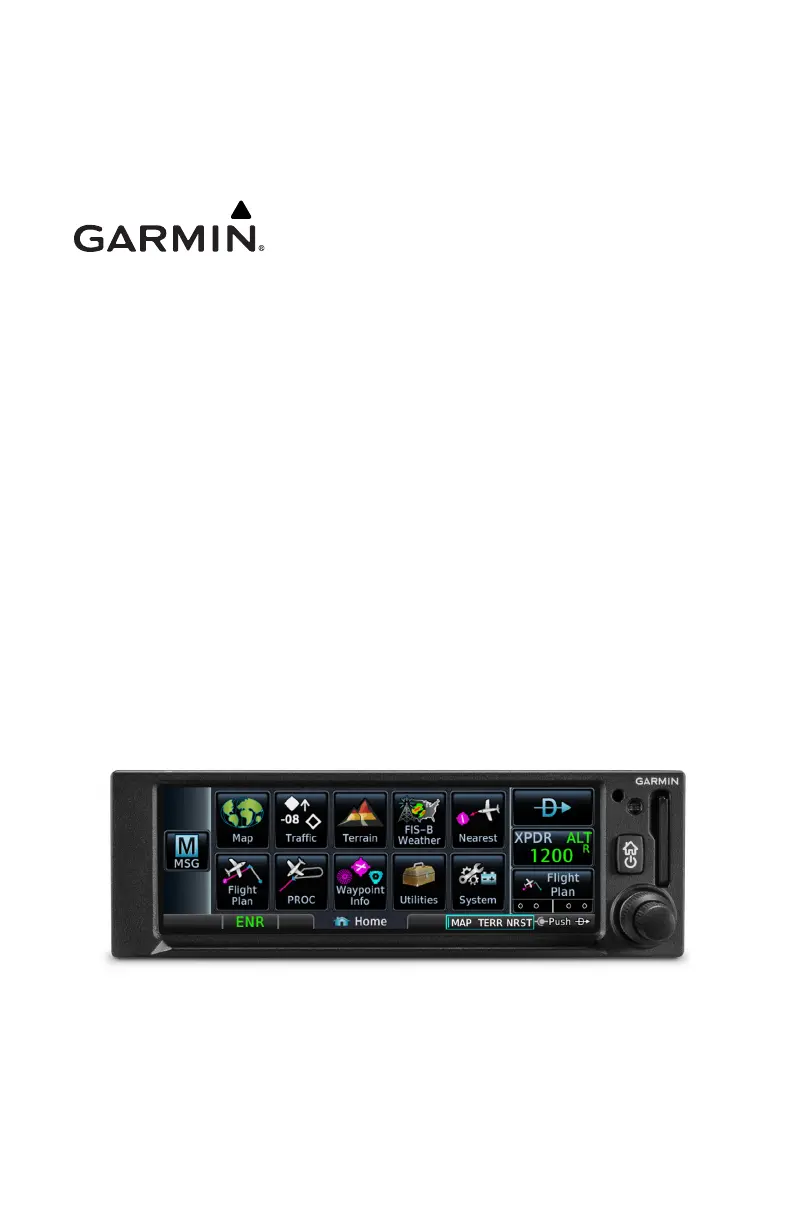
GPS 175
GNC 355
GNX 375
Pilot's Guide

Table of Contents

Other manuals for Garmin GPS 175

Questions and Answers

  • S
    Stephen SteinSep 8, 2025
    Why won't my Garmin GPS 175 OBS resolver calibrate?
    • S
      sandy00Sep 9, 2025
      If your Garmin GPS 175 OBS resolver won't calibrate, the issue is likely due to an incompatible resolver or an improper connection. Check the resolver specifications and wiring to ensure they are correct.
  • D
    Dustin MooreAug 23, 2025
    What to do if my Garmin 175 GPS/GNX/GNC does not compute position?
    • E
      Emily MullinsAug 23, 2025
      If your Garmin GPS 175, GNX 375, or GNC 355 is not computing its position, the issue might be due to inadequate GPS signals. Check the GPS antenna connections to ensure they are secure. Also, make sure the aircraft is in a location free from obstructions such as hangars, buildings, or trees.
  • A
    April WatsonAug 25, 2025
    Why does Garmin GPS/GNX/GNC signal drop when avionics are turned on?
    • A
      Ashley Mcgrath MDAug 25, 2025
      If the GPS signal level of your Garmin GPS 175, GNX 375, or GNC 355 drops when avionics are turned on, it's likely due to noise interference from other avionics. To address this, turn off all other avionics and then turn them back on one at a time to identify the source of the interference. Reroute the GPS cable and reposition the GPS antenna away from the interfering unit.
  • L
    Linda WoodAug 26, 2025
    Why are Garmin GNC 355 GPS signal levels very low?
    • S
      snyderjamesAug 26, 2025
      If the GPS signal levels on your Garmin GNC 355 are very low, this could be due to several reasons. First, check the GPS antenna installation, connections, and cable routing, ensuring the antenna is mounted on top of the aircraft. Second, ensure the aircraft is clear of obstructions like hangars, buildings, or trees. Third, RF interference at 1575.42 MHz from VHF COM can be the cause. Add a 1575.42 MHz notch filter in COM coaxial. Fix or replace the COM. Disconnect the ELT antenna coaxial to check for possible re-radiation. Move GPS antenna further from the COM antenna.
  • G
    Glen RamirezAug 27, 2025
    Why are Garmin 175 175 GPS signal levels very low?
    • J
      James YoungAug 27, 2025
      If the GPS signal levels on your Garmin GPS 175 are very low, it could be due to improper antenna installation or the antenna being shaded. Check the GPS antenna installation, connections, and cable routing, ensuring the GPS antenna is mounted on the top of the aircraft. Also, make sure the aircraft is clear of obstructions like hangars, buildings, or trees.
  • D
    David FuentesSep 22, 2025
    How to adjust COM sidetone level on Garmin GNC 355?
    • D
      david28Sep 22, 2025
      If the COM sidetone level on your Garmin GNC 355 is too low or too high, it could be due to using the wrong type of headsets or because the sidetone level needs adjustment. If necessary, adjust the sidetone level on the COM Setup Config Mode page.
  • E
    erinharrisSep 16, 2025
    How to correct incorrect Mode S aircraft data transmitted by Garmin?
    • B
      Brandon GarciaSep 16, 2025
      If your Garmin system is transmitting incorrect Mode S aircraft data, the problem might be an incorrect Flight ID configuration. Check the Flight ID Configuration page and verify that the settings are configured correctly.
  • S
    Scott MossSep 18, 2025
    Why does Garmin GNC 355 COM not transmit?
    • G
      Gregory MorganSep 18, 2025
      If the Garmin GNC 355 COM does not transmit, there might be several reasons: 1. The PTT input is not being pulled low. Check that the MIC 1 Transmit (P3552-11) input is pulled low for transmit; the state of this discrete input can be monitored on the Discrete Inputs page found on the GNC Diagnostics page. 2. There is no transmit power to COM. Ensure power input is connected to the COM 44-pin connector P3552—30, -43, and -44, and ground to P3552-37, -38, and -40. 3. The input voltage is too low. Increase the input supply voltage to >11VDC.
  • P
    Paul WoodSep 7, 2025
    Why is my Garmin GNC 355 not receiving heading from compass system?
    • L
      Luis HensonSep 7, 2025
      If your Garmin GNC 355 is not receiving heading from the compass system (ARINC 429 heading input), this could be due to an incorrect ARINC 429 input speed setting or incorrect wiring connections. Check the ARINC 429 input port speed setting for the device and verify it is correct. You should also check the wiring connections; the raw data being received by the GNC 355 can be monitored on the ARINC Inputs page found on the Diagnostics page.
  • A
    Alex DavisSep 4, 2025
    Why is my Garmin GPS 175 not receiving heading from compass system?
    • J
      Jacob JacobsSep 4, 2025
      If your Garmin GPS 175 is not receiving heading from the compass system (ARINC 429 heading input), it could be due to an incorrect ARINC 429 input speed setting or incorrect wiring connections. Verify the ARINC 429 input port speed setting for the connected device. Also, check the wiring connections; the raw data received by the GPS 175 can be monitored on the ARINC Inputs page found on the Diagnostics page.

Summary

Get Started

Navigation

MAP

Depicts aircraft position relative to land, weather, and traffic information.

Active Flight Plan

Displays current flight plan information as a scrolling list.

Direct To

Opens the Direct To function for waypoint selection and navigation.

Waypoints

Details database and user waypoint types and information.

Procedures

Provides lateral and vertical guidance for visual and GPS/RNAV approaches.

Approaches

Details loading and activating approach procedures into the flight plan.

Planning

VERTICAL CALCULATOR

Calculates time to Top of Descent and vertical speed for altitude changes.

FUEL PLANNING

Allows viewing fuel conditions along any flight plan or between waypoints.

DALT;TAS;WIND CALCULATOR

Calculates density altitude, true airspeed, and wind conditions.

RAIM Prediction

Determines GPS coverage availability and predicts RAIM integrity.

Hazard Awareness

WEATHER AWARENESS

Provides information on datalink weather services like FIS-B.

TRAFFIC AWARENESS

Overview of traffic information display and applications.

TERRAIN AWARENESS

Provides visual alerts for potential flight path conflicts involving terrain.

Terrain Alerting

Explains visual alerts for flight path conflicts involving terrain or obstacles.

Messages

Qualification

Garmin GPS 175 Specifications

General IconGeneral
Display Resolution480 x 272 pixels
GPS ReceiverWAAS GPS
Receiver TypeGPS/WAAS
Display TypeColor TFT
MountingPanel mount
InterfacesRS-232, ARINC 429
Operating Temperature-20°C to +55°C
TypeAviation GPS Navigator
InterfaceRS-232
DatabaseObstacle, Terrain
CompatibilityCompatible with select autopilots

Related product manuals