A
B
Track Log Submenu
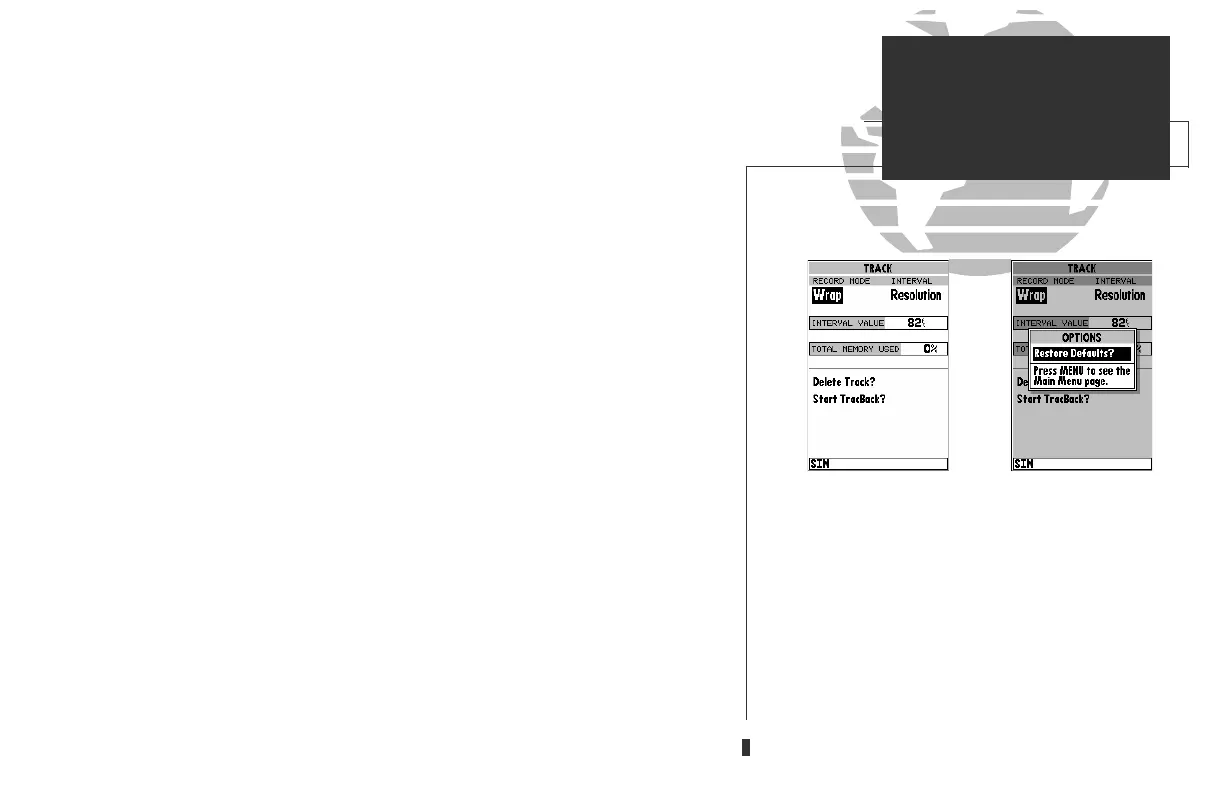
The GPSMAP’s main menu page’s track submenu lets you specify whether or
not to record a track plot (an electronic recording of your path) and define how it is
recorded. It also provides an indicator of the track memory used and selects func-
tions to clear the track memory and start a TracBack route. The following functions
are available:
• Record Mode— lets you select one of three track recording options:
• Off– No track log will be recorded. Note that selecting the ‘Off’ setting
will prevent you from using the TracBack feature.
• Fill– a track log will be recorded until the track memory is full.
• Wrap– A track log will be continuously recorded, wrapping through the
available memory (replacing the oldest track data with new data).
• Interval— defines the frequency with which the track plot is recorded. Three inter-
val settings are available:
• Time– records track plot based on a user-defined time interval.
• Resolution– records track plot based upon a user-defined variance from
your course over ground. The resolution option is the default setting and
is recommended for the most efficient use of memory and TracBack per-
formance. The distance value (entered in the interval field) is the maxi-
mum error allowed from the true course before recording a track point.
• Distance– records track based on a user-defined distance between points.
• Interval Value— defines the distance or time used to record the track log.
• Delete Track?— allows you to clear the track log currently stored in memory.
• Start TracBack?— converts the current track log into an inverted route and begins
route navigation along the track log.
To reset all track options to the default settings:
1. Press
O
, followed by
T
.
55
A. The ‘Wrap’ option will continuously record a track
log, and replace the oldest track log point with new
data. The ‘Fill’ option will record a track log until
the memory is full.
B. The track submenu’s default settings may be quick-
ly restored from the track options page.
SECTION
9
SETUP MENUS
Track Log Setup
gps 130 7/23/98 9:22 AM Page 55












 To Next Page