GPSMAP 188/188C Sounder Owner’s Manual 21
BASIC OPERATION > ADDITIONAL INFORMATION
To Find an item using the Find options:
1 From any page, press FIND.
2. Using the ROCKER, highlight a category from the list, and
press ENTER.
3 From the search results list, press MENU, highlight an
option, and press ENTER.
Find Menu Options
Additional Information
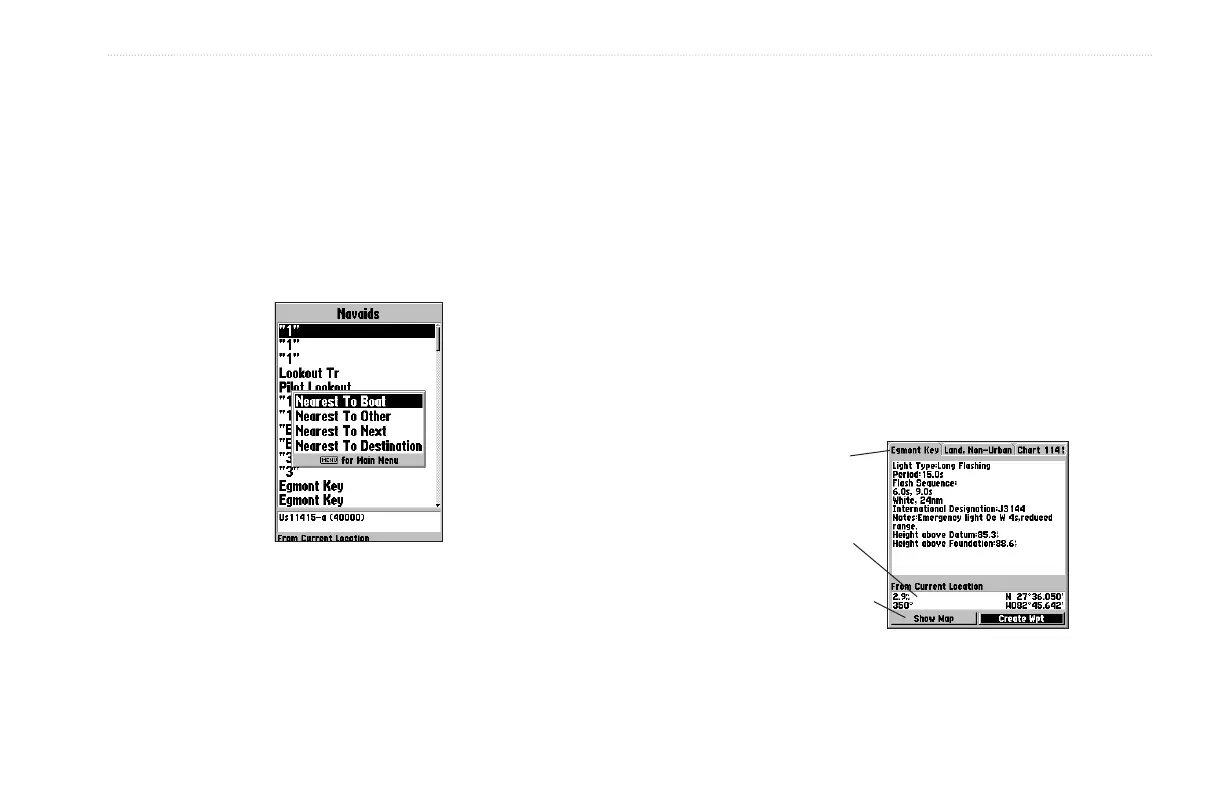
Items located using the Find feature have information about the
point available. The information varies depending on the type of
data loaded on the optional data card. Sub tabs along the top of the
detail window contain the information available for the item. Any
additional options are displayed along the bottom.
To view additional information for a Find item:
1. From the Find list, highlight an item, and press ENTER.
2. Use the ROCKER to highlight the individual tabs and
display the information. To scroll the text, highlight the field,
and press ENTER. Use the ROCKER to scroll.
Or
Press MENU, and choose a scroll option.
Information Window
Additional
Information Tabs
Additional Options
Distance,
Bearing,and
Coordinates of item


 To Next Page