54 GPSMAP 188/188C Sounder Owner’s Manual
MAIN MENU > ROUTES TAB
Route Review Page
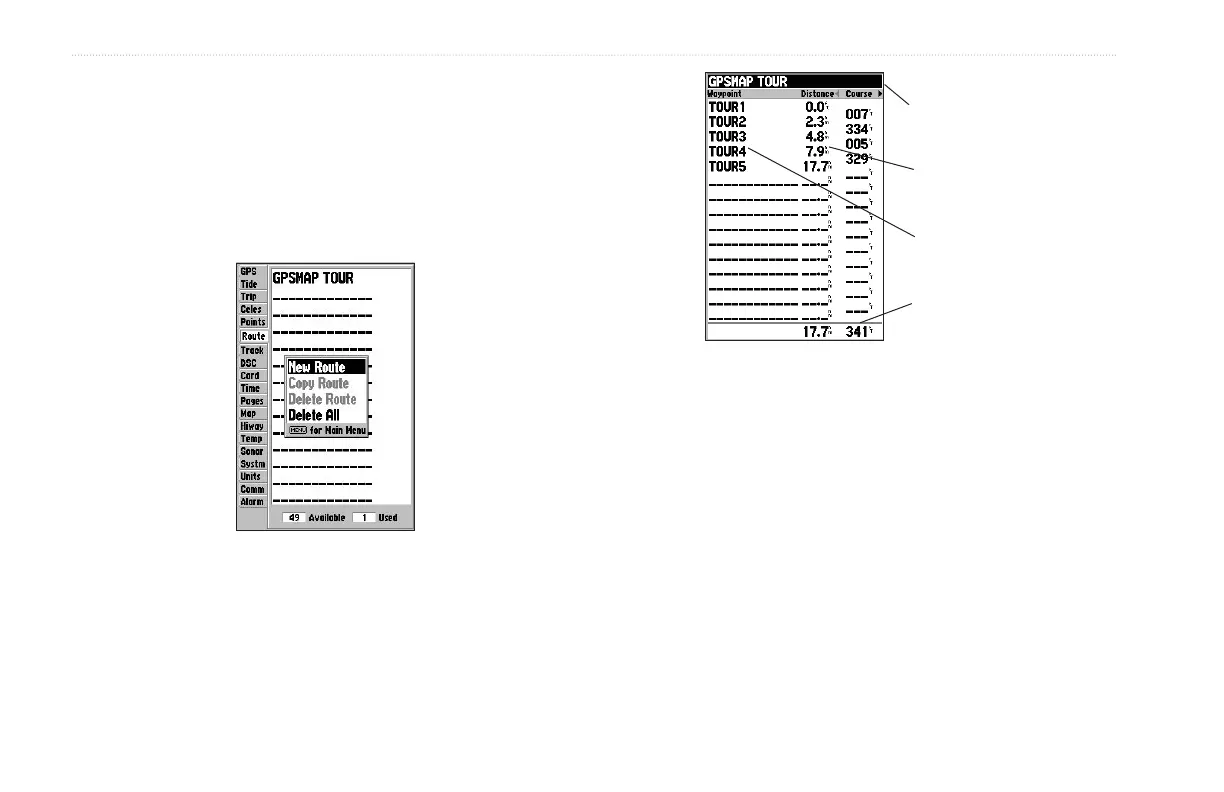
After you create a route, use the Route Review Page to review and
modify the route displayed.
To show the Route Review Page:
1. Press MENU twice, and highlight the Route tab.
2. Highlight the route you want to review, and press ENTER.
Route List Menu
Route Points
Data Fields
Route Name
Data Totals
The Route Review Page also allows you to enter your own 15-
character name for any listed route. By default, the name includes
the first and last waypoints in the route.
To enter a custom route name:
1. From the Route Review Page, highlight the name field, and
press ENTER to begin editing.
2. Use the ROCKER to enter a name, and press ENTER.


 To Next Page