58 GPSMAP 188/188C Sounder Owner’s Manual
MAIN MENU > ROUTES TAB
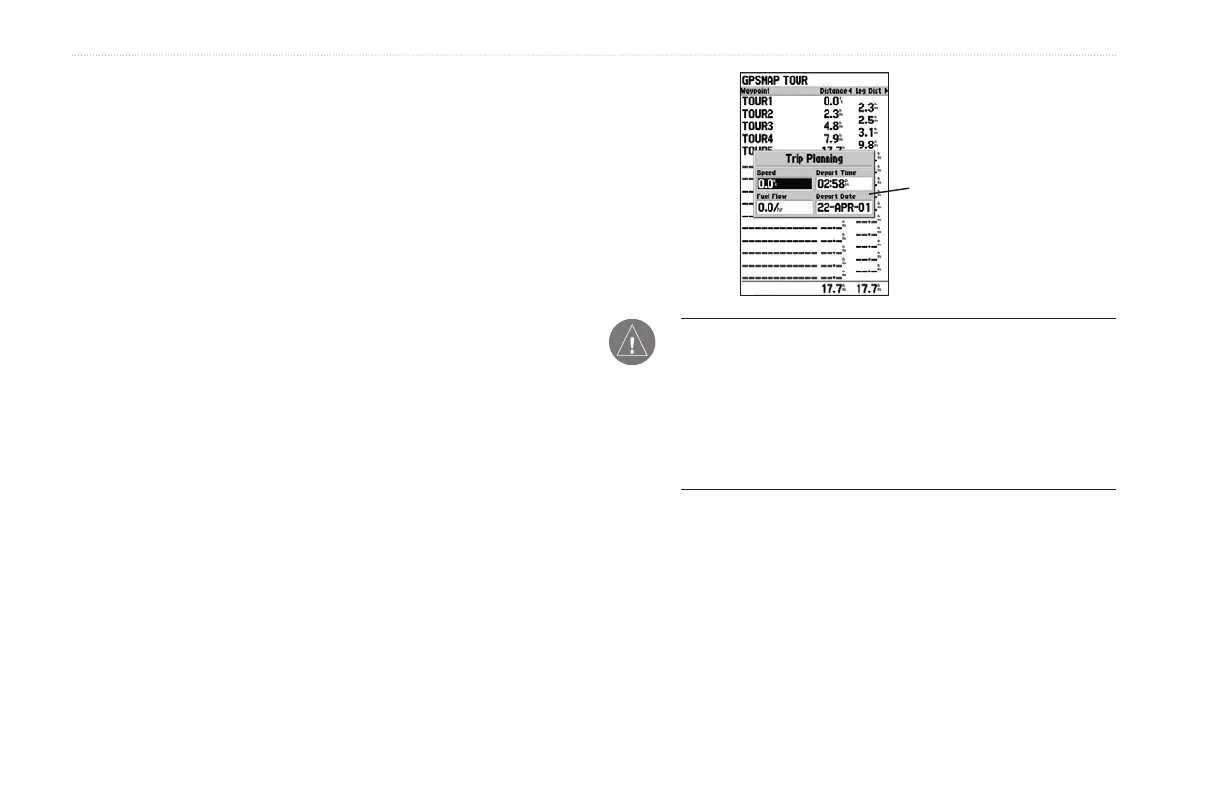
Trip Planning—the Route Review and Active Route Pages also
display trip-planning information for each leg or the entire route.
Available information includes Course, ETA, Fuel (to point),
Leg Distance, Leg Fuel, Leg Time, Sunrise and Sunset (at point
location), and Time To (point).
To use the Trip Planning feature:
1. To select a planning field, highlight a route from the Route
List, and press ENTER to display the Route Review Page.
One of nine available planning fields appears to the right of
each route waypoint and its distance.
2. Press left or right on the ROCKER to select an item.
3. To enter planning information, from the Route Review
Page only, press MENU, and select Trip Planning from
the options list. Enter the figures for Speed, Fuel Flow,
Departure Time, and Departure Date. Press QUIT to return
to the Route Plan Page.
Trip
Planning
Data Fields
NOTE: Fuel flow rates on your unit are measured in units
per hour. System setting changes for units of measure (statute,
nautical or metric) do not affect the fuel flow measure. You
should enter fuel flow rates based on available information
for your vehicle’s (operator’s manual, or performance
specifications.) Make note of the units of measure
(gallons or liters.)
Delete Route—deletes a route from the Route List. Waypoints and
map items are not deleted from the unit’s memory.
To delete a route:
1. From the Route Review Page, press MENU.
2. Highlight Delete Route and press ENTER.
3. Press ENTER again to confirm the deletion.


 To Next Page