2
Select a training key.
3
Observe the dog for a reaction, such
as a head shake, neck movement, or
just a change in expression.
Sometimes dogs will vocalize due to
the surprise of the electrical
stimulation. If the dog vocalizes more
than once, the intensity level is too
high for beginning training.
4
If there is no reaction, increase the
intensity level by one level until the
dog has a slight but recognizable
reaction to the stimulation.
The intensity level that causes a slight but
recognizable reaction is your dog's
baseline level for beginning collar training.
You do not need to, and should not, apply
this intensity selection test again.
After you begin training, the dog’s
performance guides your intensity
selection. As the dog advances in training,
you may need to change the level
depending upon the training situation.
Changing th Intensity Level
You can select a different intensity level
or each dog collar device.
1
Select a dog collar device
(page 6).
2
A just the dial to increase or decrease
the intensity level.
Training Key Functions
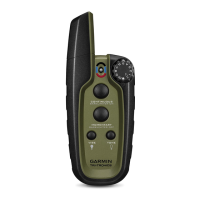
The Pro
550 Plus system provide s veral training modes, which assign different
combinations of momentary s imulation, continuous stimulation, and tone to the training
keys. The three ve tical le ers n xt to the mode toggle switch correspond to the training
key functions, fr m top to bo tom.
Key Momenta y (M) Accessory (A) Continuous (C)
Tone key Ton Tone Tone
Top training key Momentary stimulation or
vibration (medium)
Light on Continuous stimulation or
vibration (medium)
Dog Training 9



 To Next Page