EasyManua.ls Logo

Garmin SL40 - Page 16

Garmin SL40
38 pages
Print Icon
To Next Page IconTo Next Page
To Previous Page IconTo Previous Page
Loading...
Installation
Power
*
Ground
Reserved
Speaker
Headphone
Audio
Ground
sL40
Mic I
COM
Mic2
Mic Ground
TxKey
Intercom
RxD
Serial Ground
I
9
2
6
t4
13
8
l5
7
4
t2
3
l0
ll
5
amF
fuse
or-hreaker
.{\'-'
\_/
T
Avionics
Power
Headphone Jack
Headphone Jack
L-l
Mic Jack
f
-ll
Mic Jack
-_r-'.
ooor
I
!';.-fl
+
Yoke
mount
transmit buttons
.,
.-..l
otr-
J
Intercom
Selector
Switch
(optional)
Notes:
RS-232 Serial
lnterface
Coax
ComAntenna
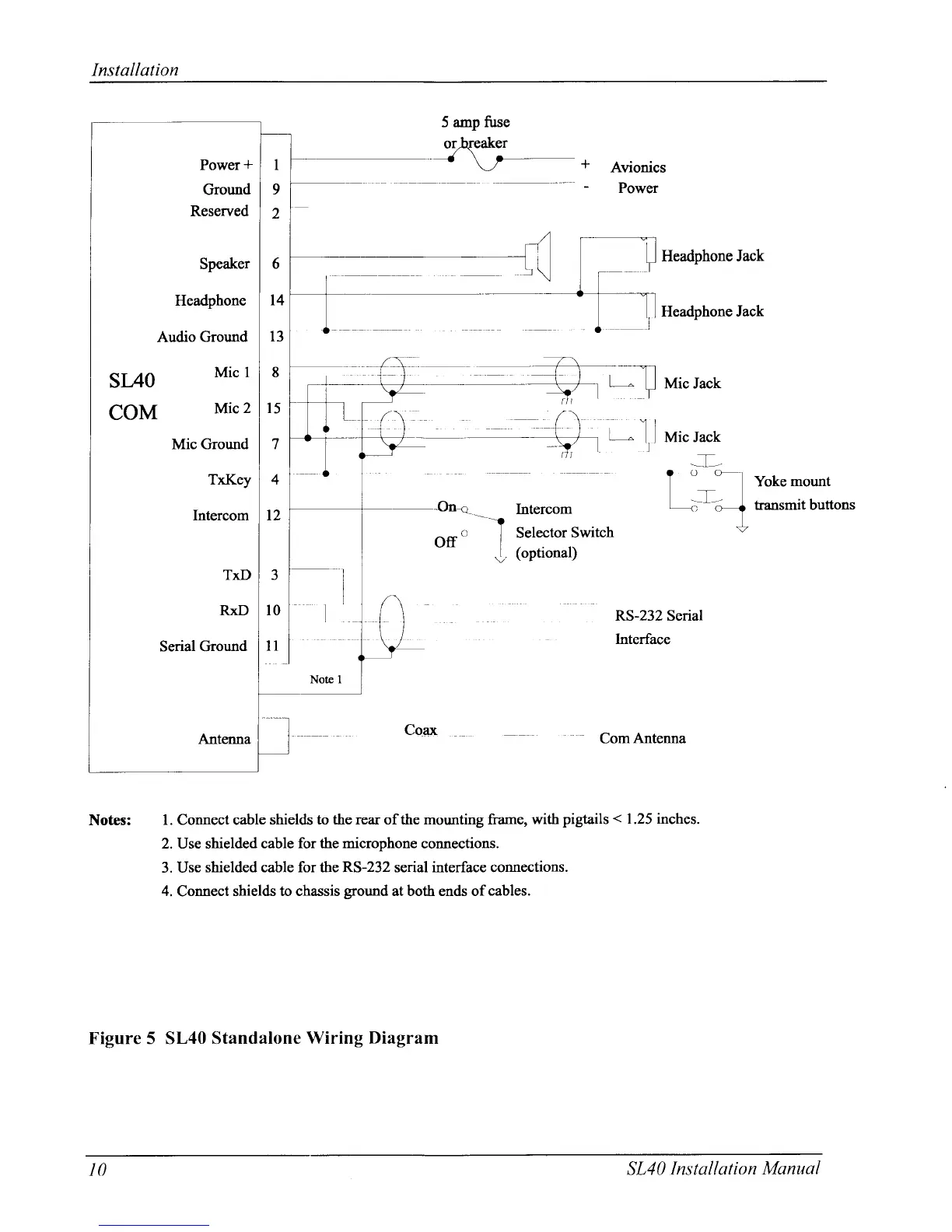
l. Connect cable
shields to the rear of the
mounting
frarne,
with
pigtails
<
1.25 inches.
2. Use shielded cable
for the microphone
connections.
3. Use
shielded cable for the RS-232 serial interface connections.
4.
Connect
shields to chassis
ground
at both ends ofcables.
Figure 5 SL40 Standalone
Wiring Diagram
IO
SL40 lnstall ation
Manuol

Other manuals for Garmin SL40

Related product manuals