EasyManua.ls Logo

Garmin SL40 - Page 17

Garmin SL40
38 pages
Print Icon
To Next Page IconTo Next Page
To Previous Page IconTo Previous Page
Loading...
Installation
[--;
Ground
Reserved
Speaker
Headphone
Audio
Ground
sL40
Mic I
COM
Mic 2
Mic
Ground
TxKey
Intercom
TxD
RxD
Serial Ground
13
8
l5
4
12
J
l0
l1
ComAudio In
Audio
Ground
Com
Mic
Audio
Mic Ground
Com Mic Key
Cbssis Ground
I
.
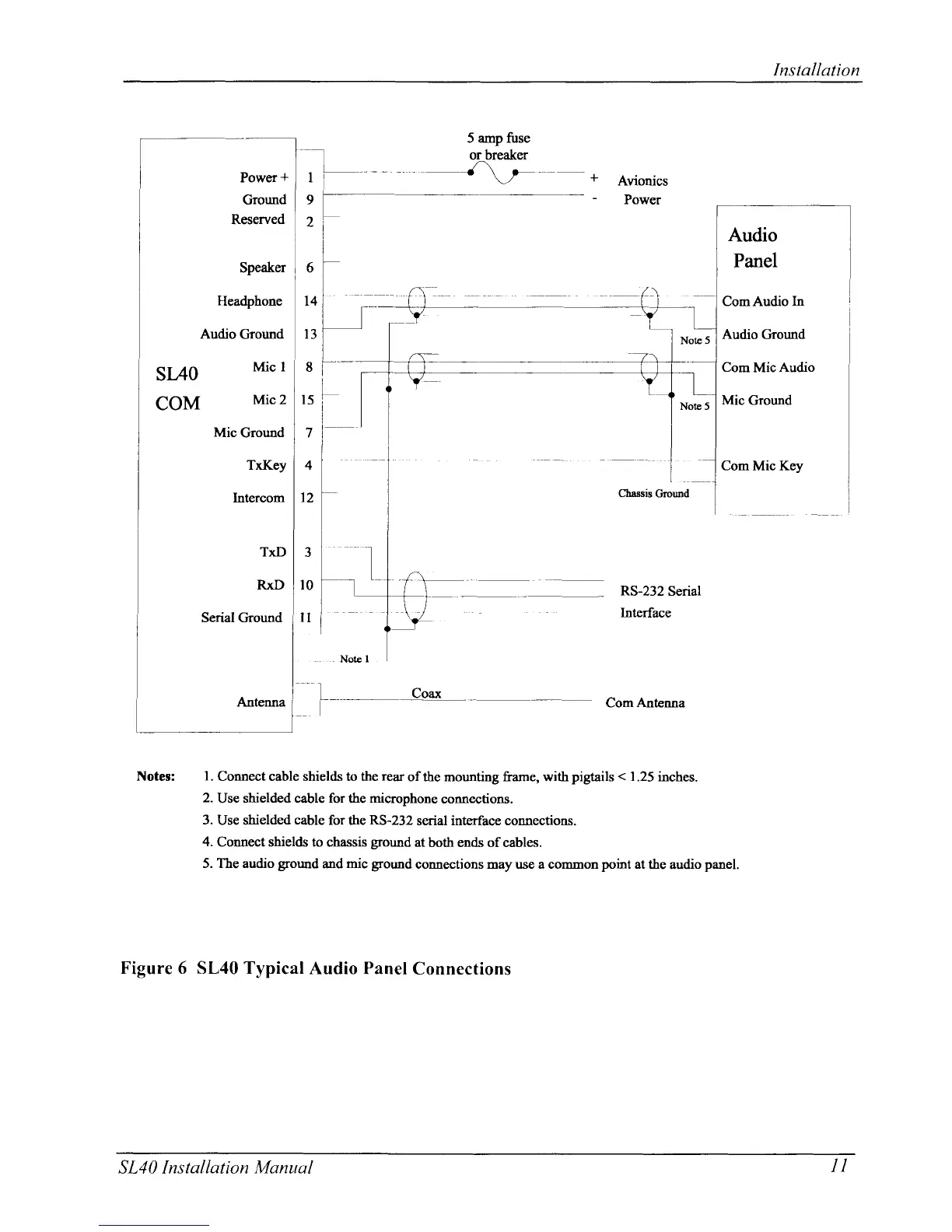
Connect cable shields to the
rear
of the mounting frame, witb
pigtails
<
1.25
inches.
2.
Use
shielded cable for
the
microphone
connections.
3.
Use shielded
cable
for the
RS-232
serial interface connections.
4.
Connect
shields to
chassis
ground
at
both ends ofcables.
5. The audio
ground
and
mic
ground
connections may use a common
point
at
the audio
panel.
Figure 6 SL40 Typical
Audio Panel
Connections
SL40 Installation
Manual
1I

Other manuals for Garmin SL40

Related product manuals