EasyManua.ls Logo

GARO GNM3D-RS485 - User Manual

GARO GNM3D-RS485
10 pages
Print Icon
To Next Page IconTo Next Page
Loading...
GARO AB
GARO GNM3D-RS485 and
Box 203, SE–335 25 Gnosjö
info@garo.se
garo.se
Manual 380251
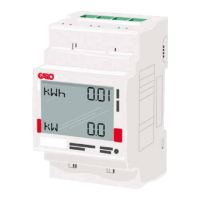
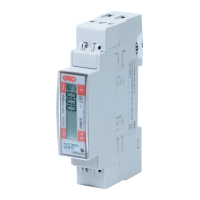
GARO GNM3D-LP RS485 as DLM meter
DLM = Dynamic Loadbalancing Meter
Installation and Programming Manual (EN)
Question and Answer IconNeed help?

Do you have a question about the GARO GNM3D-RS485 and is the answer not in the manual?

Summary

Product Information and Safety

Product Information

Details on the validity of the guide for GARO GNM3D-RS485 and GNM3D-LP RS485 meters.

Safety Warnings

Important safety precautions, including turning off power and using authorized electricians.

Modbus Connection Setup

Modbus Connection Procedure

Instructions for installing the DLM meter and connecting it using shielded twisted pair cable.

Electrical Connection and Wiring

Power Cable Connections

Details on connecting power cables, including cable sections and torque specifications for the meter.

DLM Meter Configuration

Navigating DLM Meter Settings

Instructions on using touch areas to navigate DLM meter settings and bypass passwords.

Modbus Address Configuration

Information on recommended Modbus addresses (002, 100, 101) for various wallbox setups.

Setting the Modbus Address

Step-by-step guide on how to set or modify the Modbus address on the DLM meter.

Configuring Baudrate

Instructions for setting and verifying the Baudrate for the DLM meter's communication.

Configuring Parity and Stopbit

Guide on setting and verifying the Parity and Stopbit for the DLM meter's communication.

Confirming Meter Settings

Finalizing DLM meter settings by confirming the configuration and verifying communication.

Overview

The GARO GNM3D-RS485 and GARO GNM3D-LP RS485 are advanced Dynamic Loadbalancing Meters (DLM) designed for monitoring electrical power consumption in various installations, particularly in conjunction with electric vehicle (EV) charging systems. These meters play a crucial role in managing the electrical load to ensure efficient and safe operation, preventing overloads, and optimizing energy distribution.

Function Description

At its core, the GARO DLM meter is an energy measurement device that continuously monitors the electrical power flowing through a mains cabinet. It provides real-time readings of kilowatt-hours (kWh) and kilowatts (kW), offering a clear overview of energy consumption. The primary function of this meter, when integrated into an EV charging infrastructure, is dynamic load balancing. This means it intelligently adjusts the available charging current to EV chargers based on the overall electrical load of the property. If the total power consumption of the building approaches its maximum capacity, the DLM meter can signal the EV chargers to reduce their charging current, thereby preventing the main fuse from tripping. Conversely, if there is ample available power, the chargers can operate at their full capacity, ensuring faster charging times.

The meter communicates its readings and status via a Modbus RS485 connection. This industrial standard communication protocol allows the DLM meter to interface seamlessly with other control systems, such as EV wallboxes or building management systems. This Modbus connection is essential for the dynamic load balancing functionality, as it enables the wallbox to receive real-time load data and make informed decisions about charging current adjustments. The meter is designed to be installed in the mains cabinet, monitoring the incoming power supply to the property. This strategic placement allows it to accurately assess the total electrical demand and manage the distribution of power effectively.

Usage Features

The GARO DLM meter is designed for straightforward installation and programming, making it accessible for authorized electricians. The device features a clear digital display that shows current kWh and kW readings, providing immediate feedback on energy usage. The user interface is touch-sensitive, allowing for easy navigation through settings and parameters.

Key usage features include:

  • Modbus Address Configuration: The meter allows for the setting of a unique Modbus address, which is critical for communication within a network of devices. For standalone wallboxes, a recommended address (e.g., 002) is provided, which enables the wallbox to pause charging if the available current drops below a safe threshold (e.g., 6A), ensuring compliance with EV charging standards. For installations with multiple wallboxes or more complex grid setups, different addresses (e.g., 100 or 101) can be assigned, often requiring an installed Wi-Fi module in the master wallbox for advanced management. These addresses also dictate whether the wallbox will pause charging at low current levels, offering flexibility based on the system's design.
  • Baud Rate Setting: The communication speed (baud rate) for the Modbus connection can be set and verified directly on the meter. The default setting (e.g., 9.6) is typically suitable, but adjustments can be made if required by the specific Modbus network configuration.
  • Parity and Stop Bit Configuration: Similar to the baud rate, the parity and stop bit settings, which are crucial for reliable Modbus communication, can be configured. The default "no" parity and "1" stop bit are common settings, ensuring compatibility with most Modbus systems.
  • Touch Interface for Settings: All programming and verification of settings are performed using the meter's touch areas. This intuitive interface guides the user through steps such as entering a password (by long-pressing specific touch areas), navigating to different parameters (like Modbus address, baud rate, and parity), and confirming selections. The display provides visual cues, such as blinking digits, to indicate active input fields.
  • Dynamic Load Balancing Integration: When correctly configured and connected to a compatible EV wallbox, the DLM meter enables dynamic load balancing. This feature ensures that the total power consumption of the property does not exceed the main fuse capacity, preventing power outages and optimizing the use of available electrical power for EV charging. The meter's real-time data allows the wallbox to intelligently manage charging currents, prioritizing household consumption while maximizing EV charging speed within safe limits.
  • Communication Status Indication: Once the settings are confirmed and the meter is communicating with the wallbox, a blinking square on the display indicates active and successful communication, providing a visual confirmation of proper operation.

Maintenance Features

The GARO DLM meter is designed for robust and reliable operation, requiring minimal ongoing maintenance once correctly installed and configured.

Key maintenance-related aspects include:

  • Durable Construction: The meter is built to withstand typical operating environments within a mains cabinet, ensuring long-term performance.
  • Clear Error Indications: While not explicitly detailed as "maintenance features," the clear display and structured programming process help in identifying and correcting configuration errors during installation, which is a crucial aspect of preventing future operational issues.
  • Standardized Communication: The use of the Modbus RS485 protocol ensures compatibility with a wide range of diagnostic tools and systems, should troubleshooting be required. This standardization simplifies integration and potential fault finding.
  • Shielded Twisted Pair Cable Requirement: The manual specifies the use of shielded twisted pair cables (e.g., CAT5 FTP, CAT6 FTP) for the Modbus connection. This requirement is a proactive measure to ensure signal integrity and reduce electromagnetic interference, contributing to the long-term reliability of the communication link and minimizing the need for maintenance related to signal quality.
  • Professional Installation: The emphasis on installation by authorized electricians ensures that the device is set up correctly from the start, adhering to electrical safety standards and manufacturer guidelines. This significantly reduces the likelihood of issues arising from improper installation, thereby minimizing future maintenance needs.
  • Firmware Updates (Implied): While not explicitly mentioned in the provided excerpts, devices of this nature often support firmware updates to introduce new features, improve performance, or address potential bugs. This capability, if present, would be a key maintenance feature for ensuring the meter remains up-to-date and functional over its lifespan.

GARO GNM3D-RS485 Specifications

General IconGeneral
CommunicationRS485
ModelGNM3D-RS485
ManufacturerGARO
Accuracy ClassClass 1
DisplayLCD
Operating Temperature-25°C to +55°C
Storage Temperature-40°C to +70°C
FunctionEnergy Meter

Related product manuals