7
Adding RFID Cards
Connect USB /usb micro to RHS slave controller config port & to laptop. Enter
192.168.123.123/operator
• SelectMASTER
• Select OPERATOR
• Enter user: operator
• Enter password: yellow_zone (for version4.2)
Cherry_zone (for version4.3)
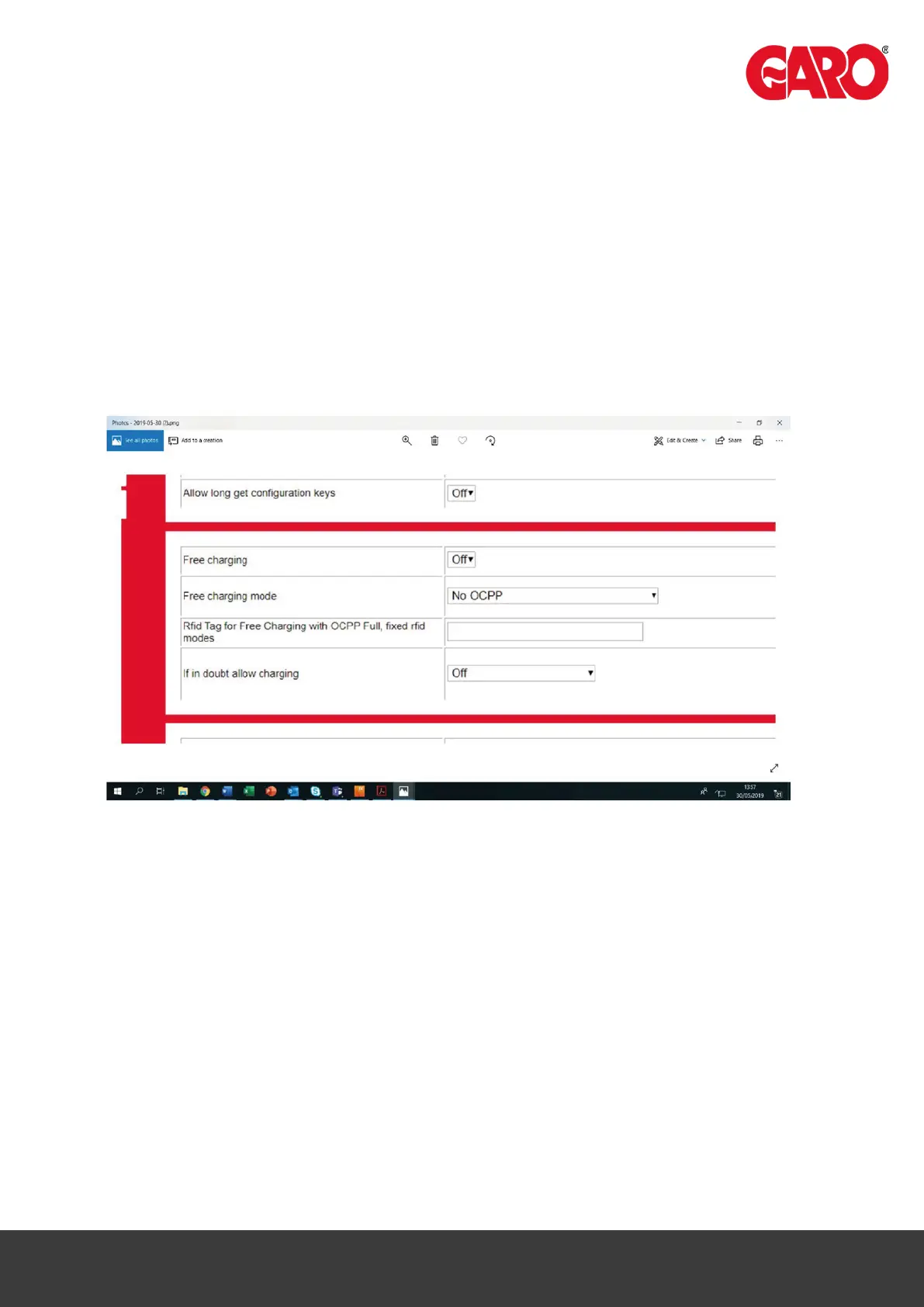
• Scroll down to Free Charging (approx. half‐way)
• Select “if in doubt allow charging”
- select ON
- Select SAVE on Laptop
- Plug in CAR or TEST Equipment to master socket (LHS) Activate CP Button
- Place new RFID card to RFID reader
- When charging “STARTS” select save on laptop
- Switch OFF charging
Start Charging again and place new card to RFID reader
- Select SAVE on laptop
- Continue as required.
- Change “if in doubt allow charging” back to OFF
- Select SAVE
EXIT


 To Next Page