20
Gates Corporation
TROUBLE SHOOTING
Troubleshooting Guide
All equipment is tested for proper performance
before it is shipped from the factory. However, if you
experience any difficulities, check the list below to
help restore equipment to proper operating standards.
WWAARRNNIINNGG
::
• Avoid electrical shock or hydraulic related injury!
• Disconnect crimper from power source before
removing control panel, loosening hydraulic tubing
or removing any components.
!
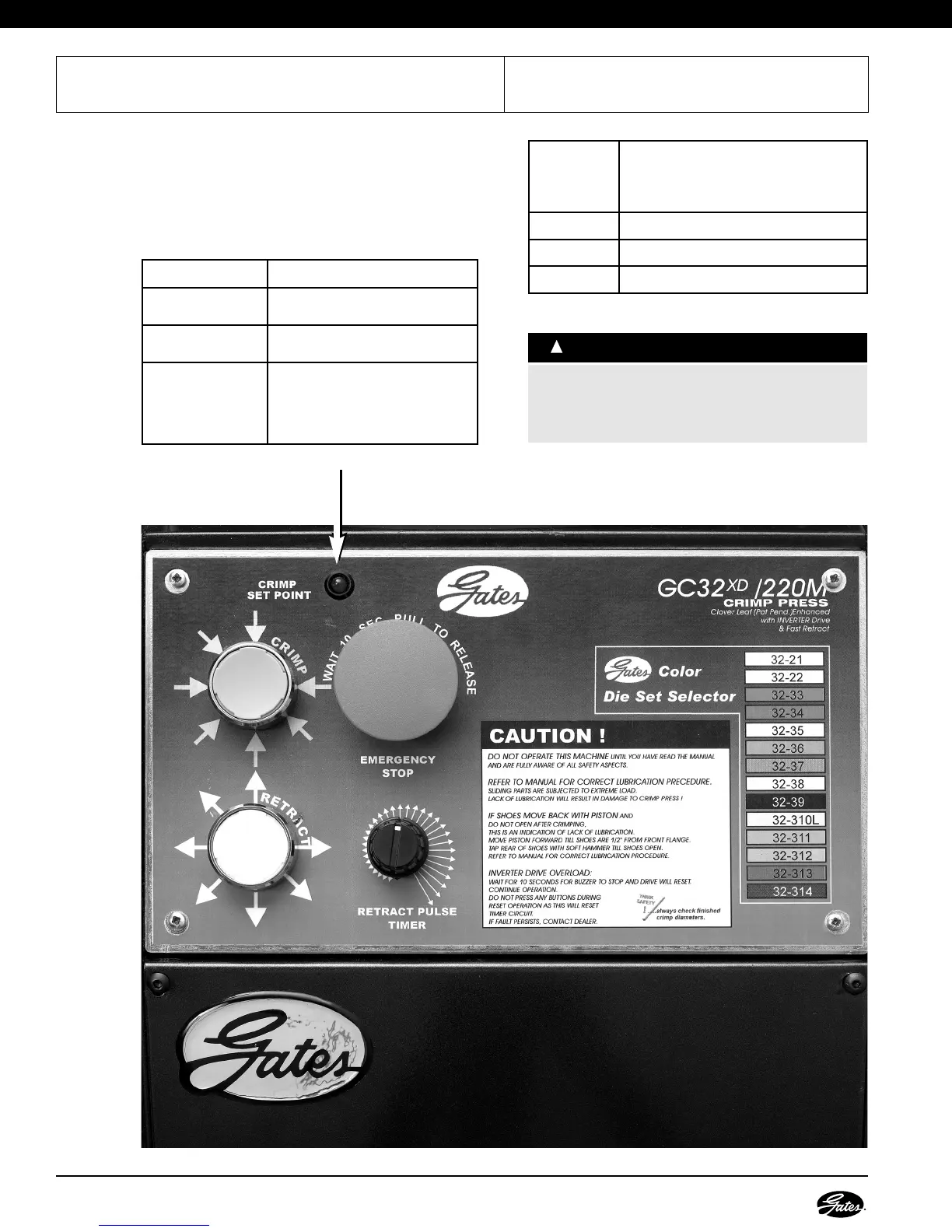
Red LED
on Control
Panel
Indicates
Flashing Crimper is ready
Solid Crimper is in the crimping process
Rapid Flashing Problem with electronics in control panel
PROBLEM CORRECTIONS
• Pump motor will
not start.
• Check electrical connections.
• Setting will not
change.
• Locking switch may be engaged.
Move Switch to left.
• Will not hold
crimp calibration.
• Flange head bolts are loose.
Check torque of flange bolts to
330 Nm or 2900 in lbs every 6
months of operation.


 To Next Page