CHAPTER4: Upgrading Your Computer
50
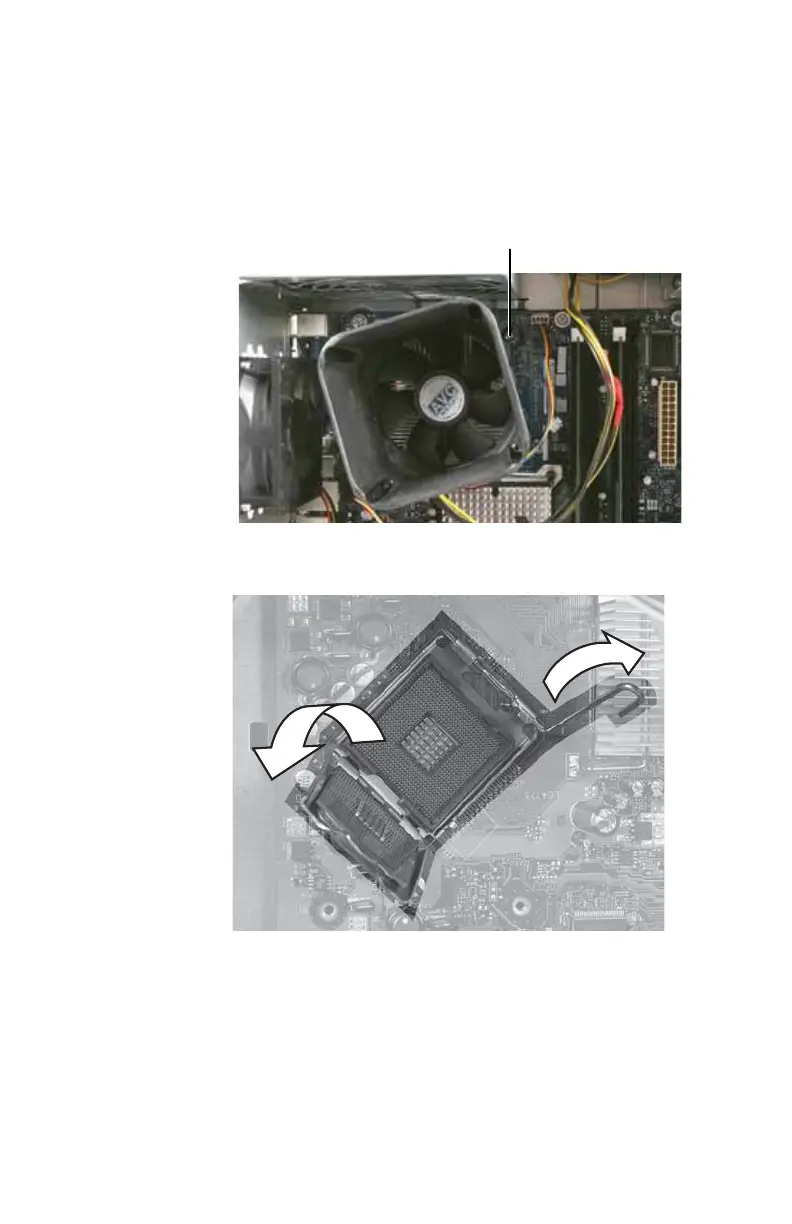
4 Loosen the four captive screws that secure the heat sink
and fan assembly to the system board, then remove the
assembly and place it on a stable surface with the flat
surface of the heat sink (the side with the thermal
grease) up. (The four screws cannot be completely
removed.)
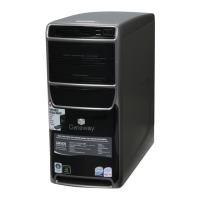
5 Push the processor release lever down, lift it completely
up, then lift the processor retention bracket.
6 Remove the processor from the system board.
7 Install the new processor onto the system board. Make
sure that Pin 1 on the processor (indicated by the
silk-screened arrow on the corner of the processor)
aligns with Pin 1 on the processor socket (indicated by
the absence of a pin hole in the processor socket), then
return the retention bracket and lever to their locked
position.
Screws (only one shown)
8512418.book Page 50 Friday, May 11, 2007 11:44 AM



 To Next Page