EasyManua.ls Logo

GBC GBC4250 - Method Using Film Threading Card

GBC GBC4250
25 pages
Print Icon
To Next Page IconTo Next Page
To Previous Page IconTo Previous Page
Loading...
10
The
“Word
Finishing"
People
Adhesive
will
deposit
on
the
heat
rollers
if
either
only
one
roll
of
film
is
used,
different
widths
of
film
are
used
simultaneously,
or
either
roll
is
loaded
with
the
adhesive
side
contacting
the
heat
rollers.
Refer
to
the
section
entitled
CARING
FOR
THE
GBC425Q
LAMINATOR
for
instructions
regarding
removal
of
accumulated
adhesive.
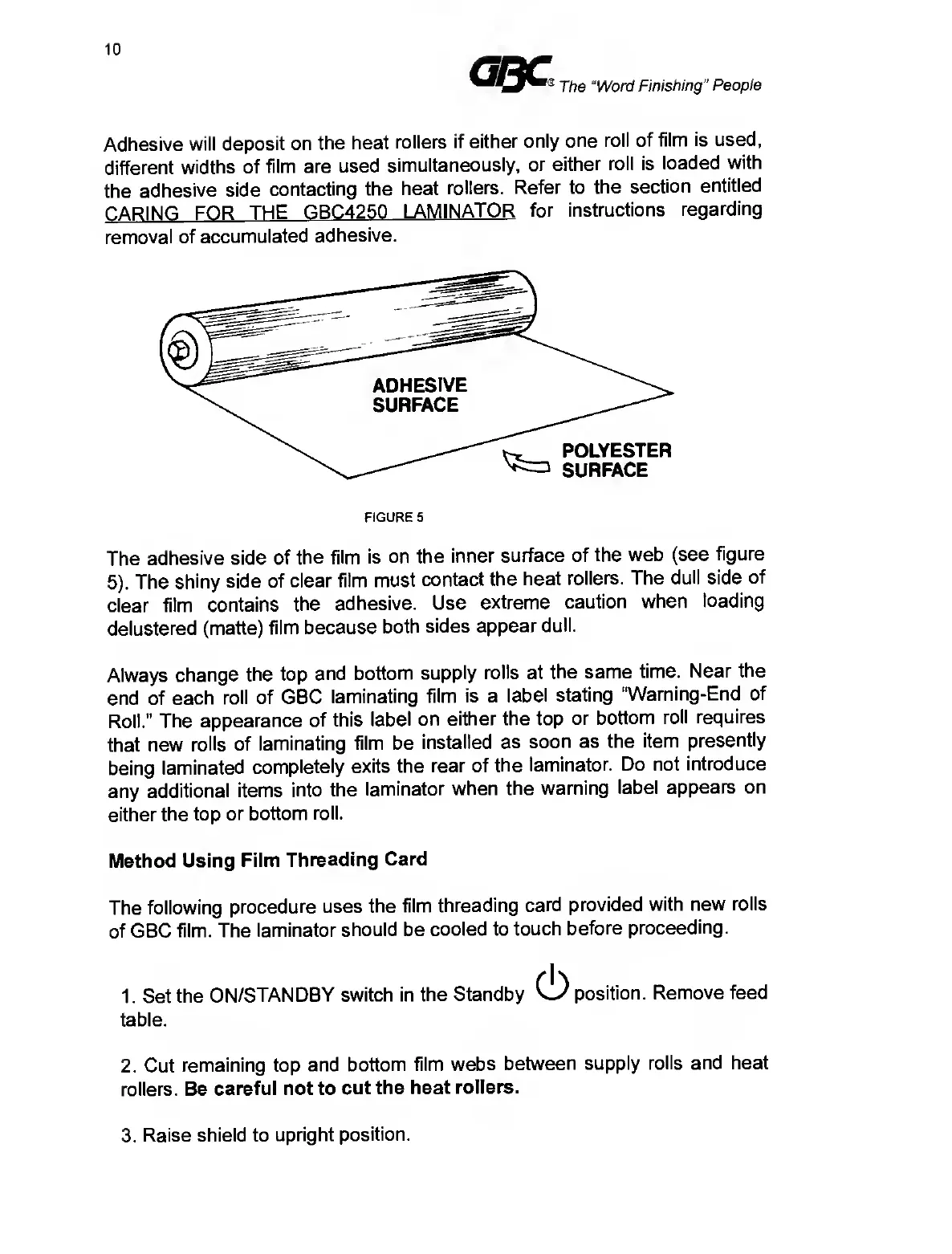
FIGURE
5
The
adhesive
side
of
the
film
is
on
the
inner
surface
of
the
web
(see
figure
5).
The
shiny
side
of
clear
film
must
contact
the
heat
rollers.
The
dull
side
of
clear
film
contains
the
adhesive.
Use
extreme
caution
when
loading
delustered
(matte)
film
because
both
sides
appear
dull.
Always
change
the
top
and
bottom
supply
rolls
at
the
same
time.
Near
the
end
of
each
roll
of
GBC
laminating
film
is
a
label
stating
"Warning-End
of
Roll.”
The
appearance
of
this
label
on
either
the
top
or
bottom
roll
requires
that
new
rolls
of
laminating
film
be
installed
as
soon
as
the
item
presently
being
laminated
completely
exits
the
rear
of
the
laminator.
Do
not
introduce
any
additional
items
into
the
laminator
when
the
warning
label
appears
on
either
the
top
or
bottom
roll.
Method
Using
Film
Threading
Card
The
following
procedure
uses
the
film
threading
card
provided
with
new
rolls
of
GBC
film.
The
laminator
should
be
cooled
to
touch
before
proceeding.
1.
Set
the
ON/STANDBY
switch
in
the
Standby
Ci)
position.
Remove
feed
table.
2.
Cut
remaining
top
and
bottom
film
webs
between
supply
rolls
and
heat
rollers.
Be
careful
not
to
cut
the
heat
rollers.
3.
R
aise
shield
to
upright
position.

Related product manuals