GCAN-PLC user manual
3.4 PLC program running switch and reset button
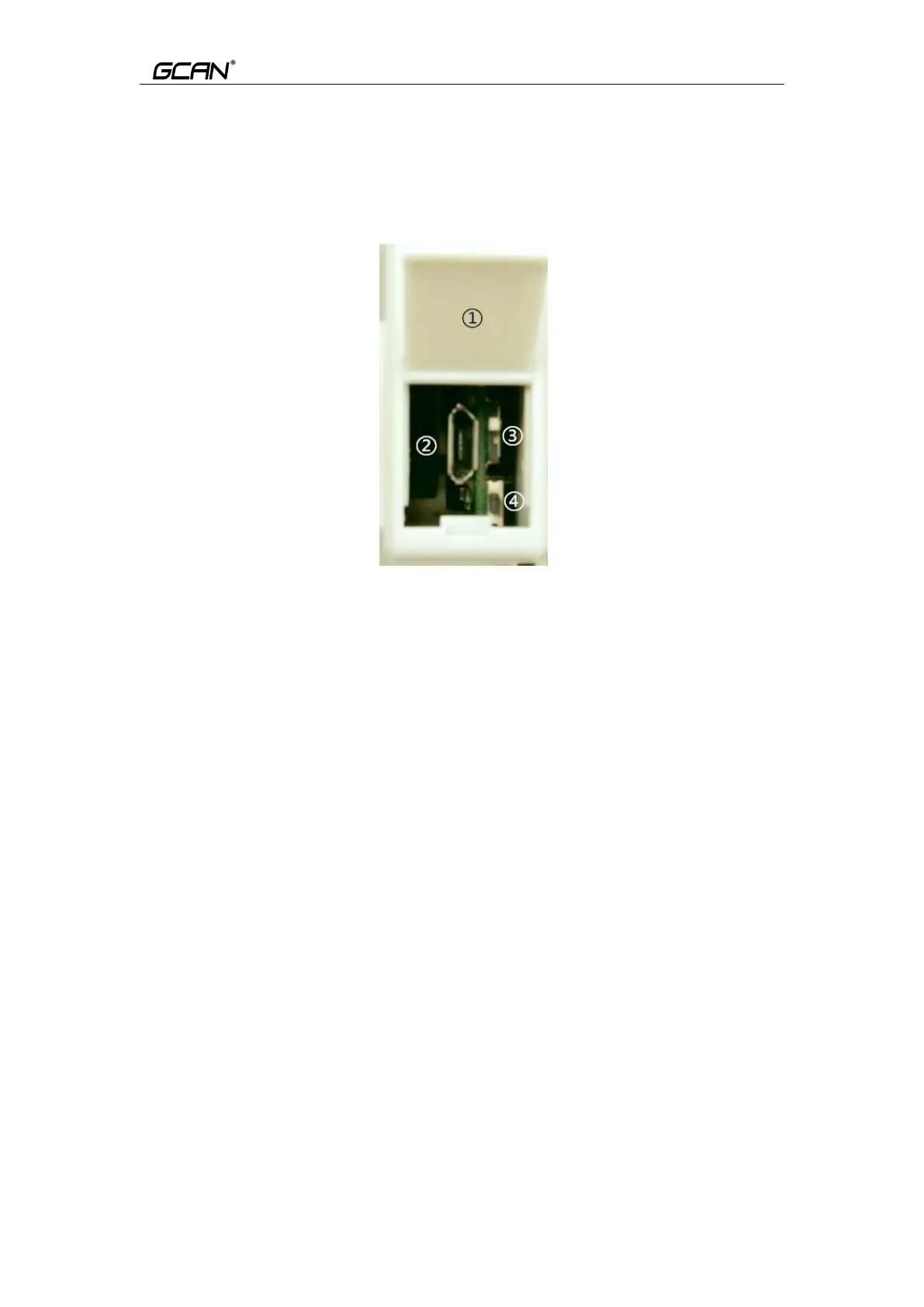
GCAN-PLC provides a core refresh USB interface, a running switch and a
reset button. The physical drawing after opening the cover is shown in Figure
3.3.
Figure 3.3 Physical Diagram of Kernel Refresh Interface
In Figure 3.3,
①
is the USB interface cover. The default is closed. You can gently pry open
the cover plate by using the attached screwdriver to close the gap under the
cover plate.
②
Micro-USB interface, which is the refresh interface of the kernel. GCAN-
PLC programmable logic controller uses Micro-USB data line as download line
of PLC core files. You can connect GCAN-PLC to USB-A interface of PC
through Micro- USB cable
③
To run/stop the dial switch, and
④ to reset the button.
Note: When the dial number of the run/stop switch is above (on the side of the
back reset button), it means that the PLC is in operation; when the dial number
of the run/stop button is below (on the side of the reset button), it means that
the PLC is in stop state. The reset button is used to upgrade the GCAN-PLC
core. Please use the button under the guidance of our technical staff.



 To Next Page