EasyManua.ls Logo

GE 600 - 1500 VA - User Manual

GE 600 - 1500 VA
14 pages
Print Icon
To Next Page IconTo Next Page
Loading...
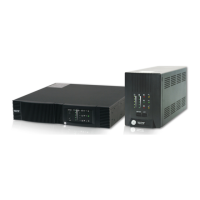
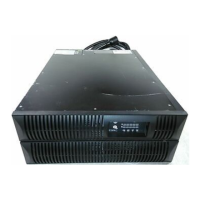
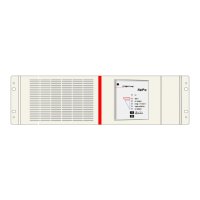
NetPro 19"
Uninterruptible Power Supply
600 - 1500 VA
Manufactured by:
GE Digital Energy
General Electric Company Telephone +41 (0)91 / 850 51 51
CH – 6595 Riazzino (Locarno) Fax +41 (0)91 / 850 51 44
Switzerland Website www.gedigitalenergy.com
GE Digital Energy
Technology for the Digital World.
ver 3.0 - GB
NetPro 19" UPS
g

Questions and Answers

  • C
    Christine SantiagoJul 30, 2025
    How to reset the thermal circuit breaker on a GE UPS?
    • D
      Dustin RiveraJul 30, 2025
      If the Thermal Circuit Breaker (TCB) tripped on your GE UPS, it might be due to an overload. Try reducing the load and then reset the TCB.
  • J
    James JenningsAug 5, 2025
    Why does my GE 600 - 1500 VA automatically switch off?
    • A
      Amanda WintersAug 5, 2025
      Your GE UPS might automatically switch off due to several reasons: * Overtemperature: Allow the UPS to cool down. * Mains failure: The battery may have discharged; wait until mains returns. * Programmed shutdown in progress. * Shutdown command: The UPS may have received a shutdown command from the computer during a mains failure. * Low Load: The load is less than 5% of the maximum load without mains power. Wait until mains returns.
  • J
    Justin RangelAug 10, 2025
    What to do if LED 'on bypass' blinks on GE 600 - 1500 VA UPS?
    • M
      Mary CunninghamAug 10, 2025
      If the 'on bypass' LED is blinking on your GE UPS, it likely indicates an overload or overtemperature. Reduce the load or allow the UPS to cool down.
  • D
    danielle09Aug 16, 2025
    Why won't my GE 600 - 1500 VA UPS switch on?
    • T
      Tanner PetersonAug 16, 2025
      If your GE UPS won't switch on, consider these potential causes: * Check if the line cord is properly connected. * The wall socket outlet may be dead, or the mains voltage is out of limits; contact a qualified electrician. * The UPS may be overheated; allow it to cool down. * The Thermal Circuit Breaker may have tripped; refer to the instructions above.
  • R
    Ryan CummingsAug 23, 2025
    What does it mean when the 'replace battery' LED is on for my GE UPS?
    • D
      Deborah FarmerAug 23, 2025
      The 'replace battery' LED illuminating on your GE UPS (with a silent buzzer) could mean that a battery test occurred just after installation or a mains failure. Allow the UPS to recharge the batteries. It may also indicate that a battery test showed a weak battery.

Summary

Introduction to NetPro 19 UPS

Product Overview

General introduction to the NetPro 19" UPS and its purpose.

Safety Rules and Precautions

Essential safety guidelines for operating and handling the UPS.

Transport and Storage Guidelines

Proper procedures for transporting and storing the UPS unit.

NetPro 19 UPS Installation Guide

Installation Rules and Requirements

Rules and requirements to follow before installing the UPS.

Step-by-Step Installation Procedure

Detailed instructions for physically installing the NetPro 19" UPS.

Operating the NetPro 19 UPS

Starting Up the UPS

Procedures for starting the UPS with and without mains power.

Normal Operation and Load Handling

How to operate the UPS under normal conditions and monitor load.

Status and Alarm Indications

Understanding the various status lights and alarm signals from the UPS.

Setup Mode Configuration

How to enter and use the setup mode for configuration.

Battery Management Features

Details on battery testing, charging, and management.

NetPro 19 UPS Communication Options

RS232 Port for Computer Connection

Using the RS232 port for advanced UPS communication with a computer.

Optional Relay Interface Card

Details on the optional relay interface card for alarm contacts.

Optional SNMP Interface Card

Connecting the UPS to an Ethernet network via SNMP card.

NetPro 19 UPS Optional Features

Extended Runtime Battery Packs

Connecting external battery packs to extend UPS runtime.

PowerFLAG Service Box for Modem

Using the Service Box for remote diagnostics and alarms.

Maintenance of the NetPro 19 UPS

General Maintenance Recommendations

Basic maintenance for keeping the UPS in good condition.

Battery Maintenance and Replacement

Guidance on battery lifespan, testing, and replacement procedures.

Troubleshooting Common NetPro 19 UPS Issues

NetPro 19 UPS Technical Specifications

GE 600 - 1500 VA Specifications

Power Ratings IconPower Ratings
voltage amperes600 1000 1500 VA
watts with resistive load360 600 900 W
input thermal circuit breaker5 5 7 A
input fuse8 8 10 A
Input Converter IconInput Converter
ac input voltage220 - 240 V
ac input voltage range at 100% load187 - 264 V
ac input voltage range at 70% load120 - 264 V
minimum start-up ac voltage187 V
input current at nominal input voltage2.0 3.3 5.0 A
input frequency range45 - 66 Hz
Output Converter IconOutput Converter
ac output voltage230 V
ac output voltage tolerance± 2%
output frequency50 or 60 Hz
output frequency rangenominal ± 0.15%
harmonic distortion< 2%
Bypass IconBypass
ac input voltage range195 - 264 V
frequency tracking rate2 Hz/sec.
frequency tracking rangenominal ± 10%
phase difference< 7º
typical transfer time4 msec
Batteries IconBatteries
nominal voltage24 36 48 Vdc
number of 7 Ah batteries2 3 4
recharge current1.5 A
battery recharge time for 90% capacity1.5 hours
runtime at typical load 75%12 12 10 minutes
Operating Environment IconOperating Environment
ambient temperature-10 to +40ºC
audible noise at 1 meter< 45 dB(A)
max relative humidity95%
Weight and Dimensions IconWeight and Dimensions
weight without battery drawer14 kg
weight with battery drawer19 22 24 kg
dimensions133.5 x 450 x 440 mm
depth required in 19” rack420 mm

Related product manuals