EasyManua.ls Logo

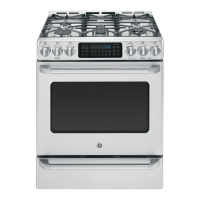
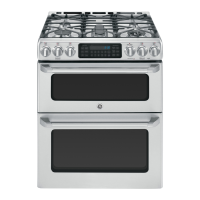
GE CCGS995 - User Manual

GE CCGS995
36 pages
Print Icon
To Next Page IconTo Next Page
Loading...
Write the model and serial
numbers here:
Model # _________________
Serial # _________________
You can find the rating label on the
front behind the range drawer.
OWNER’S MANUAL
RANGES
Self-Cleaning Double Oven Gas
29-6181 11-17 GEA
SAFETY INFORMATION ........... 3
USING THE RANGE
In Case of a Power Failure ............... 8
Surface Burners ........................ 8
Griddle ................................10
Oven Controls ..........................11
Options. . . . . . . . . . . . . . . . . . . . . . . . . . . . . . . .12
Settings ...............................12
Sabbath Mode ..........................14
Oven Racks ............................15
Aluminum Foil and Oven Liners ...........16
Cookware .............................16
Cooking Modes .........................16
Oven Air Vents .........................17
Oven Probe ............................18
Cooking Guide .........................19
CARE AND CLEANING
Range – Exterior .......................20
Range – Interior ........................21
Cooktop .............................. 22
Door .................................24
Oven Probe ...........................24
Oven Light ............................ 25
Oven Door ............................ 26
TROUBLESHOOTING TIPS ....... 27
WARRANTY .......................30
ACCESSORIES .....................31
PRODUCT REGISTRATION ....... 33
CONSUMER SUPPORT ........... 36
GE is a trademark of the General Electric Company. Manufactured under trademark license.
CCGS995,
PCGS960


Questions and Answers

  • G
    grantlambertSep 1, 2025
    Why won't the burners light on my GE Range?
    • K
      Kevin JohnsonSep 1, 2025
      If the burners on your GE Range aren't lighting, first ensure the range is fully plugged into a properly grounded electrical outlet. Check that the gas supply is connected and turned on. Also, check your home's fuse box or circuit breaker and replace the fuse or reset the breaker if needed. Make sure the burner parts are correctly replaced. Clean any clogged burner slots near the electrode, or the round lighter port on the oval burner, after removing the burners. Lightly polish any food residue on the electrode with a nail file or sandpaper until shiny.
  • D
    Douglas SilvaSep 12, 2025
    What to do if my GE CCGS995 food does not bake properly?
    • L
      Lisa AndersonSep 13, 2025
      Several factors can cause this issue. First, ensure the oven controls are properly set. Next, check that the rack position is correct and level. Also, using incorrect cookware or cookware of an improper size can impact baking. Finally, the oven temperature may need adjustment.
  • J
    josejohnsonAug 30, 2025
    Why is there excessive smoking during the GE CCGS995 Ranges clean cycle?
    • J
      Jennifer HolmesAug 30, 2025
      Excessive soil or grease is the cause. Press the Cancel/Off pad. Open the windows to rid the room of smoke. Wait until the LOCKED light goes off. Wipe up the excess soil and reset the clean cycle.
  • M
    Monique BooneSep 15, 2025
    Why is my GE CCGS995 oven light not working?
    • D
      Douglas BennettSep 15, 2025
      The light bulb is loose or defective. Tighten or replace bulb.
  • J
    Justin HansenSep 14, 2025
    What to do if my GE Ranges food does not broil properly?
    • C
      Cynthia CastilloSep 14, 2025
      Make sure you select the appropriate broil mode. Check Cooking Guide for rack location suggestions. Use a pan specifically designed for broiling. If using aluminum foil on broil pan, wrap tightly and add slits conforming to those in the pan to allow grease to drain.
  • K
    Kari LinSep 23, 2025
    Why are my GE CCGS995 Ranges burner flames very large or yellow?
    • J
      Jessica NguyenSep 23, 2025
      This is due to an improper air to gas ratio. If range is connected to Propane gas, contact the technician who installed your range or made the conversion.
  • M
    Maria MooreAug 27, 2025
    Why is my GE CCGS995 oven not clean after a clean cycle?
    • J
      John PetersAug 27, 2025
      Oven was heavily soiled. Clean up heavy spillovers before starting the clean cycle. Heavily soiled ovens may need to self-clean again or for a longer period of time.
  • A
    Adam CookAug 27, 2025
    What to do if my GE Ranges oven door will not open or LOCKED light is on when you want to cook?
    • G
      Gina LeeAug 27, 2025
      The oven door is locked because the temperature inside the oven has not dropped below the locking temperature. Press the Cancel/Off pad and allow the oven to cool below the locking temperature.
  • J
    Jesse GonzalezAug 26, 2025
    What to do if my GE Ranges oven and/or display appears not to work?
    • K
      Kristy AnthonyAug 27, 2025
      First, check if a fuse in your home may be blown or the circuit breaker tripped and replace the fuse or reset the circuit breaker if needed. Also, the oven controls may be improperly set, so please, check the settings. Verify, that the oven is not in Sabbath Mode. Finally, check if the clock is turned off.
  • K
    Kristie RubioAug 25, 2025
    What to do after a power outage and clock flashes on my GE Ranges?
    • C
      Christopher BoydAug 26, 2025
      If there was a power outage and the clock on your GE Range is flashing, reset the clock. If the oven was in use, you must reset it by pressing the Cancel/Off pad, setting the clock and resetting any cooking function.

GE CCGS995 Specifications

General IconGeneral
BrandGE
ModelCCGS995
CategoryRanges
LanguageEnglish

Related product manuals