GE Grid Solutions
G500 Substation Gateway,
Quick Start Guide
GE Information SWM0106-1.00-0
3
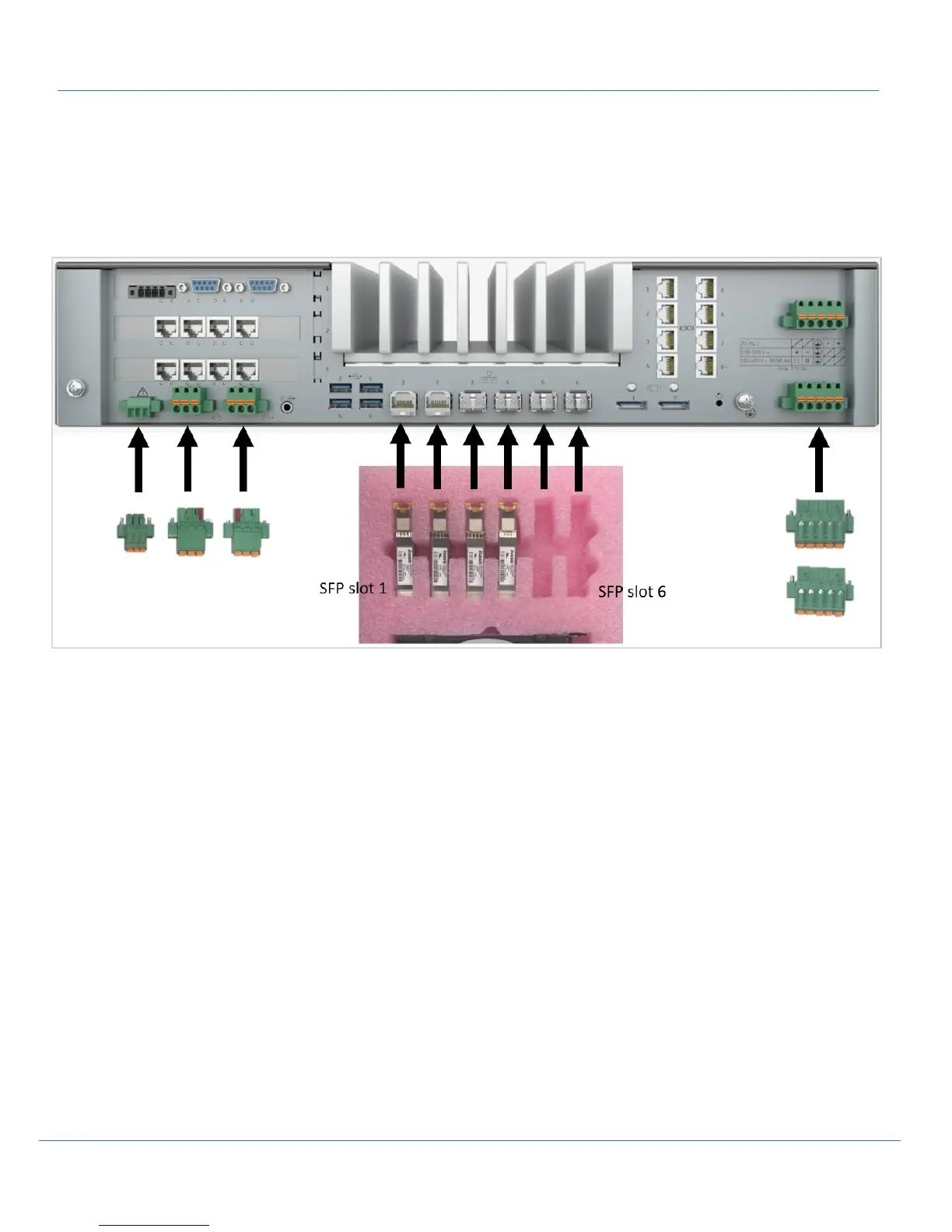
The SFP’s are inserted in the tray in the same order as the cages are labeled on the rear of the G500 chassis.
Note: The single notch in the tray corresponds to the SFP cage labeled 1.
The Hardware compartment also includes the Connector set which includes two power supply connectors, one Alarm connector,
one IRIG-B input and output connectors.
Note: The IRIG-B input and output connectors are keyed and can only be installed in the corresponding position.
Missing Something?
Contact GE Customer Service right away and we’ll figure it out. Be sure to include your order number and mail address
associated with your order.
Prerequisites
• DS-Agile Studio’s MCP Studio
• Minimum Windows 7 x64, 10 x64 and 8GB Memory required for DS Agile MCP Studio
G500 Interface Options
The following connection/interface options are available after G500 first powers up.
• Local KVM (Keyboard, Video, Mouse)
• Front Ethernet port – Default IP address 192.168.168.81
• Front USB Serial port with a baud rate 115200



 To Next Page