EasyManua.ls Logo

GE JS760 - User Manual

GE JS760
32 pages
Print Icon
To Next Page IconTo Next Page
Loading...
Write the model and serial
numbers here:
Model # _________________
Serial # _________________
You can find them on a label
behind the door or drawer.
ESPAÑOL
Para consultar una version en
español de este manual de
instrucciones, visite nuestro sitio de
internet GEAppliances.com.
OWNER’S MANUAL
RANGES
Electric Free-Standing
49-2000999 Rev. 1 11-21 GEA
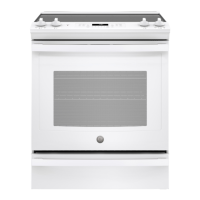
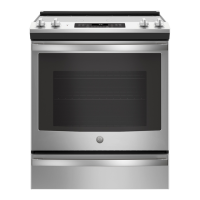
30" Free-Standing Range
PB935, JB735, JS760
GE is a trademark of the General Electric Company. Manufactured under trademark license.
SAFETY INFORMATION .......... 3
USING THE RANGE
Surface Units ........................... 7
Cookware for Radiant Glass Cooktop. . . . . . 9
WiFi Connect ..........................10
Oven Controls ..........................11
Special Features ........................12
Sabbath Mode ..........................13
Oven Racks ............................14
Aluminum Foil and Oven Liners ...........14
Oven Cookware ........................14
Cooking Modes .........................15
Cooking Guide .........................16
Air Fry Cooking Guide ...................17
CARE AND CLEANING
Cleaning the Range – Exterior ............18
Cleaning the Range – Interior ............19
Cleaning the Glass Cooktop ..............21
Oven Light ............................ 23
Oven Door ............................24
Storage Drawer. . . . . . . . . . . . . . . . . . . . . . . . 24
Removable Storage Drawer ............. 25
TROUBLESHOOTING TIPS .......26
LIMITED WARRANTY ............30
ACCESSORIES .....................31
CONSUMER SUPPORT ........... 32

Other manuals for GE JS760

Questions and Answers

  • R
    Robert MooreAug 28, 2025
    How to fix a blank display on GE JS760?
    • D
      David EdwardsAug 28, 2025
      If the display on your GE Ranges goes blank, there are a couple of potential causes. First, check to see if a fuse in your home may be blown or the circuit breaker tripped; if so, replace the fuse or reset the circuit breaker. Also, the clock may be turned off; check the Special Features section.
  • T
    Tammy PooleAug 28, 2025
    Why my food does not bake properly in GE Ranges?
    • L
      Laura ThompsonAug 29, 2025
      If your food isn't baking properly in your GE Ranges, several factors could be contributing to the issue: * The oven controls may be improperly set. * The rack position might be incorrect, or the rack isn't level. * You might be using incorrect cookware or cookware of an improper size. * The oven temperature may need adjustment. * Ingredient substitution can change the recipe outcome.
  • V
    Vanessa RamirezSep 22, 2025
    How to fix a GE Ranges storage drawer that won't close?
    • R
      Raymond LaraSep 22, 2025
      The power cord may be obstructing the drawer in the lower back of the range, so reposition the drawer and power cord. The rear drawer support may be on top of the guide rail, so reposition the drawer. The soft close mechanism may be uncoupled from the drawer, so reset the mechanism.
  • K
    Kenneth MillerSep 14, 2025
    Why is there fan noise coming from my GE JS760 oven?
    • C
      Charles GrantSep 14, 2025
      If you hear fan noise from your GE Ranges, a convection fan may automatically turn on and off to maximize cooking evenness. This is normal. The convection fan will operate during preheat of the bake cycle and turn off after the oven is heated to the set temperature. Also, a cooling fan may automatically turn on and off to cool internal parts, even after the oven is turned off, which is normal on some models.
  • L
    Laura RhodesSep 23, 2025
    Why is there a strong odor when I use my GE JS760?
    • J
      joseph13Sep 23, 2025
      An odor from the insulation around the inside of the oven is normal for the first few times the oven is used. This is temporary and will go away after several uses or a self-clean cycle.
  • C
    Cynthia CampbellSep 8, 2025
    What does 'F— and a number or letter' mean on my GE Ranges display?
    • V
      Victor GillSep 8, 2025
      If you see “F— and a number or letter” flashing on your GE Ranges display, it indicates a function error code. Press the Cancel/Off pad and allow the oven to cool for one hour before putting it back into operation. If the code repeats, disconnect power to the oven for at least 60 seconds, then reconnect it. If the error persists, call for service.
  • A
    Amanda MitchellAug 30, 2025
    What to do if GE JS760 oven door will not open after a clean cycle?
    • A
      Annette KellyAug 30, 2025
      If your GE Ranges oven door won't open after a clean cycle, it's likely because the oven is still too hot. Allow the oven to cool below the locking temperature.
  • P
    Pamela TurnerAug 30, 2025
    What causes excessive smoking during broiling in GE JS760 Ranges?
    • L
      Lauren BrownAug 30, 2025
      Excessive smoking during broiling in your GE Ranges is often caused by the food being too close to the burner element. Lower the rack position of the food to resolve this.
  • P
    plyonsAug 30, 2025
    What to do if GE JS760 Ranges oven is not clean after a clean cycle?
    • W
      William TrujilloAug 30, 2025
      If your GE Ranges oven isn't clean after a clean cycle, it could be due to a couple of reasons. The oven controls may be improperly set. Also, the oven might have been heavily soiled; clean up heavy spillovers before starting the clean cycle, and for heavily soiled ovens, consider running the self-clean cycle again or for a longer period.
  • N
    nicholasjohnsonAug 30, 2025
    What to do when power outage makes clock flashes in GE JS760 Ranges?
    • M
      Mrs. Darlene AndersonAug 30, 2025
      If you experience a power outage and the clock on your GE Ranges is flashing, reset the clock. If the oven was in use, you must reset it by pressing the Cancel/Off pad, setting the clock, and resetting any cooking function.

Summary

Safety Information for Your GE Appliances Range

Anti-Tip Device Installation and Safety

Guidelines for securing the range to prevent tipping hazards and ensure stability.

General Safety Guidelines for Appliance Use

Essential safety rules for proper appliance operation, installation, and maintenance.

Fire Prevention and Response Procedures

Warnings about flammable materials and steps to prevent fires and ensure safe response.

Cooktop and Oven Safety Precautions

Specific safety advice for operating cooktops, ovens, and during self-cleaning.

Oven and Self-Cleaning Safety Instructions

Safety guidelines for oven operation, including self-cleaning and proper disposal.

Using Your GE Appliances Range

Surface Unit and Warming Zone Operation

How to use and control the range's surface heating elements and warming zone.

Cookware Selection for Radiant Glass Cooktops

Recommendations for choosing and using cookware suitable for the glass cooktop.

WiFi Connect and Remote Control Setup

Instructions for connecting the oven to WiFi and enabling remote operation.

Oven Control Panel and Functions Overview

Explanation of oven controls, cooking modes, timers, and special functions.

Special Oven Features and Adjustments

Details on features like temperature adjustment, sound volume, and auto-conversion.

Sabbath Mode Setup and Usage

Instructions for setting up and using the Sabbath Mode for specific cooking needs.

Oven Racks, Foil, and Cookware Guidance

Guidance on oven rack placement, foil usage, and cookware considerations.

Oven Cooking Modes and Techniques

Descriptions of various cooking modes like Bake, Broil, Convection, and Air Fry.

Care and Cleaning Procedures for Your Range

Oven Cooking Guide and Air Fry Tips

Food preparation guidance and specific tips for Air Fry cooking mode.

Exterior Surface Cleaning and Maintenance

Procedures for cleaning the range's exterior, knobs, and control panel.

Interior Oven Cleaning Methods

How to clean the oven interior using manual, steam, or self-clean cycles.

Glass Cooktop Cleaning and Protection

Steps for cleaning the glass cooktop, removing residue, and preventing damage.

Oven Light Bulb Replacement Guide

Instructions for safely removing and replacing the oven light bulb.

Oven Door and Storage Drawer Servicing

Procedures for removing and reinstalling the oven door and storage drawer.

Removable Storage Drawer Maintenance

Guide for removing and reinserting the removable storage drawer for cleaning.

Troubleshooting, Warranty, and Support

Range Troubleshooting and Problem Resolution

Solutions for common problems with surface units and general cooking performance.

Oven Operation Troubleshooting

Addressing issues related to oven temperature, controls, and door functionality.

Oven Error Codes and System Indicators

Interpreting error messages, operational noises, and display indicators.

Limited Warranty Information

Details of the GE Appliances electric range limited warranty coverage and terms.

Available Accessories and Parts

Listing of optional accessories and replacement parts available for purchase.

Consumer Support and Contact Options

Information on how to get assistance, schedule service, and utilize online support.

GE JS760 Specifications

General IconGeneral
TypeSlide-In
Number of Burners5
Oven Capacity5.3 cu. ft.
ConvectionYes
Self-CleaningYes
Fuel TypeElectric
Oven TypeConvection
Burners5
Ignition TypeElectronic
GrillNo
GriddleNo
Color OptionsStainless Steel
Width29.88 inches
Cooktop MaterialCeramic Glass
Depth28.25 inches

Related product manuals