38 MDS 4710/9710 Technical Manual MDS 05-3305A01, Rev. E
Invisible place holder
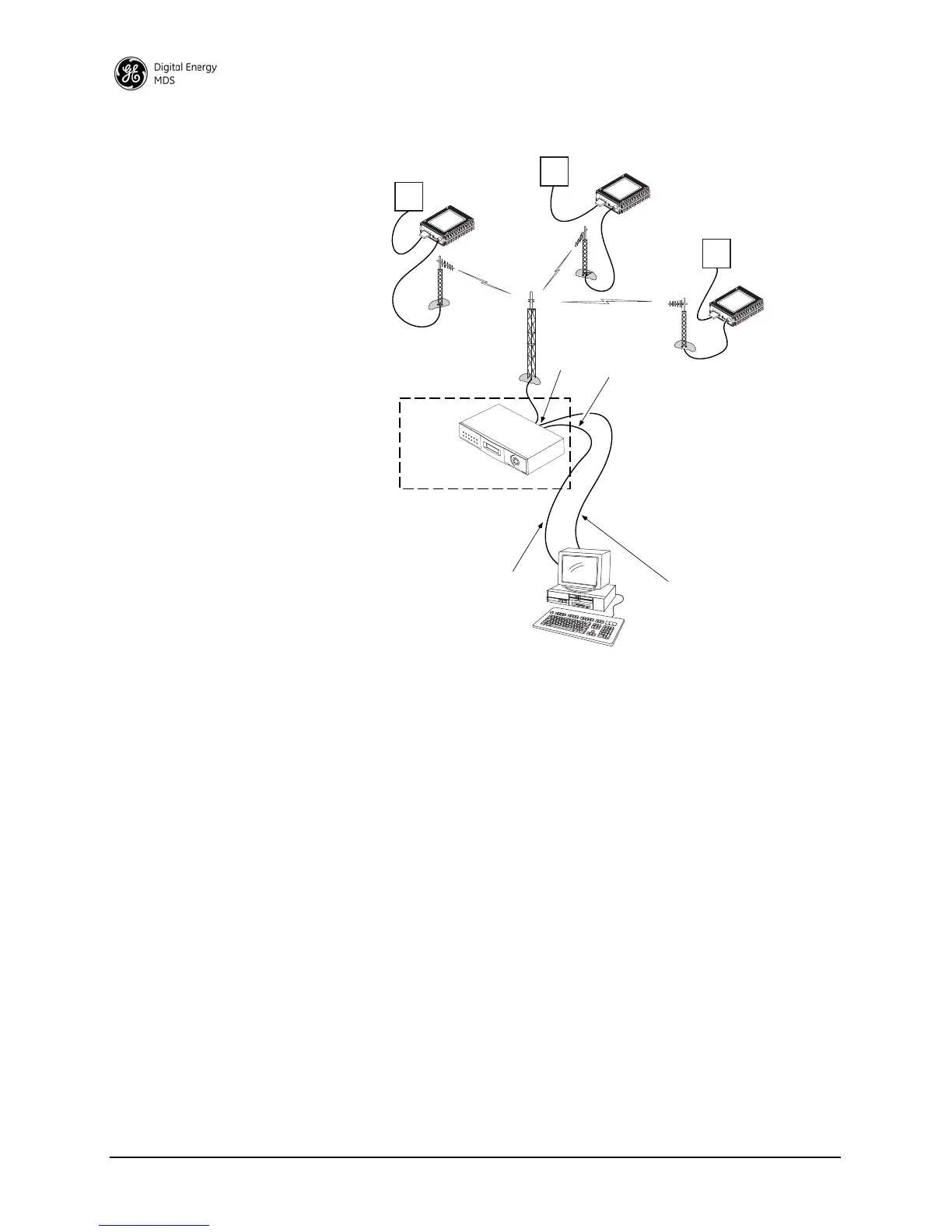
Figure 13. Network-Wide Remote Diagnostics Setup
If a PC is connected to any radio in the network, you can perform intru-
sive polling (polling that briefly interrupts payload data transmission).
To perform diagnostics without interrupting payload data transmission,
connect the PC to a radio defined as the “root” radio. A radio is defined
as a root radio using the
DTYPE ROOT command at the radio.
A complete explanation of remote diagnostics can be found in GE MDS’
Network-Wide Diagnostics System Handbook. See the handbook for
more information about the basic diagnostic procedures outlined below.
1. Program one radio in the network as the root radio by entering the
DTYPE ROOT command at the radio.
2. At the root radio, use the
DLINK ON and DLINK [baud rate] commands
to configure the diagnostic link protocol on the RJ-11 port.
3. Program all other radios in the network as nodes by entering the
DTYPE NODE command at each radio.
RTU
DIAGNOSTICS DATA
(TO InSite)
HOST COMPUTER
RTU
TO
DIAGNOSTICS
PORT
TO DATA
PORT
MASTER STATION
ROOT
DTYPE
ROOT
PAYLOAD DATA
(TO SCADA APPLICATION)
RTU
DTYPE
NODE
DTYPE
NODE
DTYPE
NODE



 To Next Page