EasyManua.ls Logo

GE Power Supply - User Manual

GE Power Supply
21 pages
Print Icon
To Next Page IconTo Next Page
Loading...
User manual
Digital Energy
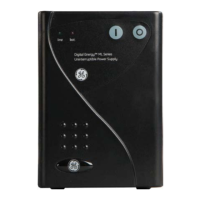
GT Series
Rack-mount Uninterruptible Power Supply
1000-1500-3000 VA
UL-version
GE Consumer and Industrial – Power Quality
Digital Energy
701 E. 22
nd
Street
Suite 300 Telephone 800-637-1738
Lombard, IL 60148
USA Website www.geindustrial.com/ups
Technolo
gy
f
or the Di
g
ital World.
ver 1.4 - US
GT Series UPS
TM
g

Questions and Answers

  • R
    Ryan CarsonAug 15, 2025
    How to fix a tripped input circuit breaker on my GE UPS?
    • M
      michellehernandezAug 15, 2025
      If the input circuit breaker on your GE UPS has tripped, it could be due to a UPS overload. Try reducing the load and then reset the breaker. If the issue persists, it may indicate a system failure.
  • D
    deansmithAug 18, 2025
    What should I do if the 'Replace battery' LED lights up and the buzzer sounds continuously on my GE UPS?
    • C
      Charles PinedaAug 18, 2025
      If the 'Replace battery' LED lights up and the buzzer sounds continuously on your GE UPS, it could be a 'false alarm' if the battery test occurred just after a utility failure. Allow the UPS to recharge the battery for approximately 8 hours, then repeat the battery test. If the alarm persists, it may indicate that the battery is close to being worn out, and you should consider replacing it after allowing the UPS to recharge for 8 hours and performing another battery test.
  • R
    Renee LongAug 21, 2025
    What to do if the overload LED is lit and the buzzer is sounding continuously on my GE Power Supply UPS?
    • A
      Ashley MillsAug 21, 2025
      If the overload LED is illuminated and the buzzer is continuously sounding on your GE UPS, it indicates that the UPS is overloaded. Reduce the load by unplugging non-critical devices.
  • S
    Stephanie GarciaAug 25, 2025
    Why won't my GE UPS turn on?
    • C
      Crystal KimAug 25, 2025
      If your GE UPS won't switch on, several factors could be the cause. First, ensure the line cord is properly connected. Second, verify that the wall socket is functional and the mains voltage is within acceptable limits. Third, check if the input circuit breaker has tripped and reset it if necessary, making sure the UPS isn't overloaded. Fourth, the battery voltage might be too low, so allow the UPS to recharge the battery.
  • M
    Mary SanchezAug 27, 2025
    What to do if my GE Power Supply UPS has no output?
    • X
      xriveraAug 27, 2025
      If your GE UPS has no output, it could be due to several reasons. The UPS may be over-temperature, in which case you should allow it to cool down. Alternatively, there may be a utility failure and the battery is depleted, so you should wait until utility power returns. Finally, the input breaker may have tripped; refer to the instructions above for a tripped breaker.
  • S
    Scott McgeeAug 30, 2025
    What does it mean when the 'Battery low' LED is lit and the buzzer beeps twice per second on my GE Power Supply?
    • F
      Frank HollowayAug 30, 2025
      When the 'Battery low' LED lights up and the buzzer beeps twice per second on your GE UPS, it means the battery is close to being exhausted during a utility failure. The UPS output will soon be lost, so you should shut down the load in an orderly manner.
  • C
    christiewalshSep 2, 2025
    Why is my GE Power Supply UPS buzzer sounding continuously due to over-temperature?
    • O
      Omar WolfSep 3, 2025
      If your GE UPS buzzer is sounding continuously due to over-temperature, it could be because the ambient temperature is too high, or the ventilation is blocked. Try to reduce the ambient temperature and enhance ventilation. It could also be due to fan failure, in which case you should have the fan replaced.
  • P
    Paul MorganSep 5, 2025
    Why can't I link my GE Power Supply UPS to my computer?
    • S
      steven96Sep 6, 2025
      If you cannot link your GE UPS to your computer, the communication cable may be defective, so check the cable. Alternatively, there may be a transmitting rate fault, so adjust the transmitting rate. Finally, the communication port may be faulty, so check the COM1/COM2 configuration of the computer.
  • N
    natasha81Sep 8, 2025
    What does it mean when the 'Fault' LED flashes on my GE UPS?
    • A
      Anne JensenSep 8, 2025
      If the 'Fault' LED is flashing on your GE UPS, it indicates a wiring fault, specifically that the L-N (Line-Neutral) wires are reversed. You should have the site wiring checked by a qualified electrician.
  • L
    Linda MooreSep 12, 2025
    What does it mean when the 'Fault' LED lights up and the buzzer sounds continuously on my GE Power Supply?
    • L
      Laura ChavezSep 12, 2025
      If the 'Fault' LED lights up and the buzzer sounds continuously on your GE UPS, it indicates an internal UPS failure.

Summary

IMPORTANT SAFETY INSTRUCTIONS

Save these instructions

Instructions for safekeeping and future reference.

General Safety Precautions

General safety guidelines and warnings for UPS operation.

Installation Safety

Safety precautions specific to the installation process.

Battery Safety

Critical safety information and handling procedures for batteries.

Transport and Storage Safety

Guidelines for safely transporting and storing the UPS unit.

FCC and Interference Compliance

Information regarding FCC rules and potential interference.

INSTALLATION

Package Contents and Inspection

Details on what is included in the packing box and initial inspection.

Recommended Location Guidelines

Criteria for selecting an optimal and safe installation location.

Rear Panel Component Identification

Overview and function of ports and connectors on the UPS rear panel.

Mounting Options

Instructions for mounting the UPS in an enclosure or vertically.

Connecting External Battery Packs

Procedure for connecting additional battery packs for extended runtime.

Communication Interface Setup

Connecting the UPS via RS232 or dry contact ports.

Connecting Loads and Utility Supply

Steps for connecting the UPS output to loads and input to the mains.

Site Wiring Fault Check

Procedure to verify correct electrical wiring using the site-wiring fault LED.

OPERATION

Operation Panel Overview

Explanation of the UPS front panel controls and indicators.

UPS Startup Procedures

Steps for starting the UPS with and without utility power available.

Normal Operation Modes

Conditions, indications, and self-test for standard UPS operation.

Silencing Buzzer and Switching Off

Procedures for managing audible alerts and powering the UPS on/off.

Handling Abnormal Conditions

Guidance on responding to fault states: On battery, Battery low, Overload.

Bypass and Failure Conditions

Information on bypass operation, battery replacement alerts, and short circuits.

COMMUNICATION INTERFACES

Description of Communication Ports

Overview of the UPS communication capabilities and connector types.

RS232 Communication Protocol

Details on using the RS232 port for UPS monitoring and control.

Dry Contact Interface Functions

Explanation of the dry contact outputs for alarm notifications.

SNMP Network Management

Information on the optional SNMP card for network integration and monitoring.

OPTIONAL FEATURES

Extended Runtime Module

Description of how to achieve extended runtime with add-on modules.

TVSS Surge Protection

Details on the Transient Voltage Surge Suppressor feature.

MAINTENANCE AND CARE

General Maintenance Recommendations

Basic upkeep and environmental considerations for the UPS.

Battery Management and Replacement

Guidelines for battery health, testing, and replacement procedures.

UPS Recycling and Disposal

Information on environmentally responsible disposal of the UPS.

TROUBLESHOOTING GUIDE

TECHNICAL SPECIFICATIONS

GE Power Supply Specifications

General IconGeneral
BrandGE
ModelPower Supply
CategoryUPS
LanguageEnglish

Related product manuals