EasyManua.ls Logo

GE PT7800 - User Manual

GE PT7800
76 pages
Print Icon
To Next Page IconTo Next Page
Loading...
49-2001077 Rev. 2 06-24 GEA
Write the model and serial
numbers here:
Model # ____________________
Serial # ____________________
You can find them on a label on
the side trim or on the front of the
(lower) oven behind the oven door.
GE is a trademark of the General Electric Company. Manufactured under trademark license.
OWNER’S MANUAL
WALL OVEN
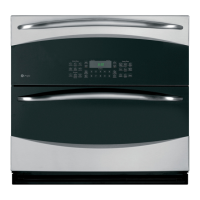
Built-In Combination Convection-Microwave/Convection
PT7800
PK7800
SAFETY INFORMATION ..........3
USING THE OVEN
Oven Controls .........................12
Oven Settings .........................13
Oven Options .........................14
Baking ...............................15
Warming and Proofing .................16
Microwaving ..........................17
Cooking Modes ........................21
Probe ................................22
Sabbath Mode .........................23
Cooking Guide ........................24
Racks ................................26
Aluminum Foil and Oven Liners ..........27
Cookware .............................27
CARE AND CLEANING
Oven .................................28
Oven Racks ...........................30
Lower Oven Maintenance ...............31
TROUBLESHOOTING TIPS .......32
LIMITED WARRANTY ............36
ACCESSORIES ....................37
CONSUMER SUPPORT ...........38
ENGLISH / ESPAÑOL

Questions and Answers

  • T
    Tyler IngramSep 8, 2025
    Why does my GE PT7800 Oven make fan noise?
    • G
      glovertaylorSep 8, 2025
      A cooling fan may automatically turn on in your GE Oven. This is normal. The cooling fan will turn on to cool internal parts and may run for up to 1-1/2 hours after the oven is turned off.
  • A
    Alicia HartAug 25, 2025
    Why does my GE PT7800 Oven control display “Control is LOCKED”?
    • C
      Claire LopezAug 25, 2025
      The “Control is LOCKED” message appears because the control feature has been activated. To unlock it, press and hold the Settings pad for 3 seconds.
  • S
    samantha05Aug 25, 2025
    How to unlock the control on my GE PT7800 when it displays 'Control is LOCKED'?
    • D
      Doris McintoshAug 26, 2025
      If 'Control is LOCKED' appears on your GE oven display, it means the control has been locked. To unlock it, press and hold the Settings pad for 3 seconds.
  • K
    Kim GeorgeSep 18, 2025
    What should I do if the pads on one side of the control do not function on my GE Oven?
    • S
      Sandra HollandSep 18, 2025
      If the pads on one side of the control on your GE oven do not function, the control has likely locked out the use of these pads and needs to be reset. Press and hold the Clear/Off pad on the other side of the display for 30 seconds. If this does not reset the control, it may be necessary to cycle the circuit breaker.
  • L
    Linda GarrisonSep 9, 2025
    Why does smoke come out of my GE Oven when I open the door?
    • K
      Kathryn EatonSep 9, 2025
      Smoke is normal when cooking high-fat foods in your GE Oven.
  • O
    onelsonSep 13, 2025
    What to do if my GE PT7800 control display is lit but the oven will not start?
    • S
      Sabrina GreenSep 13, 2025
      Several factors can prevent your oven from starting. First, ensure the clock is set. Next, check that the door is securely closed. After selecting your cooking preferences, press the Start/Pause pad or selector dial. Also, make sure you have entered a cooking time. If another selection is already entered, press the Clear/Off pad to cancel it. If the Clear/Off pad was accidentally pressed, reset the cooking program and press the Start/Pause pad.
  • T
    tinacooperSep 3, 2025
    Why does my GE PT7800 Oven show "OVEN IS COOLING DOOR IS LOCKED"?
    • V
      Victoria BaldwinSep 3, 2025
      The message 'OVEN IS COOLING DOOR IS LOCKED' appears on the display because the temperature inside the oven has not dropped below the unlocking temperature. Press the Clear/Off pad and allow the oven to cool.
  • C
    cheryl08Sep 4, 2025
    Why does my GE PT7800 Oven sometimes take longer to preheat to the same temperature?
    • E
      Emma MooreSep 4, 2025
      The cookware or food in the oven will cause the oven to take longer to preheat. Remove items to reduce preheat time. Adding more racks to the oven will cause the oven to take longer to preheat, so remove some racks. The different cooking modes use different preheat methods to heat the oven for the specific cooking mode, so some modes will take longer than others (i.e. convection bake multi).
  • D
    Daniel WiseSep 23, 2025
    Is it normal for my GE PT7800 door glass to appear "tinted" or have a "rainbow" color?
    • J
      Joshua RodgersSep 23, 2025
      No, the inner oven glass is coated with a heat barrier to reflect the heat back into the oven to prevent heat loss and keep the outer door cool while baking. Under certain light or angles, you may see this tint or rainbow color; this is normal.
  • J
    Joshua DavisAug 29, 2025
    What to do if my GE Oven will not self-clean?
    • T
      Tommy PearsonAug 29, 2025
      If your GE Oven won't self-clean, the temperature may be too high to start the self-clean operation. Allow the oven to cool and reset the controls.

Summary

Safety Information

Precautions to Avoid Possible Exposure to Excessive Microwave Energy

Safety guidelines to prevent harm from microwave energy exposure.

To Reduce the Risk of Fire in the Cavity

Precautions to mitigate fire risks within the oven cavity.

To Reduce the Risk of Burns

Safety measures to prevent burns during oven operation.

Operating Safety Tips

General operating safety tips for the appliance.

Using the Oven

Oven Controls Overview

Overview of upper oven, lower oven, and common controls and their functions.

Upper Oven Cooking Modes

Instructions for using upper oven features like microwave, warming, proofing, and baking.

Lower Oven Features

Details on lower oven specific features like probe and Sabbath mode.

Cooking Guidance and Accessories

Guidance on cooking modes, rack positions, cookware, and oven accessories.

Care and Cleaning

General Cleaning Tips

General tips for keeping the oven clean and fresh.

Control Panel and Exterior Cleaning

How to clean the oven's control panel and exterior surfaces safely.

Interior Oven Cleaning

Detailed instructions for cleaning the oven interior, door seal, and turntable.

Troubleshooting Tips

Fan and Cooking Issues

Resolving common problems related to oven fan operation and cooking results.

Display and Control Issues

Addressing issues with the oven's display screen and unresponsive controls.

Other Oven Problems

Solutions for miscellaneous oven problems like hot surfaces or locked controls.

Limited Warranty

Warranty Service and Coverage

Information on obtaining warranty service and what is covered or excluded.

Implied Warranties and Exclusions

Details on implied warranties and their limitations.

Extended Warranties

Information on purchasing extended warranties for the appliance.

Accessories and Parts

Ordering Accessories

Information on how to order additional accessories for the appliance.

Replacement Parts

List of available replacement parts for the oven.

Cleaning Supplies

List of recommended cleaning supplies for appliance maintenance.

Consumer Support

Online Support Resources

Accessing support, product registration, and service information online.

Scheduling Service and Extended Warranties

How to schedule repair service and information on purchasing extended warranties.

Contact and Connectivity Assistance

Assistance for remote connectivity and contacting customer support.

GE PT7800 Specifications

General IconGeneral
BrandGE
ModelPT7800
CategoryOven
LanguageEnglish

Related product manuals