GE HEALTHCARE - KRETZTECHNIK VOLUSON® 730EXPERT (BT03)
D
IRECTION 105899, REVISION 3 DRAFT (APRIL 29, 2008) SERVICE MANUAL
Chapter 3 - Setup Instructions 3-23
3-6-2-2 Back-end Processor Boot Up
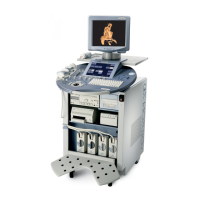
Press the ON/OFF Standby switch left below the control panel.
NOTE: The mains outlet of the system for peripheral auxiliary equipment are commonly switched with the
Standby switch. The switch of printers has to be in ON position before starting the system.
However, be aware some auxiliary equipment may switch itself to standby mode when
Standby power is on (e.g., Color video printer) and must therefore be switched on separately.
(CPN6 only - Auxiliary equipment need not to be switched ON/OFF separately if the F2 power switch
on the rear of the system is always ON.)
When the ON/OFF Standby switch left below the Control Panel is pressed, the System (including the
Back-end Processor) starts and the operating system is loaded which then leads the application
software to activate the scanner.
The system automatically performs an initialization sequence which includes the following:
- Loading the operating system.
- Running a quick diagnostic check of the system.
- Detecting connected probes
As soon as the software has been loaded, the system enters 2D-Mode with the probe and application
that were used before the system was shut down.
NOTE: Total time used for start-up is about 2 minutes.
Figure 3-23 ON/OFF Standby Switch
ON/OFF Standby switch


 To Next Page