EasyManua.ls Logo

GearLight S400 PRO - User Manual

GearLight S400 PRO
2 pages
Print Icon
To Next Page IconTo Next Page
Loading...
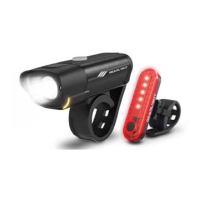
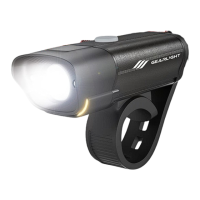
GearLight S400 PRO Rechargeable Headlight
GearLight S400 PRO Rechargeable Taillight
USB Charging Cables
User Manual
Warranty Card
1x
1x
1x
1x
2x
PACKAGE CONTENTS
CHARGE
BEFORE
FIRST USE
S400 PRO
RECHARGEABLE
User Manual
FOR YOUR SAFETY, READ BEFORE OPERATING
The lights are not a replacement or substitute for your bicycle’s original reflectors.
Please check your local regulations before operating the lights.
WARNING
If the bike light does not turn on, or works intermittently:
• Charge the bike light for 3 hours or until the red LED indicator light turns green.
If the bike light does not charge:
• Inspect the bike light and charging cable for any damage or corrosion.
• Check the USB charging cable connections and the power source.
• Replace the USB charging cable.
Note: A computer in sleep mode might not charge the bike light.
If the bike light appears dim or faded:
• Charge the bike light for 3 hours or until the red LED indicator light turns green.
• Replace the USB charging cable.
If the problem persists, contact GearLight for a replacement.
052021
When the lights are not in use, store them with a moderate level of charge and in
a cool place away from flammable materials. Once every few months, discharge
the batteries fully and recharge.
Irvine, California | USA | www.GearLight.com
GearLight warrants this product for one year from the date of purchase against any
defects in material or workmanship. This warranty does not cover normal wear and
tear, nor damage resulting from misuse or neglect. We will, at our discretion, repair,
replace, or refund the purchase price of this product should we determine it to be
defective.
Liability limited to the purchase price of this product. GearLight shall not be liable
for any incidental or consequential damages or any implied warranty on this
product. Some states do not allow the exclusion or limitation of incidental or
consequential damages, so the above limitation or exclusion may not apply to you.
WARRANTY AND LIMITATION OF LIABILITY
Limited One-Year Warranty
Limitation Of Liability
TROUBLESHOOTING
MAINTENANCE
For product support, contact Customer Service:
support@GearLight.com
Question and Answer IconNeed help?

Do you have a question about the GearLight S400 PRO and is the answer not in the manual?

Summary

Troubleshooting Guide

Addressing Operational and Charging Issues

Covers intermittent operation, charging failures, dim lights, and provides solutions like charging and cable checks.

Persistent Problems and Support

Guidance for issues that remain unresolved after initial troubleshooting steps, including contacting support.

Product Maintenance

Storage and Battery Conditioning

Instructions for storing lights properly and periodic battery discharge and recharge for optimal performance.

Warranty and Liability Information

Limited One-Year Product Warranty

Details the one-year warranty against defects in material or workmanship and its coverage limitations.

Limitation of Liability

Outlines the extent of GearLight's liability for incidental or consequential damages.

Getting Started

Charging the Bike Light Set

Step-by-step instructions for connecting and charging the bike lights via USB port.

Product Operations

Headlight Functions and Modes

Explains how to turn the headlight on/off and cycle through its five distinct lighting modes.

Taillight Functions and Modes

Details how to operate the taillight, including on/off and switching between its four lighting modes.

Mounting the Lights

Guides on how to securely attach the headlight and taillight to a bicycle.

Overview

The GearLight S400 PRO Rechargeable Bike Light Set is designed to enhance visibility and safety for cyclists. This set includes a rechargeable headlight and taillight, both equipped with various lighting modes to suit different riding conditions. The lights are designed for easy mounting and charging, ensuring a convenient user experience.

Function Description

The GearLight S400 PRO set provides essential illumination for cycling, making riders more visible to others and improving their view of the road. The headlight projects a powerful beam forward, while the taillight ensures visibility from the rear. Both lights are rechargeable, eliminating the need for disposable batteries and offering a sustainable lighting solution. The multiple lighting modes allow riders to adapt the light output to their environment, whether it's bright daylight, dusk, or complete darkness. The inclusion of side strobe lights on the headlight further enhances peripheral visibility, a crucial safety feature for urban cycling.

Usage Features

Charging the Bike Light Set: To begin using the lights, they must first be charged. The charging process is straightforward:

  1. Locate the USB charging port: For the headlight, lift the rubber cover on the device. For the taillight, press down on the release latch to slide the taillight out, then access the port. It's important to note that the taillight does not need to be unmounted to charge.
  2. Connect to a USB charging cable: Use the provided USB charging cables to connect the lights to a powered USB port. This can be a phone charger, power bank, or computer.
  3. Monitor charging status: The headlight's power button will blink red while charging and turn solid green when fully charged (approximately 3 hours). The taillight's LED indicator will be solid red while charging and turn solid green when fully charged (approximately 2 hours).
  4. Unplug when charged: Disconnect the USB charging cable once the LED indicator turns green or after the specified charging time. It's important not to overcharge the bike lights.

Headlight Operation: The headlight offers versatile lighting options:

  • Turning On/Off: Press the power button located on the top of the headlight to turn it on. To turn it off, cycle through all the lighting modes until the light is off.
  • Switching Modes: There are five distinct lighting modes: High, Medium, Low, Strobe with Side Strobe Lights, and Medium with Side Strobe Lights. Press the power button repeatedly to cycle through these modes and select the desired illumination.

Taillight Operation: The taillight ensures rear visibility with multiple modes:

  • Turning On/Off: Press the power button located on the front of the taillight to turn it on. To turn it off, cycle through all the lighting modes until the light is off.
  • Switching Modes: The taillight features four different lighting modes: High, Slow Chase, Strobe, and Fast Chase. Press the power button repeatedly to alternate through these modes.

Mounting the Headlight: The headlight is designed for easy attachment to handlebars:

  1. Wrap the silicone strap: Securely wrap the silicone strap around the handlebar.
  2. Attach to the strap hook: Fasten the strap to the strap hook to hold the headlight firmly in place.

Mounting the Taillight: The taillight can be mounted and adjusted for optimal visibility:

  1. Wrap the silicone strap: Wrap the silicone strap around the bike frame.
  2. Attach to the strap hook: Secure the strap to the strap hook.
  3. Rotate the taillight (optional): To adjust the taillight's angle, press on the release latch and slide the taillight off. Rotate it to the desired position, then press the release latch again and slide the taillight back on.

Low Battery Warning: During use, both bike lights will blink red to indicate a low battery. The lights will turn off within minutes of this warning, signaling that they need to be charged before further use.

Maintenance Features

General Maintenance: Proper care ensures the longevity and optimal performance of the bike light set:

  • Storage: When not in use, store the lights with a moderate level of charge in a cool place, away from flammable materials.
  • Battery Discharge/Recharge: Every few months, fully discharge the batteries and then recharge them. This practice helps maintain battery health.

Troubleshooting: The manual provides guidance for common issues:

  • Light does not turn on or works intermittently:
    • Charge the bike light for 3 hours or until the red LED indicator light turns green.
  • Light does not charge:
    • Inspect the bike light and charging cable for any damage or corrosion.
    • Check the USB charging cable connections and the power source.
    • Replace the USB charging cable if necessary.
    • Note: A computer in sleep mode might not charge the bike light.
  • Light appears dim or faded:
    • Charge the bike light for 3 hours or until the red LED indicator light turns green.
    • Replace the USB charging cable if necessary.
  • Persistent problems: If issues persist, contact GearLight for a replacement.

Safety Precautions: Adhering to safety guidelines is crucial for preventing damage and injury:

  • Charging Port Cover: Before and during each use, ensure the rubber cover is secured over the USB charging port to prevent water ingress.
  • Avoid Heavy Rain: Do not use the lights in heavy rain.
  • Battery Safety: The bike lights contain lithium batteries, which can present fire, explosion, and burn hazards if mishandled.
    • Do not repair, disassemble, or modify the lights.
    • Do not charge or store the lights near flammable materials.
    • Do not charge with a wet or damaged USB charging cable.
    • Do not overcharge the lights; unplug them once fully charged or if left unattended.
    • Use only UL-Listed charging adapters rated at 5V 2.4A max.
    • Do not use or charge the lights if they are wet or damaged.
    • Do not use the lights while they are charging; unplug them before use.
    • Keep the lights away from fire, water, and high temperatures.
  • Reflectors: The lights are not a replacement or substitute for your bicycle's original reflectors. Always check local regulations before operating the lights.

By following these instructions, users can ensure safe and effective operation of their GearLight S400 PRO Rechargeable Bike Light Set, enhancing their cycling experience and safety on the road.

GearLight S400 PRO Specifications

General IconGeneral
MaterialAluminum
ModesHigh, Medium, Low, Strobe, SOS
Run TimeUp to 10 hours
Weight5.6 ounces
Battery Type18650 lithium-ion (included) or 2x CR123A batteries

Related product manuals