EasyManua.ls Logo

Geco G-202-P05 - User Manual

Geco G-202-P05
16 pages
Print Icon
To Next Page IconTo Next Page
Loading...
INSTALLATION, OPERATING AND MAINTENANCE MANUAL
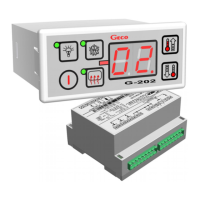
G-202-P05
COOLING APPLIANCES CONTROLLER
For software releases 01,02,03
We kindly request that you study this manual carefully PRIOR to connecting and starting
up any of our equipment. Should you have any queries or doubts, please contact us
between 8 a.m. and 4 p.m. Any comments e-mailed will be appreciated.

Questions and Answers

  • H
    Heather JensenAug 14, 2025
    What to do if my Geco G-202-P05 appliance does not reach its set temperature?
    • C
      christinerobinsonAug 14, 2025
      If your Geco Controller appliance isn't reaching the set temperature, verify the user-defined temperature settings and check the values of parameters 'c2', 'c5', 'd0', and 'd1'. Make sure the appliance defrosts completely. Also, check the location and mounting of the chamber sensor. Ensure there are no removed side or front glass panels. Avoid direct sunlight or drought exposure. Check for nearby fans or air conditioners. Ensure the condenser is clean and the shop temperature is within the appliance's operating limits. Finally, inspect the amount of gas, fans, evaporator heater, and evaporator water drain hose.
  • H
    howardmarcAug 17, 2025
    Why is my Geco G-202-P05 displaying flashing dots and not turning on?
    • P
      Patricia HarrisonAug 18, 2025
      If your Geco Controller's display is flashing dots and it won't turn on, check the power voltage value, the condition and tightening of power connectors. Also, verify the connection between the actuator module and the control panel, and consider replacing the ribbon cable.
  • A
    Ana WilliamsAug 21, 2025
    Why is my Geco G-202-P05 compressor not starting, even with the red LED on?
    • S
      Steven RichardsonAug 21, 2025
      If the Geco Controller compressor isn't starting despite the red LED being on, check for 220V voltage on terminals K and N. If voltage is present, inspect the compressor. If not, verify the correct connection of the actuator with the control panel and try connecting another ribbon.
  • W
    wayne09Aug 25, 2025
    What to do if my Geco G-202-P05 Controller is showing an incorrect temperature reading?
    • A
      Andrew YuAug 25, 2025
      If your Geco Controller is displaying an incorrect temperature reading, check the sensor connections to the terminals and the value of parameter ‘d4’. Also, verify the sensor's installation and cable condition, ensuring there's no damage. Examine the outer shell of the sensor for any signs of mechanical damage.
  • J
    Jillian PadillaAug 28, 2025
    How to troubleshoot defrosting problems with my Geco G-202-P05?
    • J
      James KirbyAug 28, 2025
      To troubleshoot defrosting problems with your Geco Controller, check the values of parameters 'd2', 'c0', and 'c1'. Ensure 'c1' (maximum defrosting duration) is adequate for complete defrosting. Verify the evaporator sensor is firmly mounted to the evaporator lamellas, ensuring tight adherence. The temperature at the sensor when the last ice falls should match parameter 'd2'.
  • R
    rthomasAug 31, 2025
    Why is the defrosting heater on my Geco Controller not switching on?
    • S
      Sarah FrancoAug 31, 2025
      If the defrosting heater on your Geco Controller isn't switching on, check for 230V voltage on the clamps as described on the controller's casing. If voltage is present, inspect the heater. If not, check the connection of the executive module with the control panel and connect another ribbon.
  • R
    rdurhamSep 3, 2025
    Why isn’t the drying heater on my Geco G-202-P05 switching on?
    • B
      biancamackSep 3, 2025
      If the drying heater on your Geco Controller isn't switching on, check for 230V voltage at the terminals marked on the upper panel of the actuator module. If there's no voltage, check for correct connections between the actuator module and the control panel, and replace the ribbon cable.
  • D
    Devin BrownSep 6, 2025
    What to do if the Geco Controller display is off even when connected to power?
    • V
      Victoria HansenSep 6, 2025
      If the Geco Controller display is off even when connected to power, check for 220V voltage on the power supply terminals L and N and the correct connection of the actuator to the control panel. Also, try removing and reinserting the ribbon sockets or connecting another ribbon.
  • R
    Renee VaughnSep 10, 2025
    How to troubleshoot incorrect door opening sensor operation on Geco G-202-P05?
    • K
      Keith BlairSep 10, 2025
      To troubleshoot an incorrectly operating door opening sensor on your Geco Controller, check the values of parameters 'r6', 'r7', and 'r9'. Verify the correct sensor connection. If the sensor connects to the actuator module, ensure the actuator module is correctly connected to the control panel. Try replacing the ribbon cable.

Summary

General Features of the G-202 Controller

Model Designation and Specifications

Details the model designation and a breakdown of its components, including relay and sensor specifications.

Ordering Information for G-202

Ordering Options and Specifications

Specifies how to order the controller, including enclosure types, optional features, and sensor/cable lengths.

Delivery, Installation, and Connection

Installation and Connection Safety Precautions

Highlights critical safety measures and precautions for electrical connections and cable management during installation.

Installation of Sensors and Cover Shells

Sensor Installation and Cable Handling

Provides guidance on sensor placement, mounting, and rules for managing sensor cables.

General Operation Principles

Defrosting and Door Sensor Operations

Details defrosting cycles and the door opening sensor's interaction with the controller and alarms.

Hysteresis and Temperature Control

Explains the concept of hysteresis and its impact on temperature stabilization settings.

On;Off Diagrams for Appliance Assemblies

Component Operation Diagrams

Visual representations of how the compressor, fan, and heaters operate under different conditions.

Setting System Parameters

G-202 Operation - User Instructions

Performing Additional Defrosting

Explains how to initiate manual defrosting for difficult operating conditions using the dedicated key.

Troubleshooting Common Issues

Troubleshooting Scenarios and Checks

Lists common symptoms like display issues, compressor failure, and provides corresponding checks.

Appliance Performance Troubleshooting

Covers issues with defrosting, temperature regulation, and door sensor operation.

Returning for Repair

Software Release Changes

Software Release Notes

Details specific modifications and added features for releases 02 and 03 of the G-202 software.

Block Diagram and Connection Execution

Wiring and Connection Diagram

Illustrates the internal wiring, terminal connections, and sensor interfaces of the G-202 controller.

Geco G-202-P05 Specifications

General IconGeneral
BrandGeco
ModelG-202-P05
CategoryController
LanguageEnglish

Related product manuals