EasyManua.ls Logo

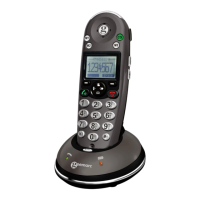
Geemarc AMPLIDECT 350 - User Manual

Geemarc AMPLIDECT 350
77 pages
Print Icon
To Next Page IconTo Next Page
Loading...
AMPLIDECT 350

Questions and Answers

  • J
    Janet CameronJul 26, 2025
    Why Geemarc Cordless Telephone handset seems to have very short battery life?
    • G
      Gerald SimsJul 27, 2025
      If your Geemarc Cordless Telephone handset's battery life seems very short, check the charge contacts. Consistently short battery life may indicate that you need to replace the batteries. Make sure you're using the correct type of batteries.
  • T
    Thomas BurkeAug 1, 2025
    Why caller number is not displayed on my Geemarc Cordless Telephone?
    • D
      daniellehernandezAug 1, 2025
      If the caller's number isn't showing on your Geemarc Cordless Telephone, first ensure you've signed up for Caller ID through your phone service provider. Sometimes, the caller might have blocked their number. Also, allow the phone to ring a few times, as there might be a slight delay before the Caller ID info appears.
  • L
    Larry KimAug 7, 2025
    How to fix Geemarc Cordless Telephone if it has no operation?
    • M
      Mary Jensen DDSAug 7, 2025
      If your Geemarc Cordless Telephone isn't working, make sure the power adapter and telephone line cord are properly connected. Also, check that the handset batteries are fully charged and correctly installed.
  • R
    roysmithAug 13, 2025
    What to do if there is no dial tone on Geemarc Cordless Telephone?
    • C
      Christopher BrooksAug 13, 2025
      If there's no dial tone on your Geemarc Cordless Telephone, check that the telephone line cord and the power adapter are properly connected.
  • P
    Preston CarterAug 19, 2025
    What to do if nothing appears on the display of Geemarc Cordless Telephone?
    • J
      javier58Aug 19, 2025
      If nothing is showing on the display of your Geemarc Cordless Telephone, verify that the handset batteries are correctly installed and fully charged. Also, ensure that the handset is turned on.

Summary

Introduction to Geemarc Amplidect 350

Unpacking

Details the contents of the box when unpacking the telephone.

Description of Geemarc Amplidect 350

Handset Description (Front)

Details the front view of the handset, labeling its keys and features.

Handset Description (Rear)

Details the rear view of the handset, labeling its features like carrying clip.

Handset Description (Side)

Details the side views of the handset, showing volume and headset jack.

Base Description (Top)

Details the top view of the base unit, labeling charge pins and page button.

Base Description (Base)

Details the base of the unit, labeling power and line connections.

Keys Description

Explains the function of handset keys.

LCD Window Icons Description

Explains the meaning of icons displayed on the handset's LCD screen.

Installation and Setup

Connecting Lines

Instructions for connecting the phone line and power adapter.

Installing Batteries

Guide on installing the rechargeable batteries into the handset.

Charging Handset

Instructions on how to charge the handset before first use.

Using Handset Carrying Clip

How to attach and use the carrying clip for the handset.

Using Headset (optional)

Instructions for connecting and using an optional headset.

Base Ringer Volume Switch

Explanation of the switch to adjust the base ringer volume.

Handset Settings

Turning Handset On;Off

Step-by-step guide on how to power the handset on and off.

Basic Functions

Making a Call

Instructions for making outgoing calls.

Receiving a Call

How to answer incoming calls and end them.

Muting the Microphone

How to temporarily disable the microphone during a call.

Amplification Function

How to use the amplification feature for better hearing.

Menu Navigation

How to navigate through the phone's menu system.

Menu Map

A visual guide to the phone's menu structure and options.

Handset Ringer Setting

How to select ring tones and adjust ringer volume.

Last Number Redial

How to redial the last dialed numbers.

CID Book

Managing caller ID information and related features.

Torch

How to use the handset's LED as a torch.

Key Lock

How to lock and unlock the keypad to prevent accidental presses.

Auto Answer

How to set the phone to automatically answer calls.

Selecting a Language

How to change the display language of the handset.

HS Name

How to assign a name to the handset for identification.

Range Alarm

How to enable/disable the audible warning for out-of-range situations.

Paging

How to locate a lost handset by making it ring.

Dial Mode

How to select between Tone and Pulse dialing modes.

Handsfree

How to use the speakerphone for handsfree calls.

Flash Signal

How to send a flash signal for call waiting or other services.

Advanced Functions

Phone Book

Storing and managing phone numbers for easy calling.

Character Map

Table showing how to enter characters using the keypad.

Adding the Phone book Entries

Step-by-step guide to adding new contacts to the phonebook.

Editing the Phone book Entries

How to modify existing contacts in the phonebook.

Deleting the Phone book Entries

How to remove contacts from the phonebook.

One-Touch Memories

Storing and dialing numbers using dedicated memory keys.

HS Settings

General settings for the handset like alarm and audio.

BS Settings

Settings related to the base station configuration.

Registration

How to register additional handsets to the base unit.

Calling with more than one Handset

Making internal calls and transferring calls between handsets.

Caller ID on call waiting

Display of caller ID during call waiting.

Safety Information

General Safety Precautions

General safety precautions and cleaning instructions.

Environmental Safety Guidelines

Safety guidelines for environmental factors like sunlight and water.

Guarantee and Compliance

Warranty and Declaration

Details about the product warranty and declaration of conformity.

Recycling Directives

WEEE Disposal Information

Guidelines for proper disposal of the product according to WEEE regulations.

Geemarc AMPLIDECT 350 Specifications

General IconGeneral
BrandGeemarc
ModelAMPLIDECT 350
CategoryCordless Telephone
LanguageEnglish

Related product manuals