12
Improving Sound by Switching Channels
The CL7350 can transmit on either of two built-in frequency
channels. You can select the channel that will produce better
audio quality.
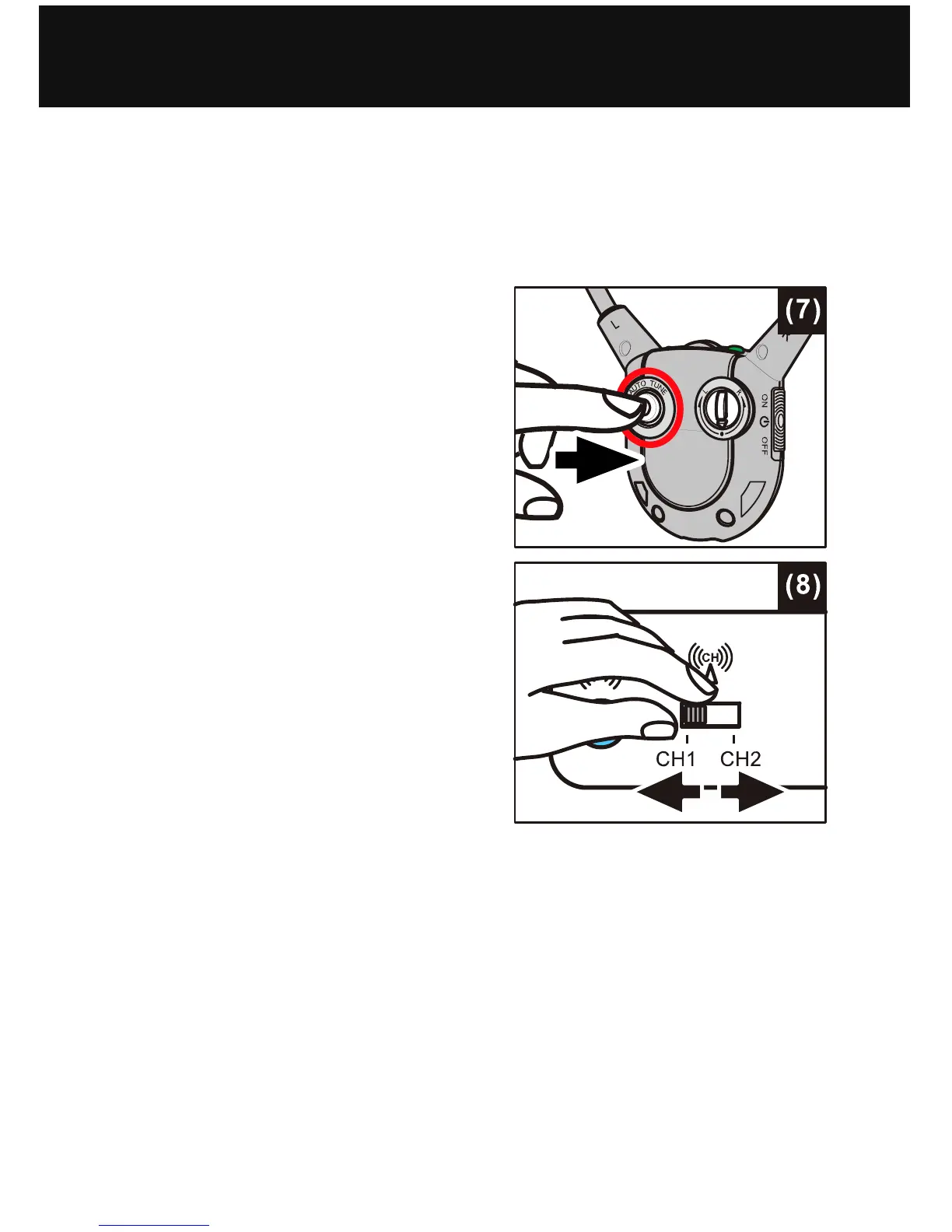
1. If the audio sound is distorted
or unclear, press the Auto
Tune Button on the Headset
Receiver (see figure (7) at
right), to match the frequency
of Channel 1 or Channel 2
set at the back of Transmitter.
Allow a few seconds for the
audio to resume.
2. If this does not help, switch
the channel selector on the
rear of the Charging Cradle
(see figure (8) at right) and
see if the audio quality has
improved.
3. Press the Auto Tune button
again to improve the quality
still further.
NOTE: The Transmitter will turn off automatically about 5
minutes if there is no audio signal from the audio source (TV
set, etc.), or the signal from the audio source is too weak for
proper reception. However, if the audio signal returns to an
acceptable level, the transmission will automatically restart.
OPERATION


 To Next Page