14
Adjusting the Sound Balance (left-right)
You can adjust the sound to suit
your hearing in each ear.
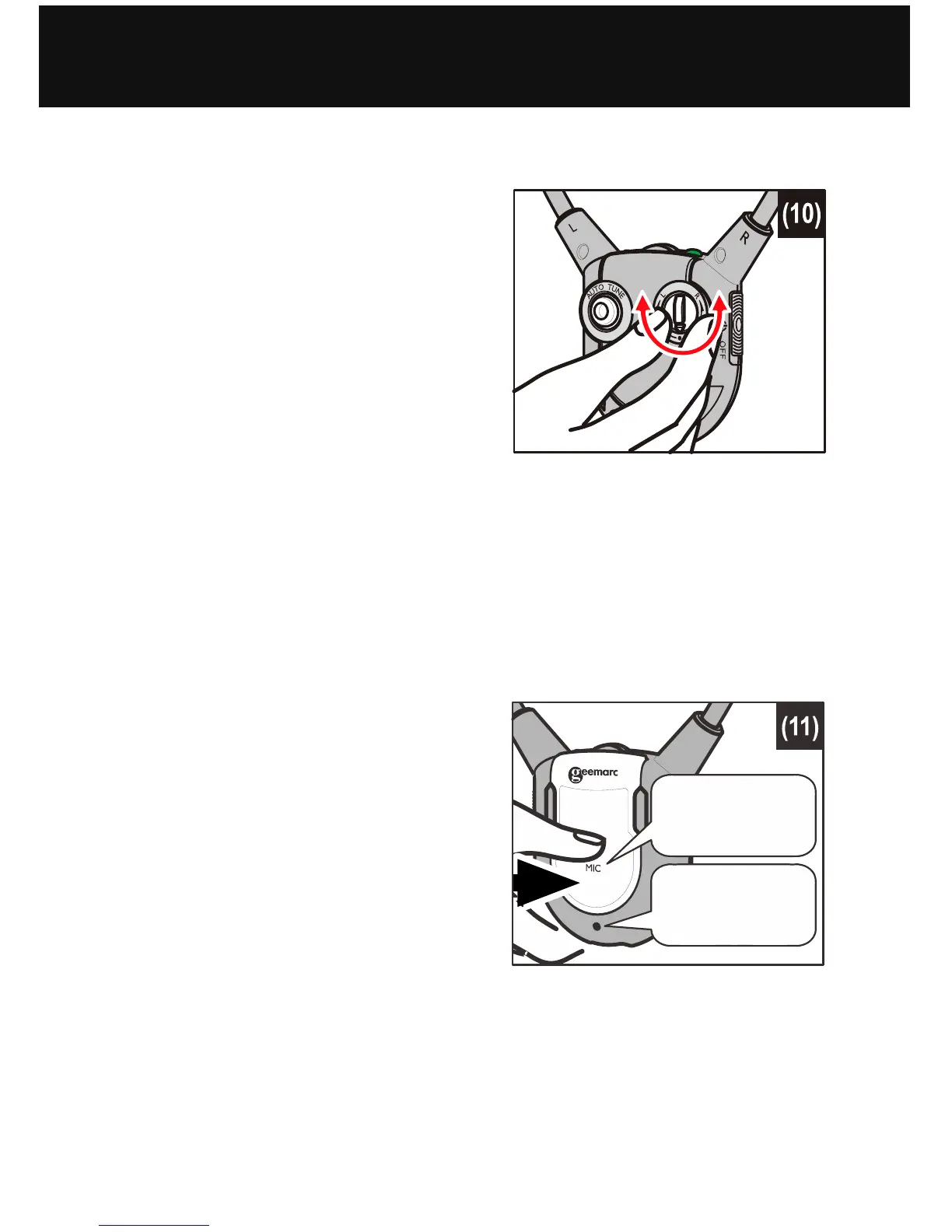
With the Headset on, rotate the
Sound Balance button (see
figure (10) at right) to adjust the
sound – you will notice that the
sound seems to “drift” from one
side to the other. Play with this
button until you find your most
pleasant sound balance.
Using the Mute Button and Microphone for Conversation
You can switch from Listening mode to Conversation mode
without having to take off the Headset.
To talk or listen to someone :
1. Press the Mute button (see
figure (11) at right). This will
shut off the Audio Source and
the Headset will become an
amplifier by activating the
Microphone.
2. To resume listening to your
audio device, press the Mute
button again. The
microphone will be shut off and the audio will resume.
OPERATION
Mute
Button
Microphone


 To Next Page