7
OPERATING THE DISPLAYPORT BOOSTER
Signal Adjustment
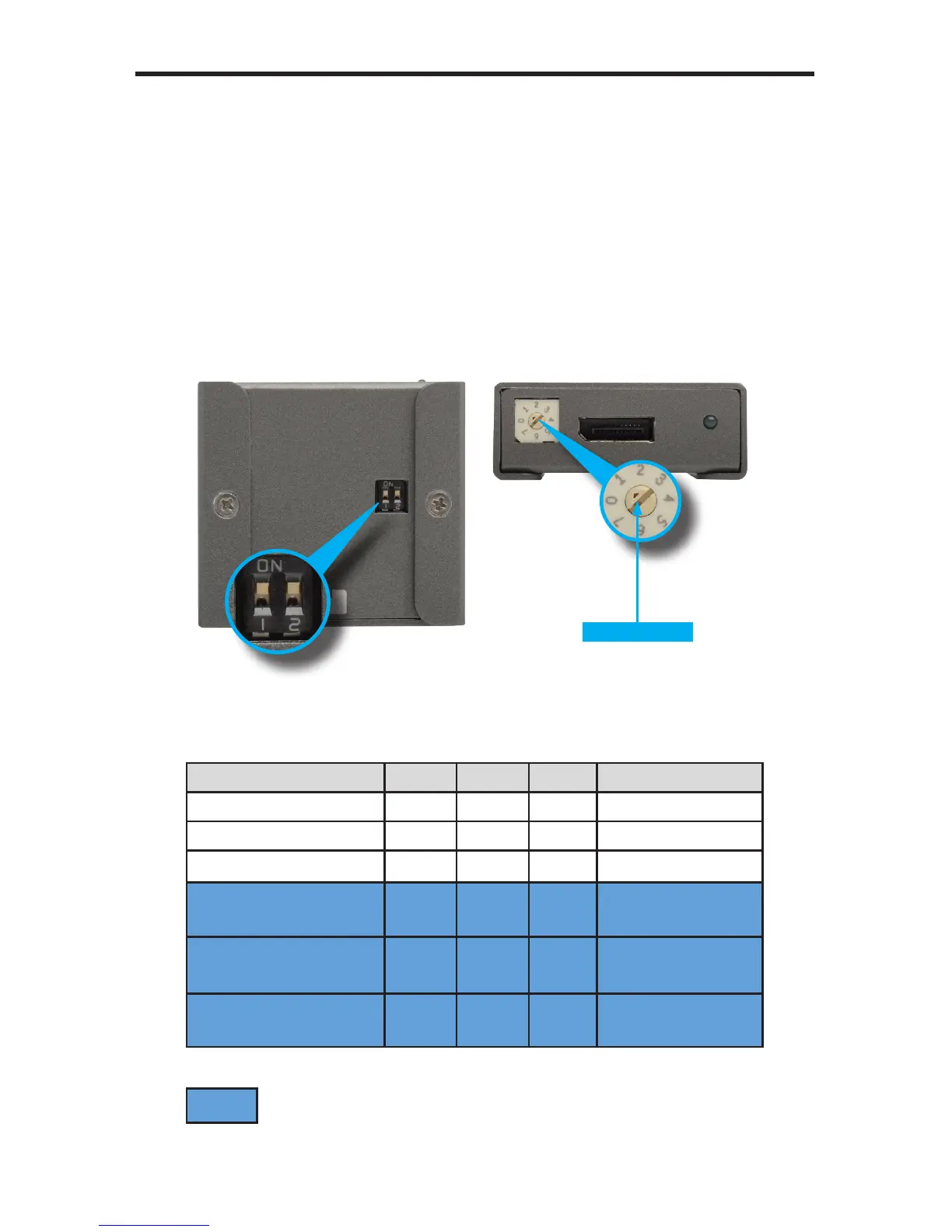
The bottom of the DisplayPort Booster has a bank of DIP switches. These DIP
switches are used for course adjustment of the signal, based on the resolution
and distance.
Use the EQ trim-pot on the front of the DisplayPort Booster to ne-tune to the
signal quality. Use the Arrow Indicator for positioning the EQ setting.
The default DIP switch settings: DIP1 = ON, DIP2 = ON.
Use the table below as a general guide for using the DIP switch / EQ settings,
based on distance, resolution, and cable width (AWG).
Cable Length / Width EQ DIP 2 DIP 1 Resolution (max.)
50 ft / 23 AWG 0 n/a n/a 2560 x 1600
50 ft / 28 AWG 0 n/a n/a 2560 x 1600
100 ft / 23 AWG 3 ON n/a 2560 x 1600
50 ft / 23 AWG +
50 ft / 28 AWG
0 n/a n/a 1920 x 1200
100 ft / 23 AWG +
50 ft / 28 AWG
1 n/a OFF 1920 x 1200
100 ft / 23 AWG +
50 ft / 23 AWG
2 OFF n/a 1920 x 1200
Arrow Indicator
= cascaded DisplayPort cables



 To Next Page