GEMORO AuRACLE
®
ANALYZER
GOLD & PLATINUM TESTER
AURACLE ANALYZER
QUICK START GUIDE
STEP 1: ANALYZER POWER ON
Aer the AC adapter and/or batteries are installed and the pen probe is
fully plugged into the unit, turn the ANALYZER on by pushing the POWER/
CALIBRATION button. The LED display will then show “Ready”.
STEP 2: CALIBRATION PROCEEDURE
Remove the pen probe cap and wipe any excess solution o the felt tip with a
paper towel. Press the POWER/CALIBRATION button again and the display will
show “Touch pen to 18K sample”. Place a filed piece of 18K YELLOW GOLD
on the testing plate and touch the pen probe to the filed area and wait for the
display to show “Done”. The ANALYZER will then be calibrated and ready to test.
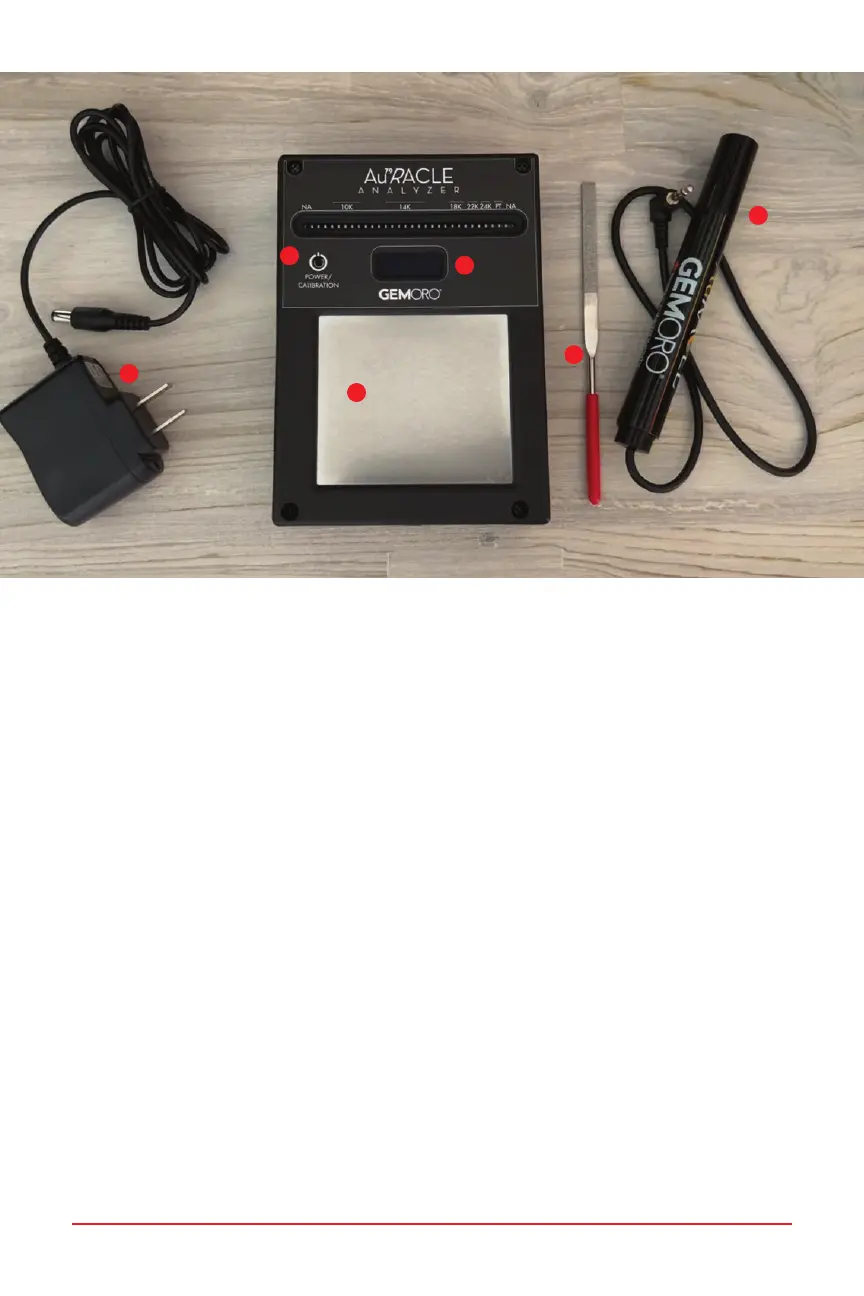
AuRACLE ANALYZER
1. POWER/CALIBRATION button
2. Screen
3. Testing plate
4. Pen probe
5. AC Adapter
6. File
1
3
2
4
5
6



 To Next Page