使用说明书 Operation Instruction
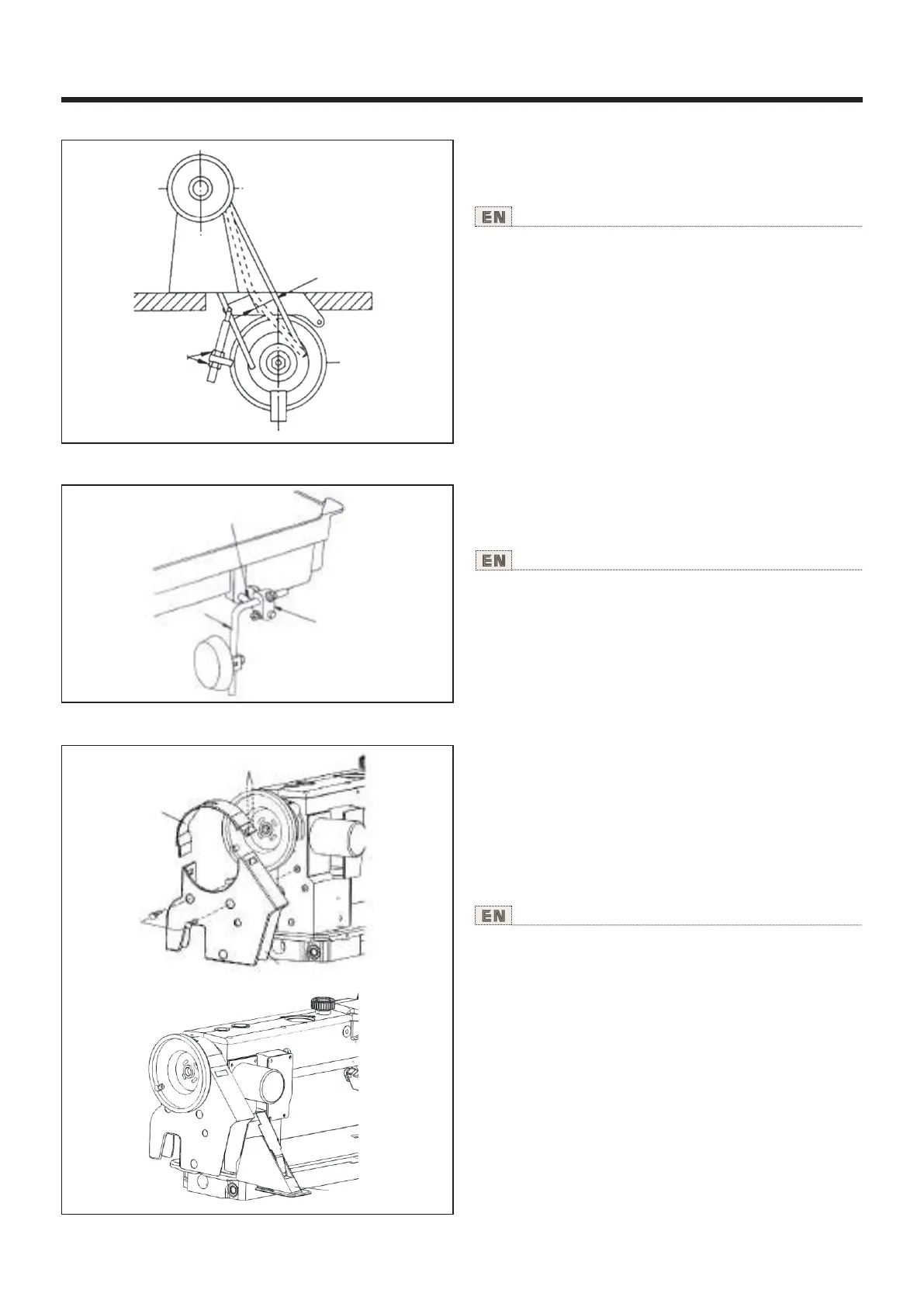
4.皮带的安装 Installation
2
②
1.放倒机头,在电机下皮带轮上安装三角皮带①。
2.用手指以1kg力压三角皮带①,调整螺母②,使皮
带弯曲程度为13-16mm。
1.Tilt back the machine head,and then place the belt ①
onto the motor pulley and the machine pulley.
2.Turn the nut ② to adjust so that there is 13-16mm of
deflection in the belt ① when it is pressed with a finger.
15mm(约1kg力)
15mm(About 1 kg force)
①
13-
16
mm
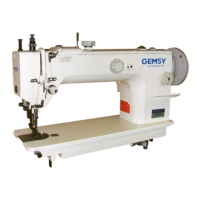
5.膝控装置 安装 Install the knee-control device
1.尽量拉出膝控铰链轴① 进行适当安装
2.在轴上装上膝控碰块接头②。
3.在膝控碰块接头上装膝控碰块弯轴组件③。
, 。
①
②
③
1.Pull the device ① and adjust it.
2.Install the joint ②.
3.Install device ③.
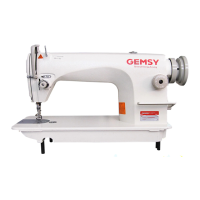
6.皮带罩的安装 Install the belt cover
1.利 用 三 个 固 定 螺 丝 , 把 皮 带 护 罩 ① 固 定 在 缝 纫 机
机体上。
此 时 , 若 把 缝 纫 机 稍 微 往 后 倾 斜 , 就 会 易 于 组 装
皮带护罩①。
组 装 完 皮 带 护 罩 ① 后 , 把 皮 带 护 罩 ③ 的 前 部 插 在
皮 带 护 罩 ① 的 小 孔 里 , 利 用 固 定 螺 丝 ④ 把 其 后 部 固
定好。
2.把皮带护罩④伏贴在工作台上。
此时,请注意,不让皮带在皮带护罩④内部干涉。
1. Fix the belt cover ① to the machine' s body using 3 fixing
screws②.
You can assemble it more easily if you slightly incline the
machine.
When the assembly of the belt cover is finished, insert the
front side of the belt cover ③ into the groove of belt
cover ①and fix the back side with the fixing screw④.
2. Attach the belt cover ④ to the table.
Please make sure that the belt do not intervene with the
inside of the belt cover④.
④
③
②
①
④


 To Next Page